Accelerating Image Generation and Utilizing ControlNet on AMD GPU, NVIDIA Cheap GPU, and MacOS

Stable Diffusion Web UI Cloud Inference
What capabilities does this extension offer?
This extension enables faster image generation without the need for expensive GPUs and seamlessly integrates with the AUTOMAIC1111 UI.
Benefits:
No expensive GPUs required, can even use the CPU.
No need to change your workflow, compatible with the usage and scripts of sd-webui, such as X/Y/Z Plot, Prompt from file, etc.
Support for 10000+ Checkpoint models, don't need download
Compatibility and Limitations
txt2img✅
txt2img_hires.fix✅
txt2img_controlnet✅
img2img✅
img2img_inpaint✅
img2img_controlnet✅
extras upscale✅
vae model✅
scripts - X/Y/Z plot✅
scripts - Prompt matrix✅
scripts - Prompt from file✅
How it works

Guide
1. Install sd-webui-cloud-inference


2. Get your omniinfer.io Key
Open omniinfer.io in browser
We can choice "Google Login" or "Github Login" 

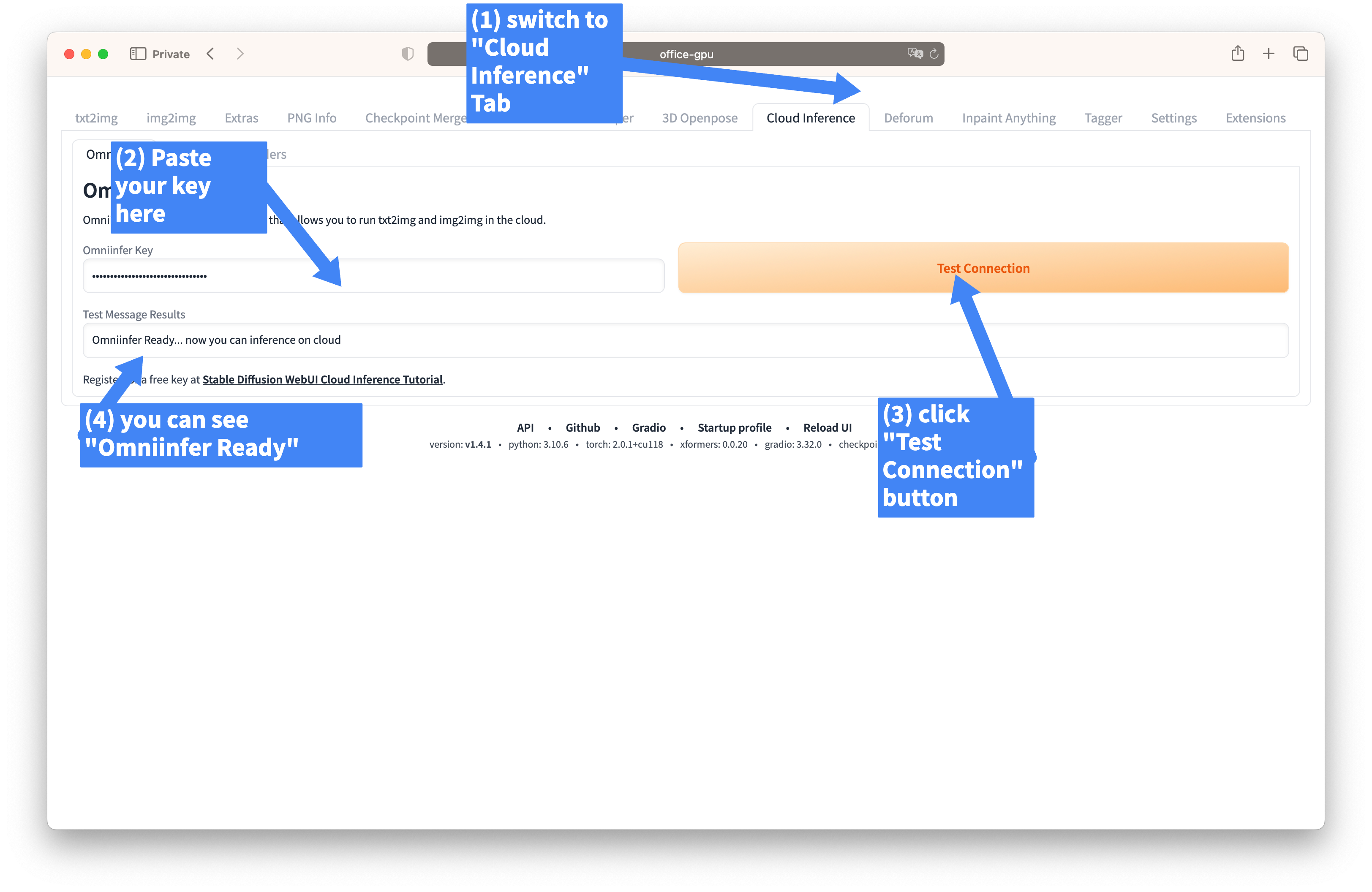
3. Enable Cloud Inference feature
Let us back to Cloud Inference tab of stable-diffusion-webui
4. Test Txt2Img
Let us back to Txt2Img tab of stable-diffusion-webui
 From now on, you can give it a try and enjoy your creative journey.
Furthermore, you are welcome to freely discuss your user experience, share suggestions, and provide feedback on our Discord channel.
5. Advanced - Lora

7. Advanced - Img2img Inpainting


8. Advanced - VAE

or you can use the VAE feature with X/Y/Z

9. Advanced - ControlNet


9. Advanced - ControlNet
10. Advanced - Upscale and Hires.Fix

