Challenge-Rank : a Chrome extension

V2.0.0 is live CHROME : https://github.com/OuincheWinch/Challenge-Rank/releases/latest
FIREFOX EXTENSION : https://github.com/OuincheWinch/Challenge-Rank/tree/firefox
FIREFOX Official package https://addons.mozilla.org/en-US/firefox/addon/challenge-rank/
Found UnOfficial board, history and cooldown visualization here : https://civitai.com/articles/27189
Challenge Rank: Spot the best rated images 🏆
Ever tried to figure out which are the best CivBot Rated images during a Civitai Challenge?
It's tough. You have to scroll… and scroll… and scroll. And open your eyes !
Challenge Rank fixes this. It's a simple, non-destructive, open source, vibe coded, Chrome Extension that works in the background to build a live "Top 20" leaderboard as you browse.
🌟 How It Works
Install the Extension: (See below).
Go to a Challenge: Navigate to any challenge page (e.g.,
civitai.com/challenges/...).Activate Judge Reviewed filter
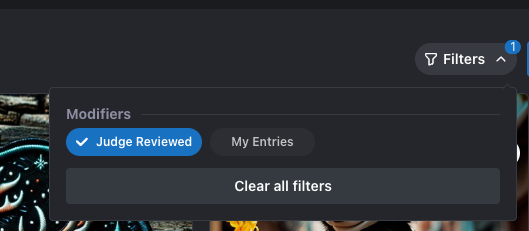
Browse Normally: Just scroll all the way down the page. The extension quietly scans every image it sees.
Click the Trophy 🏆: A floating trophy button appears in the bottom right. Click it to see the Top 20 Highest Rated images found so far.

This is not an official ranking, just a tool to see top 20 rated images !
✨ Key Features
📊 Persistent Leaderboard: The overlay remembers the best images even if you scroll past them.
🖱️ Draggable Button: Move the floating trophy button anywhere on your screen.
🧠 Smart Scoring: It ignores "PG-Rating"
🚫 No broken layouts: It doesn't try to reorder the grid (which breaks infinite scroll). It just shows you a clean overlay.
⚡ Auto-Reset: Switching to a new challenge automatically clears the list for you.
🛠️ How to Install & Run
Since this is a custom tool, you'll load it as an "Unpacked Extension" in Chrome (or Edge/Brave).
Download the extension folder from the GITHUB Repro : https://github.com/OuincheWinch/Challenge-Rank/ (
challenge-rank-extension).Open your browser and search for Manage Extensions (or go to
chrome://extensions).Toggle "Developer Mode" (usually a switch in the top right corner).
Click the "Load Unpacked" button.
Select the
challenge-rank-extensionfolder.That's it! Go to a Civitai Challenge page and look for the 🏆.
⚖️ Disclaimer
This is an unofficial, community-created extension and is not affiliated with, endorsed by, or connected to Civitai in any way.
Civitai™ is a trademark of its respective owners. This tool is provided "as is" without warranty of any kind.
Created to make life easier for Civitai challengers!
Coded by Ouinche & Gemini 3 Pro
Previously posted on https://www.ouinche.com/challenge-rank-a-civitai-com-chrome-extension/
If you found this article useful does not hesitate to tip some Yellow Buzz by clicking on the ⚡️ below ⬇️⬇️⬇️