
Introducing the sequel of Qwen-Image-Edit, version 2509!


Qwen-Edit-2509
Summary:
Qwen-Image-Edit-2509 IS LIVE... and it's a GAME CHANGER.🔥
We didn't just upgrade it. We rebuilt it for creators, designers, and AI tinkerers who demand pixel-perfect control.
✅ Multi-Image Editing? YES.
Drag in “person + product” or “person + scene” — it blends them like magic. No more Franken-images.
✅ Single-Image? Rock-Solid Consistency.
Faces stay you — through poses, filters, and wild styles.
Products keep their identity — ideal for ads & posters.
✍️ Text? Edit everything: content, font, color, even material texture.
✅ ControlNet Built-In.
Depth. Edges. Keypoints. Plug & play precision.
Introduction:
This September, we are pleased to introduce Qwen-Image-Edit-2509, the monthly iteration of Qwen-Image-Edit. To experience the latest model, please visit Qwen Chat and select the "Image Editing" feature. Compared with Qwen-Image-Edit released in August, the main improvements of Qwen-Image-Edit-2509 include:
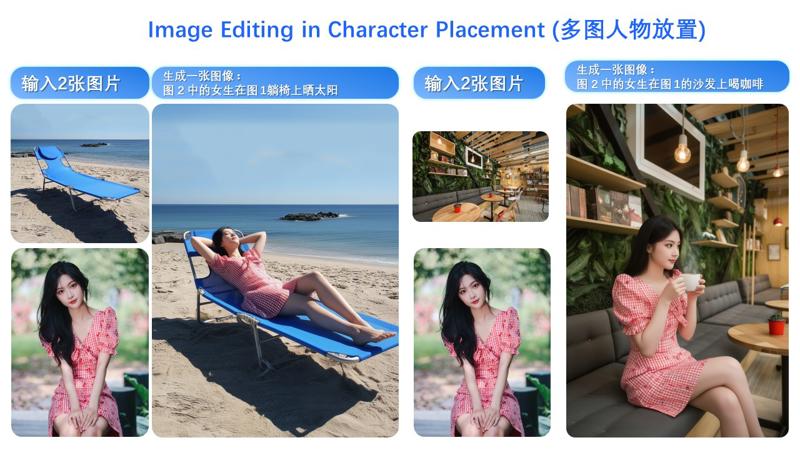
Multi-image Editing Support: For multi-image inputs, Qwen-Image-Edit-2509 builds upon the Qwen-Image-Edit architecture and is further trained via image concatenation to enable multi-image editing. It supports various combinations such as "person + person," "person + product," and "person + scene." Optimal performance is currently achieved with 1 to 3 input images.
Enhanced Single-image Consistency: For single-image inputs, Qwen-Image-Edit-2509 significantly improves editing consistency, specifically in the following areas:
Improved Person Editing Consistency: Better preservation of facial identity, supporting various portrait styles and pose transformations;
Improved Product Editing Consistency: Better preservation of product identity, supporting product poster editing;
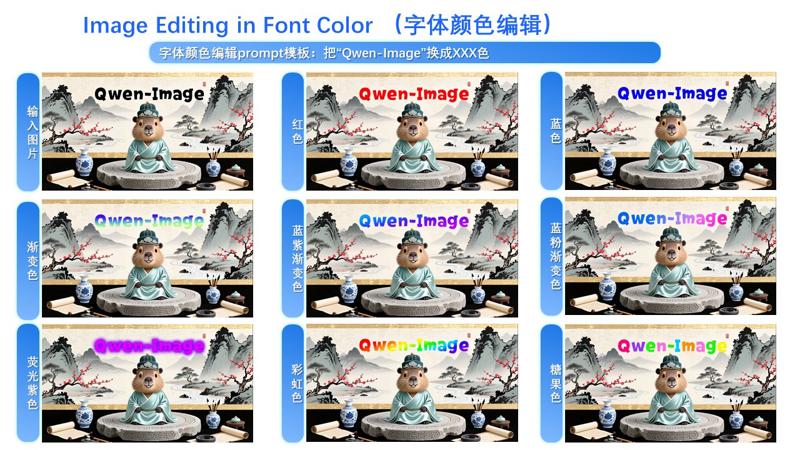
Improved Text Editing Consistency: In addition to modifying text content, it also supports editing text fonts, colors, and materials;
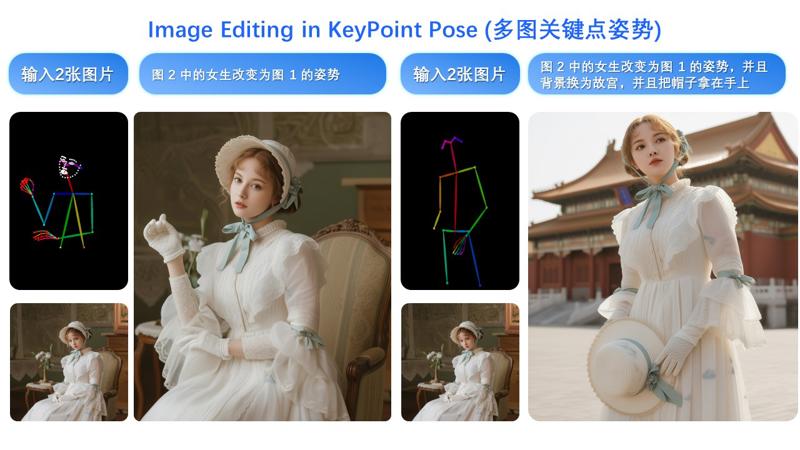
Native Support for ControlNet: Including depth maps, edge maps, keypoint maps, and more.
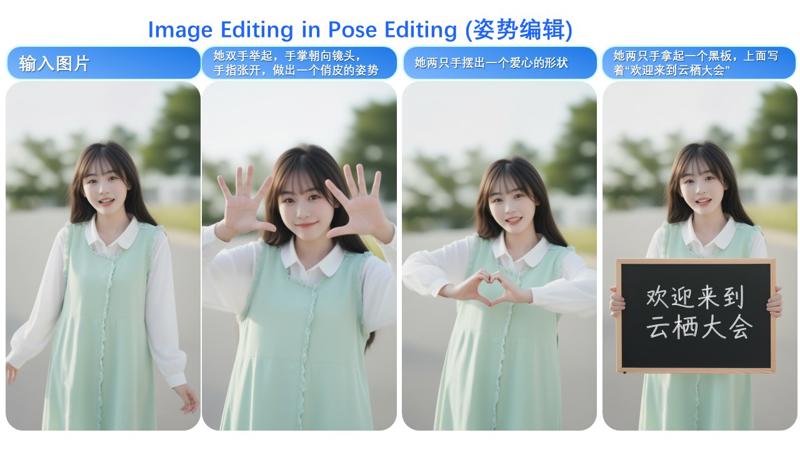
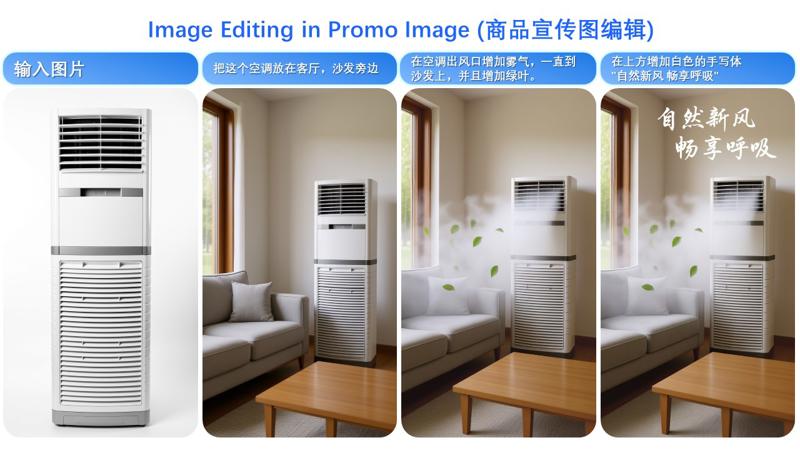
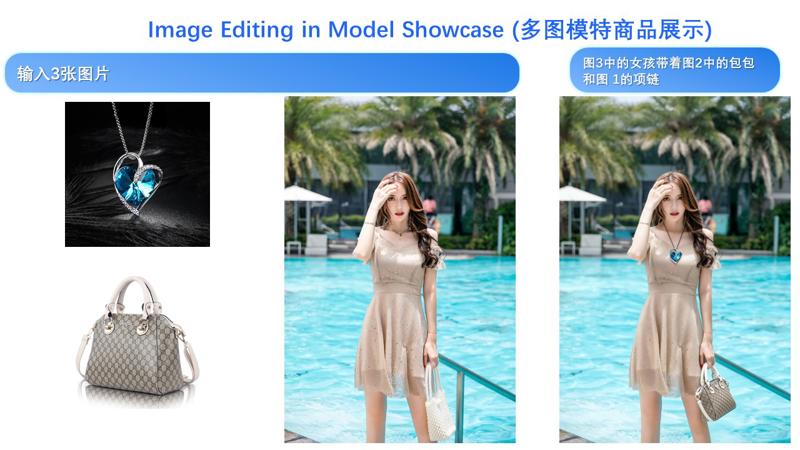
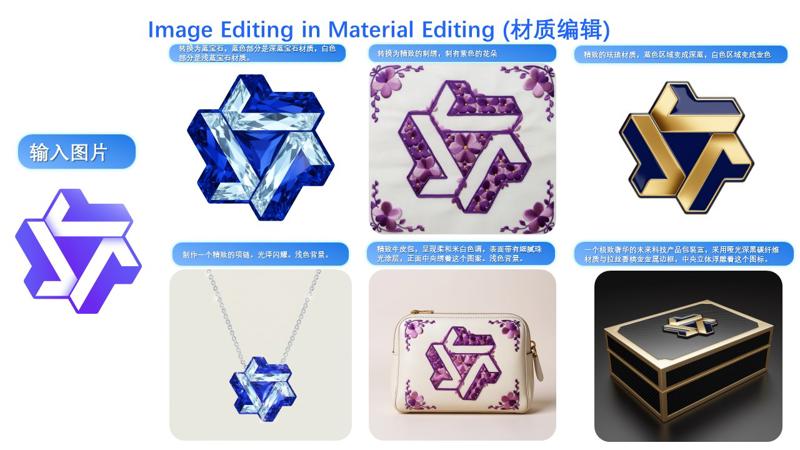
The primary update in Qwen-Image-Edit-2509 is support for multi-image inputs.
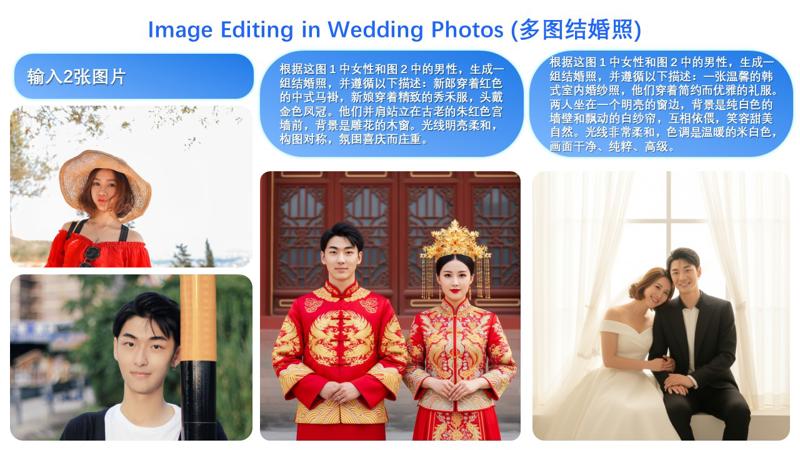
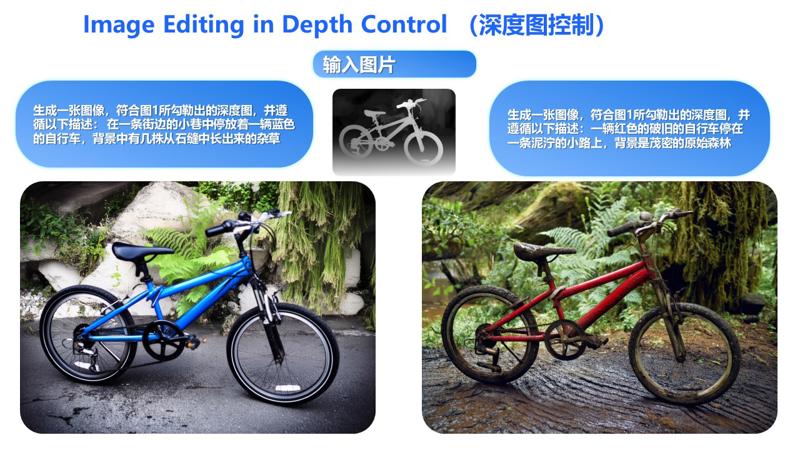
In fact, multi-image input also supports commonly used ControlNet keypoint maps—for example, changing a person’s pose:
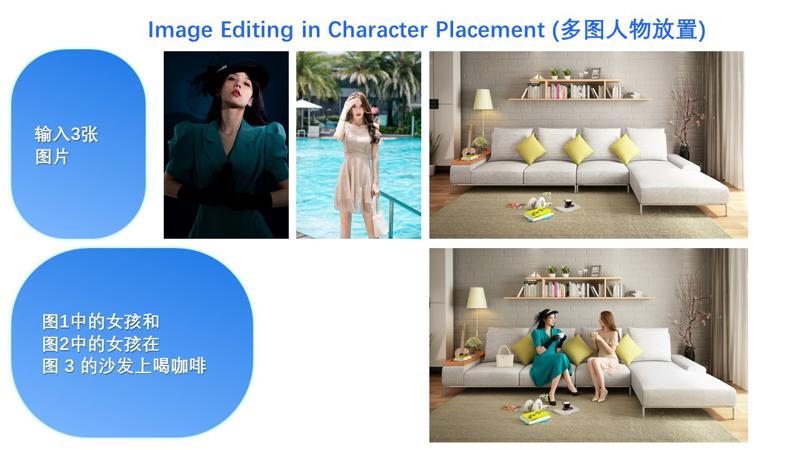
Similarly, the following examples demonstrate results using three input images:
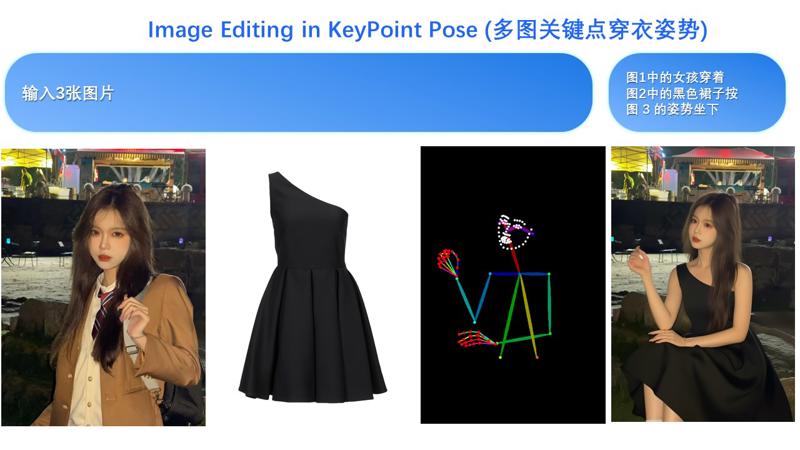

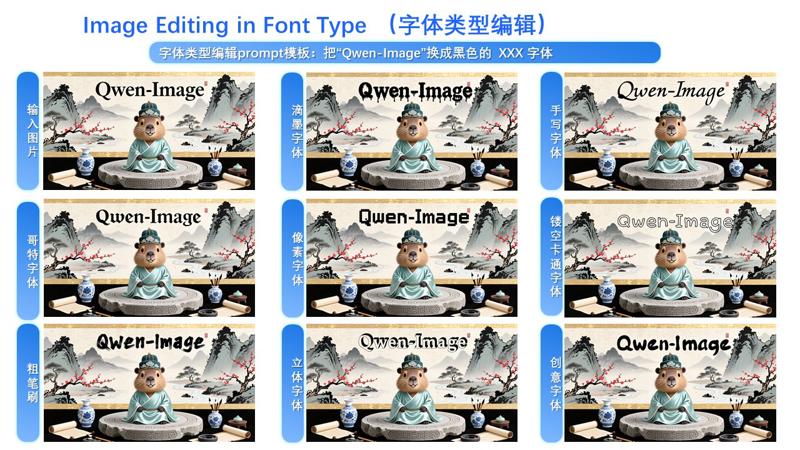
Another major update in Qwen-Image-Edit-2509 is enhanced consistency.
First, regarding person consistency, Qwen-Image-Edit-2509 shows significant improvement over Qwen-Image-Edit. Below are examples generating various portrait styles.
Description
FAQ
Comments (45)
Hope that we will get proper nsfw support soon
Yeah, thought its uncensored right away.
Is not unfortunately, tho.
I'm not sure that it's censored - they just didn't train it on those concepts. You can use LoRAs created for the previous version of Edit, so all the tidbits you'd want are fully possible right now. There isn't any limitation.
It's completely uncensored. It just doesn't know how to draw genitals.
Note: if you're using the lightning loras from the previous versions it breaks 2509 and limits what it can do. Using 2509 on its own you can do whatever you want.
Unlikely. It will need to be trained by the community, like how Chroma is a community made uncensored version of Flux.
@NewTesterAI574 Even then the results are sub par. And it makes sense when you look at the training datasets, even entire Chroma 'nsfw' all in one finetunes, not LoRAs, but FINETUNES are trained on as little as ***128 images***.
i still new in comfyui maybe this is stupid question. which model should i use for rtx3090 24gb and sys ram 64gb? fp16, fp8 or gguf q8?
Probably the fp8 version. If that ends up spilling into RAM too much, then Q6_K.
fp8 我也是3090
I can run the fp16 model on a 5090 with 16 GB Vram. You should have no problems (unless there is something about the 3090 I am not familiar with)
@justdavid65 if not wrong 5090 has 32gb vram is it?
@WildCentaur The one I have is 16 GB Vram
@justdavid65 you sure you don't have a rtx 5060 ti 16gb? A rtx 5090 has 32gb vram, but maybe you didn't have enough PCIE lanes free or only half the power cables aren't connected (I recall my old NVIDIA Tesla k80 having 24gb, but it was actully 2 cards in one (so 2 12gb cards or just 12gb vram if only half powered)
@justdavid65 RTX 5090 comes with 32 GB of GDDR7. Not 16 O.o
@Cyph3r fp8 is not directly supported on Ampere 30 series architecture and can lead to messed up results when it tries to work around it. this completely ruins WAN generations, might be bad for Qwen too. I'd use gguf on lower tier 30 series, and fp16 if available on 3090.
@illinar which gguf you prefer for 3090?
I compared 2 version fp8 and Q3 KS. The Q3 generates more smooth and less detailed than the fp8. But the speed for Q3 is reduced by 2.
That's the norm for quants. GGUF runs slower. and Q3 will have a lot less detail and quality than FP8.
@Cyph3r That is the sad story of my low budget hardware.
@codeaim @codeaim it depends of the contry you in, how low budget hw you have. -_- I have 4070tiS, buyed it a 1.5 year ago for 940 usd, now price doesn't even changed (for less price I buyed i7-14700, z790 motherboard and 32gb ddr5, other stuff I took from older pc). That's all ok, but my job pays about 360usd per month (it's middle pay for country). So, that was a hard two months without weekends (I got second job, 12+ hours main 2-2, 12+ hours second 2-2) to get only videocard. -_-
And I was like: wait a sec, 20gigs new 2509 q8. WAIT, WHAT?
And now 16gb isn't enough anymore if you want quality and not wasting your time (also can got 3090 for "low" price (660usd) a week ago, but what's the point if it work with the lower speed like mine, yeah, I could load larger than 16 models, but...). -_-
Which one works better, FP8 or Q8?
I have a 4090 24GB
Usually the FP8 > Q8, but test and see.
@Cyph3r Thank you so much for your reply!
What Qwen-VL Vision model do you recommend pairing with FP8?
@Cyph3r fp8 is a meme
Generally Q8 is very close to the quality of the full-precision model (FP16/FP32), better than FP8
NSFW Lora?
I have some focus on nudity but not porn focus. https://civitai.com/models/698244/ultimate-realistic-breast-nipples-gmr you can check my profile for more.
This is listed as a checkpoint, but ComfyUI says it's not.
2025-10-08T07:05:54.090895 - Warning, This is not a checkpoint file, trying to load it as a diffusion model only.
2025-10-08T07:05:54.199742 - model weight dtype torch.float8_e4m3fn, manual cast: torch.bfloat16
2025-10-08T07:05:54.201801 - model_type FLUX
2025-10-08T07:06:22.069617 - WARNING: No VAE weights detected, VAE not initalized.
2025-10-08T07:06:22.158482 - !!! Exception during processing !!! ERROR: VAE is invalid: None
Try unet folder instead?
No embedded vae, so put the model in unet folder and a qwen vae in vae folder, load them both along with qwen3 vl text encoder
try the diffusion models folder. also you need the qwen vae in the vae folder.
BTW, you can use this as a text to image generator model too (bit better than Qwen Image).
I will post some example images below that you can load into ComfyUI to see my simplified workflow...
Can I use loras trained on Qwen image with it ?
The FP16 version is not FP16, it is BF16.
I have 5070 12gb VRAM. what version should i usee
version smaller than 12 gb.
klein
Friends, tell me what the problem is! the regular version of fp8 works fine, but I'm doing workflow with the gguf version and the generation seems to stupidly not respond to the prompt and does not show the changes that I specified through promt
GGUF is a smaller model so its less intelligent.
got on qwen_image_fp8_e4m3fn error reconnect. someone know how fix it? 5060ti 16gb
我的显卡也是5060ti16GB,无法跑,一跑就显示内存不够
16 gb cannot load a 19 gb model.
What are the differences between your version and the official version?
md5sum
1a2251468447944ffdcb98f2c34c60c1 qwenEdit2509NewVersion_fp8E4m3fn.safetensors
c6047609b96eecf517f27575f87b2e84 qwen_image_edit_2509_fp8_e4m3fn.safetensors
its just a reupload to civitai. nothings new