Z-Image-Turbo_clear
VAE: Z-Image_clear_vae
Compare to Z-Image-Turbo (Original)
Z-Image-Turbo_clear | Z-Image-Turbo

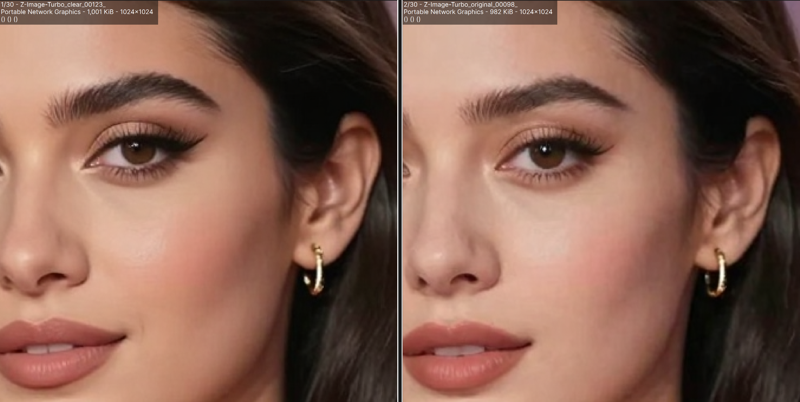
The Z-Image-Turbo_clear model is a fine-tuned version of Z-Image-Turbo that improves details compared to the original.
For better results, please use it with the dedicated VAE, Z-Image_clear_vae.
Which Precision Should I Use?
+----------+------+----------+----------+--------------------+-----------+
| Format | Sign | Exponent | Mantissa | Significant Digits | Precision |
+----------+------+----------+----------+--------------------+-----------+
| FP32 | 1bit | 8bit | 23bit | 7โ8 digits | โ
|
| BF16 | 1bit | 8bit | 7bit | 2โ3 digits | ๐ |
| FP16 | 1bit | 5bit | 10bit | 3โ4 digits | ๐ |
| FP8(e5m2)| 1bit | 5bit | 2bit | 1โ2 digits | โ ๏ธ |
| FP8(e4m3)| 1bit | 4bit | 3bit | 1โ2 digits | โ ๏ธ |
+----------+------+----------+----------+--------------------+-----------+Exponent: Stability
Mantissa: Quality
Anime Illustration Comparison

Hand Close-up

FP32: Highest precision, high VRAM usage
BF16: Most popular in Z-Image-Turbo model, good for LoRA compatibility
FP16: Slightly better precision than BF16, less performance degradation on pre-RTX 2000 or non-NVIDIA GPUs
FP8(e4m3): Lower precision, low VRAM usage, accelerated on RTX 4000 series and later
If you are unsure which precision to use, it is safest to choose the BF16 format.
Recomended Settings
Sampler:
euler
res_multistep
Scheduler: beta
Steps: 9
ModelSamplingAuraFlow: shift 7.5 (3-9)
Upscaler
your choice, examples:
Tips (External Sites)
License
Description
FAQ
Comments (6)
pre-RTX 2000 getting black outputs
FB16
@Kongyiji12825ijjjย
Yes, the FP16 format is inherently less stable than BF16, so this kind of issue can sometimes occur depending on your environment (especially with older GPUs).
I am unsure whether your specific defect is originating from the Sampler or the VAE, but if you can successfully generate images using the FP32 or BF16 format, please use one of those instead.
SDXL VAE case: https://huggingface.co/madebyollin/sdxl-vae-fp16-fix
where can I find a workflow for this?
Uploaded a PNG image containing the ComfyUI workflow to Hugging Face.
https://huggingface.co/easygoing0114/Z-Image-Turbo_clear/blob/main/README.md#workflow
@easygoing0114ย great. thanks!

