


You can click on the link below to try it out directly. If the effect is good, you can deploy it locally
https://www.runninghub.ai/post/2009527411641159681/?inviteCode=sdhs0trb
Fan benefits,register to get 1000 points,daily login 100 points,play 4090!Experience the super power of 48G.
Youtube:(2) AIGC-Singularity - YouTube
2511_Anything to Real Characters [Official Release]
Description
This is a specialized LoRA designed to transform anime/stylized images into high-quality, photo-realistic real-life characters. Updated to the Qwen Image Edit 2511 version.
Training Details:
Total Steps: 30,900
Dataset: 103 high-quality pairs (206 images total)
Special Thanks: * chuxinzhongmo (Contributed 7 images) @Atimea
tangmupidashu (Contributed 2 images)
Effect Showcase


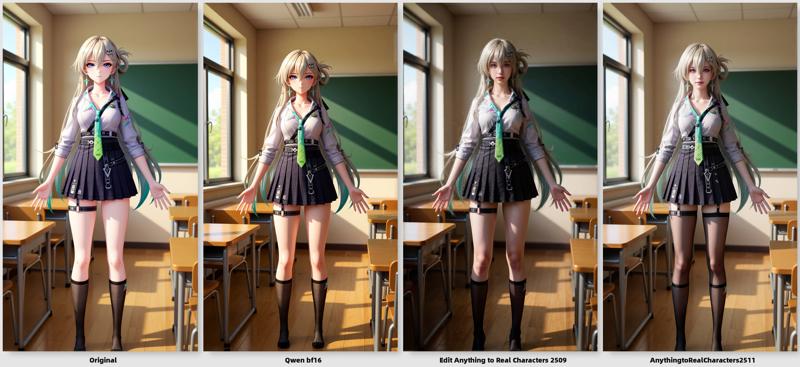
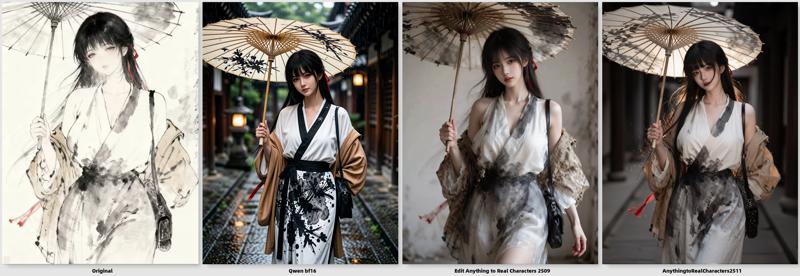
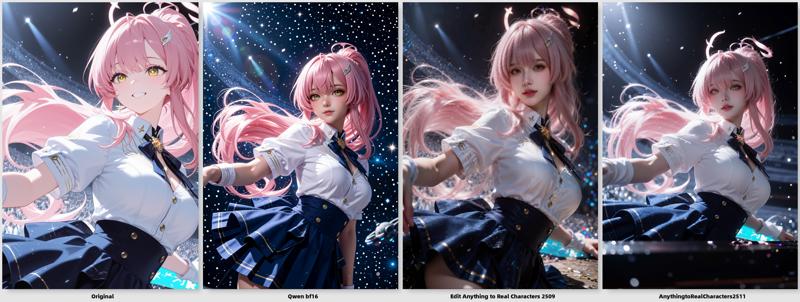

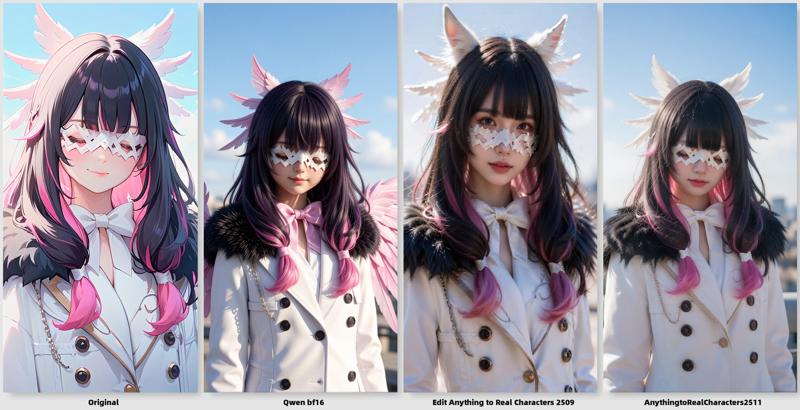
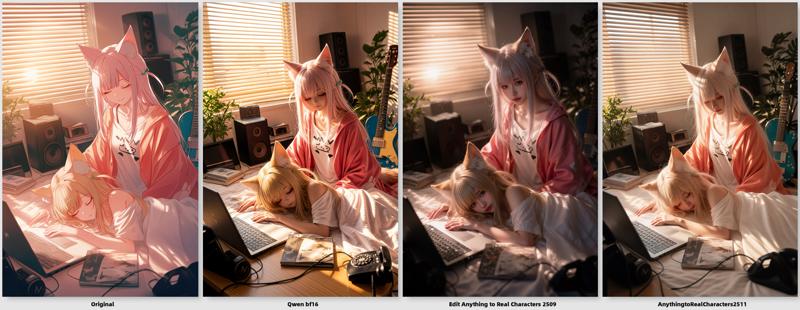


Optimizations (Change Log)
Face Consistency: Significantly improved facial stability and responsiveness to text prompts.
Expression Preservation: Enhanced the accuracy of capturing original character expressions.
Character Diversity: Better results for various demographics, including children, men, and women.
Realism Boost: Drastically improved skin textures and overall photographic quality.
Background Realism: Added a dedicated dataset for environment reconstruction to ensure backgrounds look authentic and natural.
Prompting Guide
Core Trigger Prompt:
transform the image to realistic photographAuxiliary Prompts (Use as needed):
normal body proportions: Use this if the original anime character has exaggerated anatomy.half-body shot: To adjust the framing to a medium shot.zoom out: To increase the distance between the camera and the subject.1man: Use if the model incorrectly identifies the gender.moist skin: To add a subtle wet/dewy skin effect.
Feel free to add other descriptive tags to refine your result.
Recommended Settings
CFG Scale: 4
Sampling Steps: 30
Base Version (2509):The Strongest Anything To Real Characters_动漫转真人_Qwen image Edit 2509 - v1.0 | Qwen Checkpoint | Civitai
Description
FAQ
Comments (23)
Official release vs V1, what's the difference between the LoRAs?
The V1 version only has a step count of 15,000 and is solely for testing purposes. This version, with a step count of 30,000, boasts stronger conversion capabilities.
Yes, I noticed too, it seems like the lore is cloned, only the pictures are different. What's the difference between this version and this one https://civitai.com/models/2285271?modelVersionId=2571949 ?
The V1 version only has a step count of 15,000 and is solely for testing purposes. This version, with a step count of 30,000, boasts stronger conversion capabilities.
很棒的lora,感谢作者。
在fp8mix底模+4step环境下,个人觉得v1表现更好一点
The resolution seem... pixelated? I don't know the words. But it isn't as smooth as Qwen. Also I noticed you put the recommended settings there but if I go any more than 1 CFG the image gets destroyed, why did you put that recommended settings there?
Increase the steps maybe around 10 if you want. Anything more than that you wil sweat a lot. I think,
main problem that bush on vagina disapear allways
Hi they keep sweating a lot why are they sweating?
Please reduce it to less than 4 or 5 bitch but not any less than 2 bitch. For the steps.
ve noticed two annoying problems. Can you tell me how to avoid them?
1) It tends to generate a lot of “sweat,” water droplets, or moisture on its own, even when there aren’t any — especially on glossy surfaces.s.
2) It tends to generate loose hair strands, as if the characters had split or frizzy hair ends, or something like that.
I created a workflow that compared the lora effects of multiple anime-to-real human conversions, including this lora(Anything to Real Characters).You can click the link to give it a try.
Thanks to the author for providing such a powerful tool for our community!
Very nice lora, i can transform my SDXL picture to realist photography, thanks a lot.
Does anyone have a workflow that can apply this to an entire folder of images sequentially?
@Rahim33 What I'm wanting is for the same workflow to be applied to all the images in a folder. That's just a comparison of different workflows.
@spicy_deluxe Yes, naturally, I know the link, which I am publishing.:)
I've given you the best example from which you can base any further extension.
Therefore, if you take the author's workflow, they are as follows:
https://civitai.com/models/1288038/anime-to-realistic-flux-workflow-no-controlnet
https://www.runninghub.ai/post/2009527411641159681?inviteCode=sdhs0trb
https://huggingface.co/WarmBloodAban/Anything_to_Real_Characters/tree/main
https://civitai.com/models/2275667/anything2real-2601-workflow
https://huggingface.co/lrzjason/Anything2Real/tree/main
And if you compare, you'll see why the first link I've given you is better. In any case - there are no such workflows from the author "applied to all the images in a folder" - Because in 70% of cases, the average computer won't be able to handle such a task—processing an entire array of images from a folder with such a complex and demanding workflow for a video card.
@Rahim33 Not all loaded into memory at the same time, but automatically running each image in sequence without having to manually queue each image.
I've noticed an issue when a scene contains one boy and multiple girls. Using the prompt "1man" sometimes randomly turns one of the girls into a boy instead of selecting the actual boy — especially when the boy is heavily occluded.
When the boy is heavily occluded — especially the face is hidden but the body is visible — using "1man" can cause a girl whose face is clearly shown to have her face turned into a boy's face. Without the "1man" prompt, the occluded boy's body is instead recognized as a girl's body.
Also, when the boy and a girl share similar features (e.g., the same hair color), prompting "X-haired boy" may end up selecting the girl with X‑hair instead.
感觉2511版本的不如2509版本的好,真实感,理解力都差远了
my gens keep coming out with 3 of almost the same but slightly different images stuck side by side? anyone know why this is happening and how to fix it?