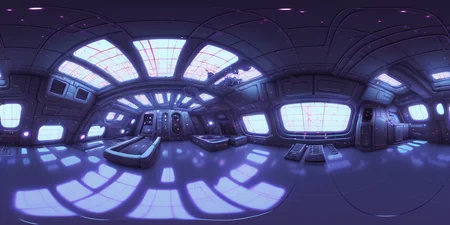
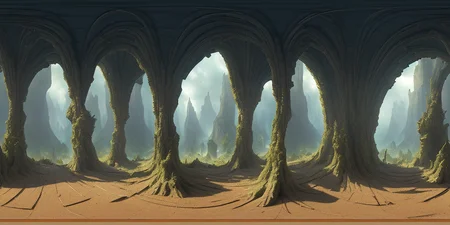
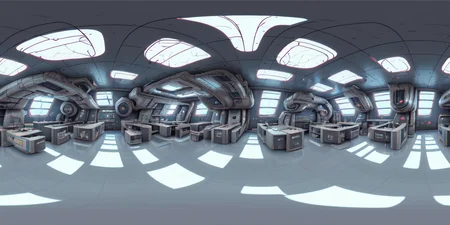
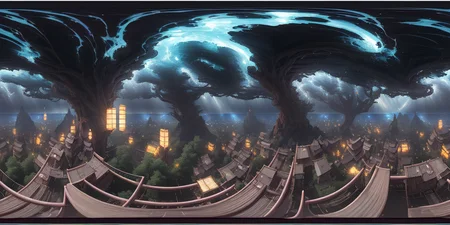
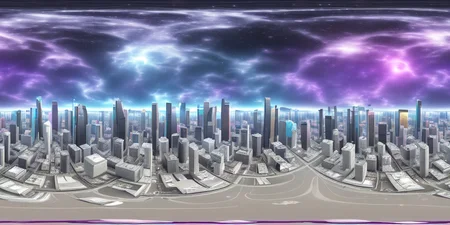
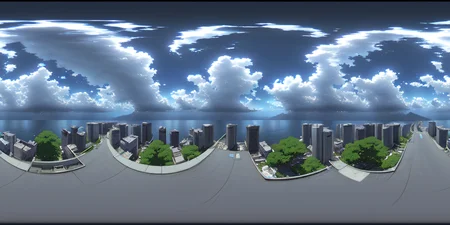
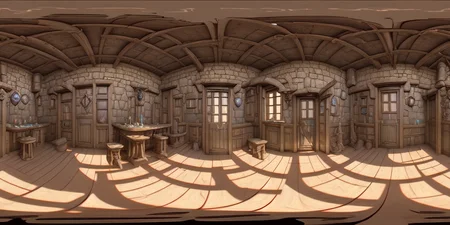

Latent Labs 360 LoRA is powerful for crafting dynamic 360-degree images that are both immersive and interactive. The LoRA has been trained on over 100 CC0 Panorama images to ensure that it provides a top-quality user experience.
The Latent Labs 360 LoRA makes it easy to produce breathtaking panoramic images that enable you to explore every aspect of the environment. For optimal image quality, it's recommended that you install the following Auto1111 extensions: asymmetric tiling and sd-webui-additional-networks. You should create your images using a 2:1 aspect ratio, such as 1024 x 512, and activate the asymmetric tiling on the X axis.
The images showcased below were generated with DreamShaper 3.31 and a LoRA weight of 1.0.
LatentLabs.art
Description
General purpose LoRA for use with any model.
This is v.01 -- expect not perfect nadir/zenith. This will be improved in the next days.
FAQ
Comments (25)
Can you add more images when you update it?
Added more images + better description
Not perfect, artifacts in the poles (top and bottom) but almost perfect projection all around with no perceptible seams, You can test it here (copy and paste the image in the browser) https://renderstuff.com/tools/360-panorama-web-viewer/
Awesome!! Thanks!
There are some problems with the 360 pictures I generated. Could you help me solve them? thank you
There is a problem with the stitching of the two sides of 360 picture. I do not know the problem
Activate asymmetric tiling on the X axis for seam issue
@LatentLabs Hi,If I used the tiling ,I'll get a completely disordered picture fragment T_T
@LatentLabs Hi, Can you tell me how to activate asymmetric tiling on the X axis in Web UI
@LatentLabs Thank you very much,I know that ,The Activate asymmetric is a plug-in ^_^
not working for me !
A guess: It was the name of this lora during testing. EQP: EQuirectangular Projection perhaps. If I understand lora correctly the prompt has to call the lora. Notice this is the only lora called. Seems like they just changed the name.
Very interesting. I was on the brink of making a 360 Equirectangular LoRA, but it looks like you beat me to the punch. Training was a bit of a brain puzzler in terms of figuring out the best way to format the training data.
Did you just toss it in at a 2:1 ratio, or did you crop it? I was under the impression it would bork things if you used unmodified ratios, so I was going to extend them to be square, mirror them vertically and content aware fill the top so that the distortion stayed the same when you crop the final outputs to 2:1.
Looks like this "just works". Really something. Gonna have some fun playing around with this, and hopefully put it to some use in some actual projects if they're decent.
u should provably still make one. It seems everyone attempting to get this to work somehow is still missing about 20% of the data in the center of the image so they end up with a huge visible seam.
One of the things i been trying to figure out is rather that attempt to deal with the seam to generate the whole texture as a 1:1 hemispherical skydome. But cant seem to be able to control the camera so it just looks directly up. If this could be achieve there would be no need for tiling since the horizon would be inside a circle within the 1:1 image.
@toontitan Like these?
I feel like for that you'd definitely need your own LoRA model, as the distortions are quite different.
Either that, or you output one of these, pop into blender and put it on a sphere as a texture, look up at the texture in orthographic view, and then render that out. It's the same process as getting those maps from equirectangular HDRI images.
For seams on equirectangular outputs, you can generate seamless images in SD with arbitrary coordinates (tiling on X OR Y, instead of X AND Y). Results work well enough, but get a bit iffy when you start upscaling them to proper resolutions with SD upscale.Once you offset the pixels so the seam is dead center of the image, content-aware fill in Photoshop usually fixes that issue no problem, or if that doesn't work, inpaint the seam and generate what's there.

Training your own LoRA on the hemispherical maps should be easy enough though, and might actually work better than these. Though I think detail around the extreme edges would get pretty squashed, and they won't generate that well since there's not a lot of pixel density there to do it. For cloud maps and stuff though I don't see that being much of an issue.
The top and bottom distortion issues seem to be related to LoRA architecture itself and not based on the amount of or quality of training data. That's why no one has fixed them yet.
I just released my own 360 LoRA here: https://civitai.com/models/26815/360-diffusion-lora-for-sd-15
Even with a better dataset though, the top and bottom issues still seem to remain, and thus I think it might be related to LoRAs in some way rather than the dataset.
@progamergov Yup, I've taken a look at that as soon as it dropped, I'll be giving it a go shortly. I've noticed in a lot of this one (the LatentLabs360 model), the horizon doesn't seem to consistently line up near the middle on the gens I've done. I haven't given yours a try yet, but I'm thinking it might be the case as well.
I'm wondering if the distortion and horizon issues could be fixed by using a ControlNet with the proper distortions to kind of guide it into place a bit more. Might be worth looking into.
Is it possible to use this with the diffusers library? If yes, how can I use it?
anyone else having problems with the resolution? When I use 2:1 ratio, with 2000px * 1000px, I seem to get a collage effect?? Not sure why, worked fine until I updated my xformers, any ideas? thanks
https://drive.google.com/file/d/1cmmu1GJi_s1J5-GuAzevSbxoIpPkV_Mt/view?usp=share_link
realise i've got the wrong lora here but same issue on both
Thank you, it's working perfectly. But how to upscale without breaking the stitch? My original 1024x512 is ok, but any upscaler from extra generates a visible glitch at the stitch (hires is broken for me).
What is the keyword for this Lora ??!!!!
Perfect jod,can you release base model, thanks
Details
Files
LatentLabs360.safetensors
Mirrors
LatentLabs360.safetensors
latentlabs360_v01.safetensors
latentlabs360_v01_1.safetensors
LatentLabs360.safetensors
LatentLabs360.safetensors
LatentLabs360.safetensors
LatentLabs360.safetensors
LatentLabs360.safetensors
latentlabs360_v01.safetensors
LatentLabs360.safetensors
LatentLabs360.safetensors
LatentLabs360.safetensors
latentlabs360_v01.safetensors
LatentLabs360.safetensors
Available On (1 platform)
Same model published on other platforms. May have additional downloads or version variants.