


Lora for Tsutsukakushi Tsukiko from the The "Hentai" Prince and the Stony Cat anime.
Trained on anime screencaps using Illustrious-XL v0.1. No fanart or other official art was included in the dataset.
Basic prompt for canon outfit: 1girl, solo, tsutsukakushi tsukiko, blue eyes, one side up, uniform, white shirt, plaid skirt, yellow ribbon
Add anime screencap and/or anime coloring to prompt if the image starts to divert from an anime style or if you want a stronger anime look.
My examples use DOMKU01 (version: v1) checkpoint and unaestheticXL | Negative TI(version: _cbp62) negative embedding that can both be found on CivitAI: DOMKU01 & unaestheticXL.
Generating images similar to examples:
Automatic1111:
Recommended to use Hi-Res fix & ADetailer
Uploaded examples were generated using Automatic1111 without any additional edits. They were uploaded with full metadata so you can click Copy all beside Generation data to get the full flow that you can paste directly into Automatic1111 or upload the example image to the "PNG Info" tab.
ComfyUI:
Install ComfyUI Impact Pack and ComfyUI Impact Subpack using ComfyUI Manager. Use flow contained in this image: ComfyUI Tsukiko Example (either drag and drop the image onto the UI or copy the workflow nodes on that page and paste into the UI). This is just a quick example, the workflow is pretty messy so I suggest you use your own.
Recommended to change values of FaceDetailer nodes depending on what you want and what detector you use. If the entire face isn't being detected in the example flow you can try decreasing sam_threshold or increasing sam_bbox_expansion. You should also modify denoise depending on how strong of a change you want.
You don't need to use the recommended checkpoint, but if you use a different mix then you should follow the recommended guidance (boilerplate prompts/CFG/Steps) that they provide.
Use low CFG (3+) for softer image with less saturated colors.
Use high CFG for more saturated colors & more emphasis on prompt.
Example using CFG of 3:
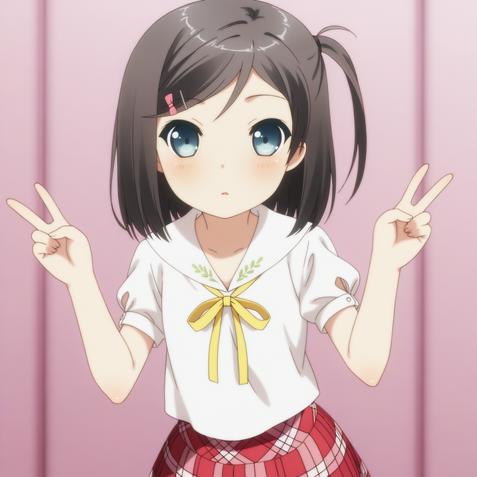 Same example using CFG of 7:
 Not recommended, but you can also prompt for
 yokodera youto with: 1boy, yokodera youto, brown eyes
Description
FAQ
Details
Available On (1 platform)
Same model published on other platforms. May have additional downloads or version variants.