

This is merge model for:
1. 100% stable-diffusion-xl-base-1.0 and 100% stable-diffusion-xl-refine-1.0
https://huggingface.co/stabilityai/stable-diffusion-xl-base-1.0
https://huggingface.co/stabilityai/stable-diffusion-xl-refiner-1.0
2. sdxl-vae-fp16-fix
https://huggingface.co/madebyollin/sdxl-vae-fp16-fix
you can use this directly or finetune.
same license on stable-diffusion-xl-base-1.0
same vae license on sdxl-vae-fp16-fix
SDXL-VAE-FP16-Fix
SDXL-VAE-FP16-Fix is the SDXL VAE, but modified to run in fp16 precision without generating NaNs.
VAEDecoding in float32 / bfloat16 precisionDecoding in float16 precisionSDXL-VAE✅ ⚠️
⚠️ SDXL-VAE-FP16-Fix✅
 ✅
✅
Details
SDXL-VAE generates NaNs in fp16 because the internal activation values are too big:
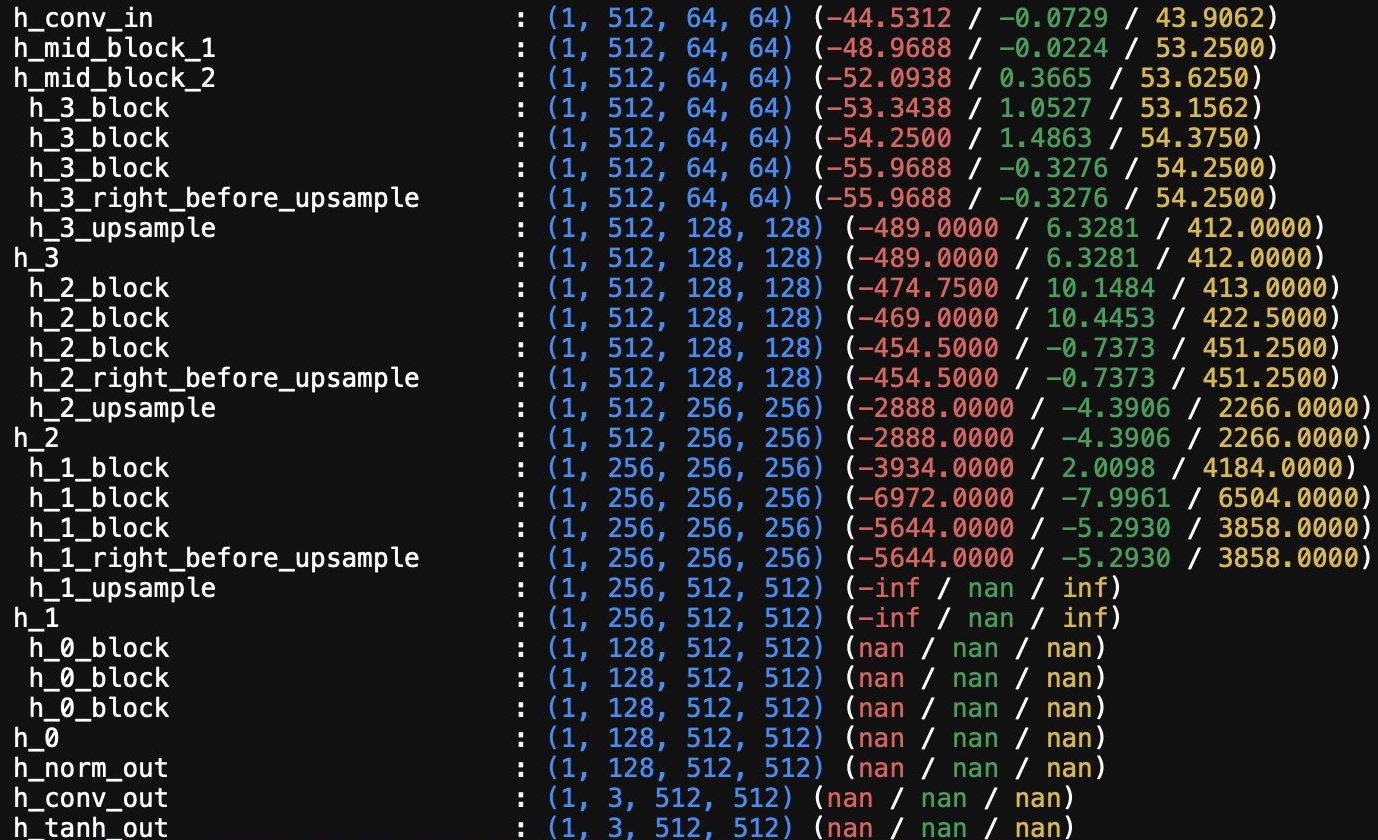 SDXL-VAE-FP16-Fix was created by finetuning the SDXL-VAE to:
1. keep the final output the same, but
2. make the internal activation values smaller, by
3. scaling down weights and biases within the network
There are slight discrepancies between the output of SDXL-VAE-FP16-Fix and SDXL-VAE, but the decoded images should be close enough for most purposes.
Benchmark from here:by Kubuxu
https://huggingface.co/madebyollin/sdxl-vae-fp16-fix/discussions/7
Evaluation on COCO val-2017, 256x256, RandomCrop with padding
Metrics:
LPIPS: https://github.com/richzhang/PerceptualSimilarity/ (lower better) and structural similarity index measure via skimage.metrics (higher better)
Metrics given as: mean [79% credibility interval]

Description
sd_xl_refine_fixed_vae_fp16
FAQ
Comments (23)
i am confused about the watermark, I never got watermark on regular sdxl and refiner model, what is this?
Those watermarks are actually invisible watermarking techniques present in the VAE that can cause artifacts in the image
青龙牛逼
I'm a bit confused from all of these comments. Do I need to download both a 6GB refiner v2 fix AND a 6GB base v2 fix? In addition to the already 6GB Base SDXL and 6GB Refiner SDXL? Or do your files replace the original two 6GB files?
i had merge fixed vae to replace original basemodel.
you can just download vae from huggingface for 335MB
or download 12GB base and refiner to replace SDXL 1.0.
@bdsqlsz Ah, I see. Thank you. On the Huggingface site, I only see a file named sdxl_vae.safetensors. Is that your fixed file? I expected to see a name matching the fp16 fix name.
@97Buckeye yes
I find the license terms to be very confusing. Here its stated to be the same as the base model. The icons on this site show no generation service and other restrictions that the license terms written for CreativeML Open RAIL++-M License contradict. So are we or are we not permitted to run generation services? If not then the license needs changing as soon as possible.
i change it now.
Thanks. I wasn't really commenting on your model specifically but on the general confusion relating to the base model across the entire community. Even the official SDXL model has contradictions in its license terms.
Hi @bdsqlsz, thanks for your great work! I've another question related to the same topic, you say "no selling models" but in the CreativeML Open RAIL++-M Licence there is this statement "Subject to the terms and conditions of this License and where and as applicable, each Contributor hereby grants
to You a perpetual, worldwide, non-exclusive, no-charge, royalty-free, irrevocable (except as stated in this paragraph) patent license to make, have made, use, offer to sell, sell, import, and otherwise transfer the Model and the Complementary Material, where such license applies only to those patent claims licensable by such Contributor that are necessarily infringed by their Contribution(s) alone or by combination of their Contribution(s) with the Model to which such Contribution(s) was submitted." so I don't understand.
I'm not interested in selling models, but I'm inetersted in understanding how licences work in Civitai.
@PaoloDalprato And still these questions remain unanswered.
To use "SDXL-VAE-FP16-Fix", the must be enabled. "--no-half-vae" or "Automatically revert VAE to 32-bit floats" too?
Thank you <3
no need,just fixed to use half vae
Hi there thanks for the work but just to let you know the file "sdxl_vae.safetensors" does NOT work in "Invoke AI 3.1" it has the FP16 error and generates black images. But when using the "diffusion_pytorch_model.safetensors" it works. So that means the "sdxl_vae.safetensors" is not the fixed one? Please rename the filenames accordingly because it's really confusing.
Also I don't see any improvement in speed or RAM/VRAM usage it's exactly the same output when I use the VAE or not. Btw. I use the "Crystal Clear XL" model that explicitly needs a VAE.
sorry,im not vae author,i cant do that.
i think crystal clearXL just use this vae so it dont have any difference
A Confused/Concerned civitaian here.
So I should get all 3 files? Base, refiner and vae? Are they 6 gb each?
if you just use base or refiner to make images,just vae
if you wang to train lora on basemodel,download all
@bdsqlsz hahah - well that was clear... (still confused here)
You can just download the V2 base and refiner. Use the base to start drawing and use the refiner to...refine it. :)
I didn't know how to use them. I added the checkpoint model and VAE model respectively in the folder, but the picture showed the color pixels