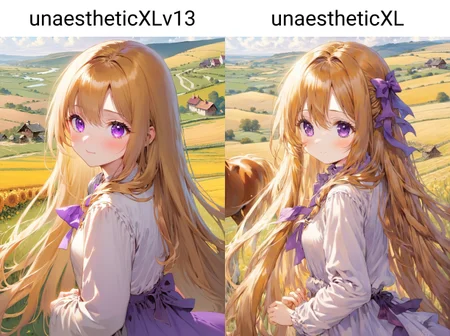


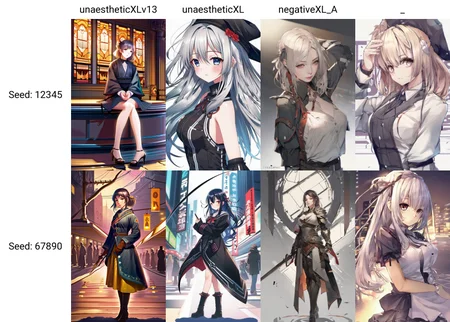

いろいろあるので好みのやつを使ってください
Of course, since there are various options, please use your preferred one.
強弱や組み合わせもありです
It can be strong or weak or a combination of the two.
モデルとの相性もあるのでコントラストがおかしい場合は違うTIを使用してください
Use a different ”TI” if the contrast is not right, as it may be compatible with the model
Support
maybe
anime: _sky3.1 , v1.0, _hk1
semireal: v3.1 , _AYv1, 2v10
real: _Jug6 , v1.3,_Alb2
Description
気分で使い分けてください
Use it according to your mood
FAQ
Comments (36)
Hello, i have a lot of embedding. All are .pt. This one is .safetensor and makes error and not work...Error loading embedding unaestheticXLv1.safetensors. Help!!
It goes into the stable-diffusion-webui\models\embeddings\ rather than the stable-diffusion-webui\embeddings\ folder
@steamrick That is totally incorrect. Anyone else, see my other comment with instructions.
@steamrick Do I need to change the .safetensors suffix?
love the embeddings :D
but i just have one problem, its too powerfull and will remove many model styles at stregth 1. it works well on 0.6 tho
How did you use this? its a .safetensor and embeddings are usually .pt . When i select an SDXL model, all textural embeddings dissapear, this one throws an error in terminal saying not loaded. thanks
@adamscinematic832
ohh the sd web ui 1.5.1 does not support sdxl emmbedings yet you have to change the branch from master to dev for it to work, this might break some extensions but the chances are not high nowdays:
1. go to your root sd folder, the root folder if you dont know is the folser that contains launch. py and web-ui. sh
2. open cmd or your terminal and cd to the root sd folder or open it from your folder
3. use git and stash it by typing "git stash" if it does not work its okay continue to step 4
4. type "git checkout dev" and then type "git pull"
5. the terminal and cmd should spit out the message that somewhere along of "you are now in a headless state...."
6. close the terminal and fire up the web ui, you should be able to use ot now
@shiowoneko Thanks for the answer, but I still don't understand, my webUI is version 1.52, how to use this unaestheticXLv31.safetensors
@alex2023 just chuck it in your "emmdeding" folder
here is a great guide by olivio:
https://youtu.be/W3BFU4oytb0?si=e0aaTh5xhpezBoGo
@shiowoneko Thank you so much
@alex2023 np happy to help :DD
How have 700+ people downloaded this when it does not work? Put .safetensors in Automatic1111 embeddings folder? no, error, no worky. 2 days of web search no answers. Should have instructions as a lot of images on here use it. Even Lykon uses it!!
please push "git checkout dev".
@Aikimi Thank you very much for the reply. I do not know how to do that. I don't think the average automatic1111 user knows what that means. I will spend another day trying to find it and explain it for people!
@Aikimi Could you possibly elaborate and explain what to do? thanks
I'm only now noticed that first comment was yours, about figuring out it 2 days.
But maybe instruction will be handy for someone else.
You DO NOT NEED add it webui bat, it's going to switch to devs every time you launch it.
@adamscinematic832 if you installed Automatic1111 manually, you have installed GIT as well,
if you use it on windows
1) open folder where all stuff and web ui bat placed
2) in address bar (where path to folder displayed), remove path and type CMD instead, and press enter
it will open Command Line with this folder as current directory
and type - git checkout dev
{{{
alternatively you may just open CMD, (win+r, and type CMD and enter)
and type in it
CD C:\stable_diffusion_gui (or whatever path to folder you use, and type :E or :D if it's not on C drive)
and then type - git checkout dev
}}}
As I understand it going to change channel of GIT to "DEV", meaning it's NOT STABLE version, I ASSUME at least, it's adds features that still in development. Correct if I wrong.
But I've checked, damn Embeddings appeared in Web UI, finally!
--
If you used any portable versions of Automatic1111, they installs git and crap somewhere in it's own folders, so I'm not sure, how this will work with them.
means automatic111111 ui is outdated. just switch to compy
@adamscinematic832 brother, if you don't know how git works maybe you should reevaluate using automatic1111, or spend some time learning git. Or at least spending the brainpower to literally Google "what does git checkout means". Have you ever updated your automatic1111?
2 DAYS IT TOOK ME TO MAKE THIS WORK!! HERE IS HOW....
So simple but you have to have extensive knowledge to even know what to look for it seems.
1. Open your webui-user.bat file in notepad
2. add "git checkout dev" ,without the "" on an empty line below set COMMANDLINE_ARGS=
There may be other ways of doing it, but that works here. Your purple Extra Networks button will disappear from automatic1111 but they will now be permanently below the prompt section.
There are only 3 textual inversion embeddings for SDXL currently, and they all do not work unless you do this. They can make huge image quality improvements and are used a lot by a lot of top people like Lykon as you will notice on here, so I am amazed it was so difficult to find out how to make them work.
It's working, thanks. Tho you probably should mention that
This line "git checkout dev" just change branch of this git, to "dev" from, I guess "stable" one. And it may or may not introduce some problems.
Also you don't need place it in web ui bat, you may apply this line once.
I just opened cmd from web ui folder, and typed the line
E:\AUTOMATIC1111\stable-diffusion-webui>git checkout dev
Switched to a new branch 'dev'
branch 'dev' set up to track 'origin/dev'.
@SilentPrayerCG Nice! yes it was a total guess what I did! And it worked for me. You are correct i'm sure, only need to do it once.
Thanks for the tips because for sure I wouldn't have found out. I'm gonna try it because I can't make SDXL work in anything but ComfyUI at the moment...
BUT it's a bit scary to change branch when you don't know what you're doing (like me). Just in case, how to go back to main branch later, do you know ?
lol I should have wait for the answer because now my auto1111 is broken haha it's fine, I will just go back to ComfyUI for now. I'm tired with all the bug fixing everyday...
@tetsuoo Sorry, I didn't checked Civit's bell. I don't know how to change back, but my automatic seems to be working fine after 'dev" thingy.
@tetsuoo Do git checkout master
@Eddie_ thank you ! Such simple thing but when you don't know, you don't know lol
Thanks for this. I thought you had broken my SD, but then i realised I had put this embedding in the positive prompts instead of negative. :D
did you need to do anything else for it to work? its in my embeddings and i have the right branch but it doesnt show up.
@aquakira Try going to Extra Networks in settings and turn on "Always show all networks on the Lora page"
You are a legend sir, thanks
Thank you, this is very helpful.
Is this still relevant?
Automatic1111 recently updated and from what I understand, dev branch is just usually unreleased main branch content
@skogsra This is no longer relevant
after customer has a long rant about various shit… “SIR! What is your problem?” … “I can’t print”
this is still relevant information, lol!
what's funny is that i spent a good half-hour trying to google variants of "how to quickly and easily switch to the dev branch" today, gave up, found this. thanks, i was trying to try out "SDXL distilled"
[protip for the people who keep having to bugfix a1111: make a new backup before you make any changes. just copy the entire folder. i have a folder named "BACKUP" where i copy everything except 'models' and 'outputs' (which i cut/paste between installs) and it has saved me soooo much time.]
so what do I need to do to get this to work with Automatic1111 as of now?
Details
Files
Available On (1 platform)
Same model published on other platforms. May have additional downloads or version variants.