I now use WAN to generate videos instead of hunyuan. This article is about the usage of the i2v function that was not officially released by hunyuan. It is now outdated. If you like the videos I posted, you can follow me or go to my model homepage
##############################
My graphics card has been changed to 5090, and I have successfully generated hunyuan video through Sage Attention. If you are not sure how to run Sage Attention on a 50 series graphics card, I have a document for reference:
https://civarchive.com/articles/12602/how-to-run-sage-attention-on-50-series-graphics-cards
2025.3.6
Hunyuan officially released the Image to video model. This workflow is based on the model just released by kijai.
Kijai model download :
https://huggingface.co/Kijai/HunyuanVideo_comfy/blob/main/hunyuan_video_I2V_fp8_e4m3fn.safetensors
Because this is just released, I haven't tested it carefully. The bouncing breast and side anal sex lora before the test can be used normally.
I sold my 4090, so the new workflow test is based on 4060ti 16GB.
Simple test;
512x512 89 frames . It took about 4 minutes
Please review the instructions below carefully
============================================================
This workflow mainly optimizes images to NFSW Video,Added lora block node, optimized parameter settings, and reduced video artifacts, blur and other issues when using certain hunyuan lora.
I use it myself, if you have any questions you can leave me a message
Check out the original author of the plugin here:
https://github.com/kijai/ComfyUI-HunyuanVideoWrapper
purgevram needs to be installed manually
https://github.com/T8mars/comfyui-purgevram
Use the new img2vid lora to replace the original version
https://huggingface.co/leapfusion-image2vid-test/image2vid-960x544/blob/main/img2vid544p.safetensors
You can check out the pinned image to see how my video looks like.
All settings are tested by me on my 4090 graphics card.
I want to tell you what I think is a good setting if your graphics card has 24GB video memory (I haven't tried other video memory sizes):
First, you should consider generating longer videos(I don't think you want to watch a 1-second or 2-second video), because the generated video can be enlarged in high definition later, so you need to crop your pictures to be smaller
Some of the resolutions and num_frames I tested, which do not use shared memory(Using shared memory is very slow):
496x496 181
408x496 217
720x576 101
624x624 101
496x896 101
816x560 101
I do not recommend using IP2V, teacache, hyvid_cfg, etc., as they will consume additional video memory. You should use the video memory based on the resolution and total frame rate of the generated video.
The following are only for NFSW
I don’t recommend using AI to write prompts, try to write them yourself,How to write a prompt word, for example:
anal sex,bouncing breasts,An Asian girl with gigantic breasts is lying on a bed. The man is holding her thighs. The man is moving his hips up and down in fast rhythmic movements, inserting his penis completely into the girl's anus, and then pulling it out in fast pumping movements. The girl's gigantic breasts are bouncing wildly as the man's hips ram into her from behind. The man's penis is very thick and is completely inserted into the girl's asshole. The girl is wearing an unbuttoned shirt and white knee-high socks. The girl rolls her eyes and loses consciousness. The background is a bedroom. High quality.
anal sex,bouncing breasts are Lora's prompts.
The prompt words should include the action and clothing, etc. It is not recommended to write too long, which will distract the weight of the main prompt words,Don’t write any prompts that are irrelevant to your video. Focus on the action description.
In addition, I found that using some loras will affect the quality of the video. It may be that the resolution is low when the loras is trained. I am not sure about the specific reason.
The video resolution should not be lower than 512x512, which will seriously affect the association between the video and the prompt word.
My parameter settings
The parameters I am currently using:
embedded_guidance_scale:12 (If the action is too intense, lower this value)
flow_shirt:12
denoise:1
num_frames:101
steps:30 or 9(Fast version)
LORAs
In addition, you need bouncing breasts lora (mainly to increase the breast shaking effect) and anal sex lora (you can use other ones, I use this one mainly for the effect, but this lora will affect the image quality)
1.
strength:0.85
2.
https://civarchive.com/models/1193034/side-anal-sex?modelVersionId=1343233
Strength: 1.1,(The default setting in the workflow is 1.1. If the action is too intense, reduce the weight slightly), the higher the weight, the smoother the action. Note that setting this value requires enabling Lora Block Weight, otherwise there will be serious image quality issues, please check the Lora Block Weight description in the next section.
Lora Block Weight
This node has been added to the new Workflow. Please set it as follows to prevent blurring when using Side Anal Sex Lora. Please see the sample images.
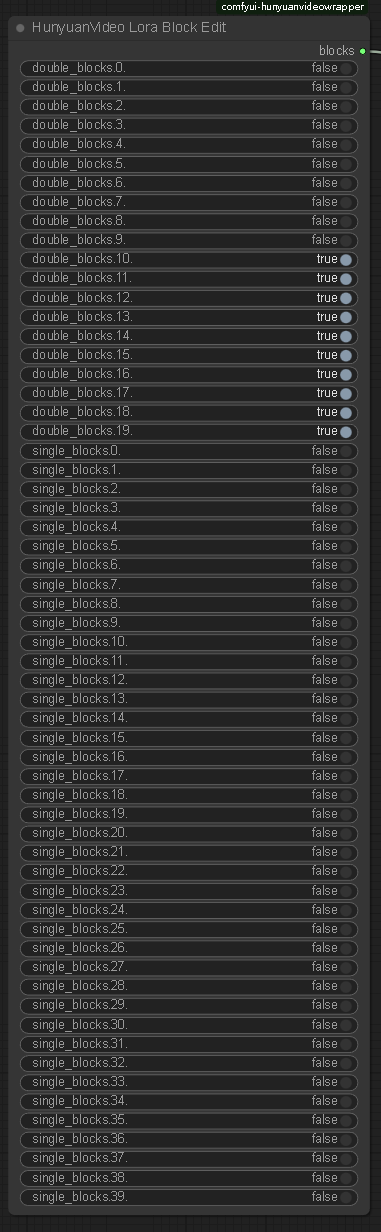
Image selection
The problem of multiple fingers and other defects in the picture is not a big deal.
Don’t choose images with a clear gap between the man and the woman, otherwise the man will not be able to touch the woman’s body when he swings, resulting in insufficient shaking. You should choose images where the man and the woman are close together.
====================================
Description
使用最新官方发布的模型,调整了些参数
Use the latest officially released model and adjust some parameters
FAQ
Comments (36)
I'm completely new to all of this workflow stuff. Is there a simple link where I can copy and paste a workflow? I did the same with a simple Hunyuan workflow a while back from a video (got a workflow by placing said video into my ComfyUI) Any insight is appreciated!
just download the 4.72 kb file that is available here for download. its a zip file. open it and place the .json file into your ComfyUI. this .json file is the workflow
Having this issue HyVideoModelLoader
cannot import name 'Config' from 'triton' (D:\ComfyUI_windows_portable\ComfyUI\custom_nodes\triton\__init__.py).
I look for the file and it is not there nor in the repository. any ideas?
You need to install the triton module
@fayer1688 I did and went to download from the github. https://github.com/triton-lang/triton. is there anything else?
@kvreborn316 There is an installation step on reddit, you need to follow the steps to install it, but this installation is difficult
https://www.reddit.com/r/StableDiffusion/comments/1h7hunp/how_to_run_hunyuanvideo_on_a_single_24gb_vram_card/?rdt=43789
You need to install the triton module in the site-package folder in your comfyui python folder. So nav to triston on c drive if you installed it and copy to your standalone path instead.
oh I've been waiting for this! question:
you list
496x496 181
408x496 217
720x576 101
624x624 101
496x896 101
816x560 101
what is 181, 217, etc...? the number of frames I should be generating with those resolutions? I'm on a 3090 with 24 GB
This is the number of frames you can generate video without oom when running at full load on 4090
@fayer1688 thank you!
Can you help me? Im trying to use with the "tittydrop" LORA, but the result its always NOT NSFW
I haven't tested this lora yet, it may not be compatible with the new model
hello? where can i see Lora Block Weight sample images and know which block should i block?
if I use loras like missinary or sth else,should I block the same blocks?
I see, seems that you only blocked weights of boobs bouncing lora
I only used lora block on side anal sex lora, because I tested bouncing breasts lora before and didn't need this
backend='inductor' raised: FileExistsError: [WinError 183] 当文件已存在时,无法创建该文件怎么办
https://github.com/kijai/ComfyUI-HunyuanVideoWrapper/issues/166
Do I absolutely need to install something called triton?
backend='inductor' raised:
RuntimeError: Cannot find a working triton installation. Either the package is not installed or it is too old. More information on installing Triton can be found at https://github.com/openai/triton
Set TORCH_LOGS="+dynamo" and TORCHDYNAMO_VERBOSE=1 for more information
You can suppress this exception and fall back to eager by setting:
import torch._dynamo
torch._dynamo.config.suppress_errors = True
If you need to install, please follow this process:
If you don't want to install triton, change SageAttention to SDPA
@fayer1688
Likewise.
This error started appearing after today's update of ComfyUI, and it doesn't matter what you choose: Sage, SDPA or Comfy. Yesterday everything worked fine (without Triton).
The previous update broke the WaveSpeed and the WORKFLOWS stopped working. And i updated hoping they fixed it. Now both are not working. )) Fuck!!
@fayer1688 I chose sdpa instead of sageattn from my first attempt. The work was stopped at the hunyuanvideo sampler, not the hunyuanvideo model loader.
disconnected the hunyuanvideo torch compile settings node and ran it, and it went well, but it was slow, so I quit. I also use 4060ti 16ram. Did you install the triton and run it with sageattn?
@fayer1688 As I reduced the length of the video, I managed to create it very quickly. Thank you for your interest.
Something is very wrong with this workflow. 100% VRAM usage for 392x512 resolution on 61 frames, on a 24GB VRAM card and 64GB RAM, is ridiculous. Not to mention that it is constantly failing, even with default settings, with this message:
The expanded size of the tensor (50) must match the existing size (49) at non-singleton dimension 4. Target sizes: [1, 16, 1, 64, 50]. Tensor sizes: [16, 1, 64, 49]
Did you clear vram before you run?
check what vision loaded, I had same issue because it tried to load wan's vision model instead of the llama vision, why that 1.5gb vision model filled a 4090, ill never know..
I got same issue too
The expanded size of the tensor (76) must match the existing size (75) at non-singleton dimension 3. Target sizes: [1, 16, 1, 76, 60]. Tensor sizes: [16, 1, 75, 60] on RTX3060 12GB
What prompts are people using to get movement with anal? I'm using this workflow with the side anal LoRA, I get video but there's no real anal movement going on like the examples at the top of the page. Thanks
After my test, the new version of Hunyuan is not as good as Wan. If you are willing, you can consider using Wan to generate videos.
OOM on 8Gb card
大佬,我遇到了问题:ValueError("type fp8e4nv not supported in this architecture. The supported fp8 dtypes are ('fp8e4b15', 'fp8e5')")。这是我的模型引起的还是GPU引起的(我是3090)?
3090 好像不支持FP8 你改成FP16试试
How well does this work on an amd card?
ComfyUI Error Report
(Down)Load HunyuanVideo TextEncoder
DownloadAndLoadHyVideoTextEncoder
argument of type 'NoneType' is not iterable
How to fix it? Ths