


Note: This is not an SDXL model! It's based on SD 1.5.
SD 1.5 | CineScapeXL beta1 is a bit of an experiment that focuses mainly on landscape and portrait images trained from SDXL - in terms of aspect ratio. Mainly cinematic style on higher resolution.
So you can use it on lower VRAM than SDXL and have (sort of) similar outputs, while also retaining the ability to merge the model with the broad range of other SD 1.5 models.
The model is primarily meant to be used with Automatic1111 and High.Res Fix. In my testing, I've found these settings to work quite well (many times you can also increase the initial resolution):
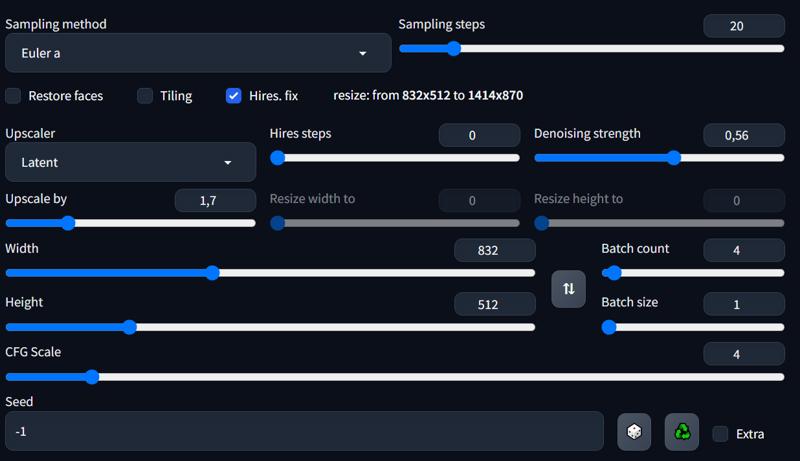
Most of the time I'd keep the lower aspect ratio at 512px (width or height depending on the ratio you want to use)
CFG Scale between 3.5 - 7.0 : Just play around with it. Sometimes the model tends to overfit a little.
The model will most of the time apply cinematic features to the image. If it doesnt, use something like 'cinematic style' 'greyscale' 'dark colors' 'photographic style' or 'analog film'.
Using (weight:1.3) on words works quite well if you miss something in the image or cant get certain style.
Generations of images at night should appear really dark, as the model has been trained with noise offset.
Important: Make sure to set SD VAE to None in Automatic1111 settings :

I might develop it further over time...
Description
First beta release
FAQ
Comments (3)
很好的东西。其实这就是我说的拿来主义,我的就是我的,你的就是我的。
Great work! I use a 6GB VRAM card and it used almost 100% of it (but it still has +16gb of shared memory to be further used). WIth 32GB RAM, all the others '6.46gig' models crashed, this one not!
I am creating a 1414x870 image by using HiResFix in up to 7 minutes (it starts with 9 or 10 minutes remaining but then it accelerates).
Is it possible to just create 'dozens' of 832x512 images, then use IMG2IMG (script ULTIMATE sd or LOOPBACK scaler) to 'refine' there, by using this same checkpoint? At least I can keep the 832x512 sources in the case HiRes was not so great (as HiRes doesnt save those 832p sources, we lose it). And I can use TILING (in order to push it ahead to, say, 1664x1024.
Thank you for you time and patience!
I don't know about your exact configuration, but if it takes 7 minutes with high res, to me it sounds like you are using the option --lowvram and it will slow down performance significantly. Try using --medvram for now. I am probably going to make the model smaller, like around 2-3gb without much loss of quality. So then the model should work well with 6GB VRAM.