

March 29th 2024 Update: A more experimental personal merge based off of Fluffusion R3 has been posted. This merge is different from previous versions of this model series. As such it will not be explicitly given that naming scheme. As it's v-prediction, remember the yaml or sampling nodes. Fluffusion is trained with clip skip 2, so make sure you set that in your UI of choice.
Below is information that is outdated. That is all.
Results oversaturated, smooth, lacking detail? No result at all? Please read the following!
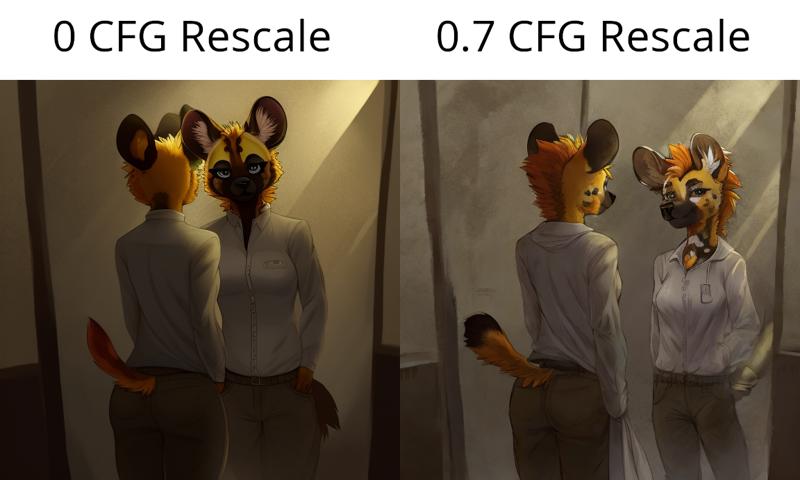
This is a terminal-snr-v-prediction model and requires a configuration file placed alongside the model and the CFG Rescale webui extension! See further down for more information and equivalent for ComfyUI.
HOW TO RUN THIS MODEL
- This is a terminal-snr-v-prediction model and you will need an accompanying configuration file to load the model in v-prediction mode. You can download it in the files drop-down and place it in the same folder as the model.
- You will also need https://github.com/Seshelle/CFG_Rescale_webui. This extension can be installed from the Extensions tab by copying this repository link into the Install from URL section. A CFG Rescale value of 0.7 is recommended by the creator of the extension themself. The CFG Rescale slider will be below your generation parameters and above the scripts section when installed. If you do not do this and run inference without CFG Rescale, these will be the types of results you can expect per this this research paper.

- If you are on ComfyUI, you will need the sampler_rescalecfg.py node from https://github.com/comfyanonymous/ComfyUI_experiments.
HOW TO PROMPT THIS MODEL
- Natural language has a strong impact on this model as of V7. It won't understand everything but it can get you places. And then when you can't squeeze any more out of it, you can use e621 tags to help refine your prompt. (or you can just use tags, either way will work.)
- Start your prompt with a short natural language prompt describing what you want, then pad it with e621 tags to refine specific concepts. As this is a v-prediction model, prompt interpretation can be a bit more literal.
- Many flavor words and artists from SD 1.5 work again.
- PolyFur is trained on MiniGPT-4 captions, so try being really flowery with your prompts and use sentences even. (check the generation info on the preview images to see how)
- If an established character isn't coming out accurately, try increasing the strength of their token and adding a few implied tags that describe their appearance. Keep in mind that characters that aren't very popular or don't have many images in FluffyRock's dataset typically won't fare that well without a LORA.
- Avoid weighting camera angle keywords too strongly, especially close-up.
- Resolutions between 576 and 1088 should work reasonably well as that is the range of FluffyRock.
Model Info and Creation Process
V8.1 now available. Last major version for a while. Currently the quality tag LORA from Feffy is not baked in and I recommend using it as a LORA. As of this V4-V6, @Feffy's Quality Tag LORA was baked into the FluffyRock part of this model. Add masterpiece, best quality and worst quality, low quality, normal quality to your positive/negative prompt.
This model is a "Train Difference" mix (see https://github.com/hako-mikan/sd-webui-supermerger/blob/main/calcmode_en.md#traindifference) of FluffyRock and PolyFur onto a diverse and versatile base model to expand the text encoder's range of prompting and understanding of concepts outside of e621 tags. This process differs from traditional merging and block merging and shouldn't be confused with "Add Difference" that we've had. The current base model is a mix of 6 non-furry models at varying ratios, which are mostly merges as well that cover a lot of ground in terms of prompting capability. As of V6 the process has gotten more intricate with CLIP tweaks and block merging.
Credits go to Lodestone Rock and company for training such an expansive model. https://civarchive.com/models/92450?modelVersionId=124661 https://huggingface.co/lodestones/furryrock-model-safetensors/tree/main
And pokemonlover69 over at https://civarchive.com/models/124655?modelVersionId=136127 for humoring my insanity on this process.
And Feffy for their Fluffyrock Quality Tags LORA. https://civarchive.com/models/127533
Description
More up to date and experimental versions available at: https://huggingface.co/zatochu/EasyFluff
Biggest change is more capability of photorealism when prompted. Outputs should be reasonably similar to V9's. Natural language may be slightly weaker and more nuanced prompts may not work as well as before. Results with Euler A as the sampler may be susceptible to worse eyes and finer details but not thoroughly tested. If you're finding results over-saturated or too vibrant, consider using the VAE available here. https://civitai.com/models/118561?modelVersionId=131656
FAQ
Comments (66)
How would someone go about finetuning a model with this as a base?
do we still need the v9 yaml to use v10?
the yaml file never changes besides its name, so just copy and rename the file to the same as the latest model's name
This is a crazy good model, it replaced like half the furry models I had in their entirety.
same, its insanely good,
I am still coming back to this with results, even when yiffymix and all the other big ones let me down. This thing is seriously an underrated model.
@pihlawrkr738 It is also a very heavy handed model and will ignore much of your prompt. However, you can use furryrock, which is a very obedient model, and then use fluffy as a refiner, works great.
@cornydogsen1243 I have not had this problem with it myself.
More examples from the author would be neat
More examples from the author would be neat
is there any ways to merge this into another model without getting de-saturated/scuffed results?
love the model but havent really been able to merge it to my own models :(
i want sdxl(
v10 wont load in for me in Automatic 1111. Whenever I select it, it thinks for a second and goes back to my previous model. I did try v9 and it works fine. When I do try to load it, then try to generate an image with another model, I get this error. "RuntimeError: "log_vml_cpu" not implemented for 'Half'"
hey bro did you get this working
@fozea60229 Its still not working for me
Edit after a week of use: I've been using Stable Diffusion since Feb '23, and this model has single-handedly turned it from a hobby to an addiction for me. The natural-language prompting the model is capable of accurately understanding is a game changer—no longer do I have to memorize a hundred danbooru/e621 keywords to get outstanding results. I groan whenever I have to switch models now because this one has spoiled me so much.
Already left a review but I wanted to double down and leave a comment because this model is so unbelievably good and the creator deserves massive credit. 5/5, 10/10, 100/100
Hi, can someone guide me in running this on automatic 1111, i installed the cfg rescacle extention and put ymfl file in the stable diffusion folder but the result is a blue blob
I used this on automatic 1111 yesterday and it worked perfectly but when I tried to use it today I was getting black images with weird colors dots etc. I have no clue how It changed and how to fix it. I tried using v9 and it worked for 3 generated images then it went back to what happened to v10.
have you found a fix?
@gsmer5000 I forgot to place the .yaml file into the same directory as the base model as you can find in ( https://huggingface.co/zatochu/EasyFluff ). Both files need to have the same name or it won't work.
it's broken :(
did you remember to drop the yaml into the model folder alongside the model?
Is there a way to fix img2img? It always shifts the color and after several passes it becomes completely unuseable.
I am getting washed out colours after a few img2img passes. I have the yaml file. txt2img works gloriously. Just img2img and similar steps
Change CFG rescale value?
i cannot for the life of me generate a pic with a navy blue sweater/hoodie. even just a standard blue shirt or sweater comes out as a "sea green" or a turquoise leaning heavy on the green.
What's the difference between this version, vs "EasyFluffV10-DoWhatISayFixed" and "EasyFluffSimple" from HF?
Does anyone know how to get results of the style like the girl on the rooftop in the pink sweatshirt from the V6 version? I'm new to all this and I tried for a couple days to figure it out, but I was not able to.
I thank the author for creating the model, I have tried many models, but this one is flexible, probably the best of its kind :DD
It returns blue noise images only
Easy fix - download config file and put it into same file as model and download extension (paste URL file from here and make it install in extensions tab in the web)
Where should I put the config file if I'm using ComfyUI? I have ComfyUI's model path to be the same as A1111's. The config file is clearly working when I use A1111, but not when using Comfy as I get the blown out colors.
ComfyUI can't automatically select the config file yet for some reason. You need the CheckpointLoader node, not the CheckpointLoaderSimple one. That will let you select the config file. It says deprecated, but I still need it for v-pred models to work ¯\_(ツ)_/¯
I think there's also a node to make it use v-prediction
advanced > model sampling discrete node iirc
@Mobbun Seems to work for me, thank you!
@Mobbun Oh wow, that actually fixed my issue with generation speed, thanks a lot!
Is the only way to use this by hooking it up to some A1111 thing (or another UI) (with the config file and etc.)? I don't want to pay money for 'Civitai Link', but I like the quality of the images this makes.
the only way you can use this model is by using a1111 or comfyui (both are localy hosted, you need at least a 4vram gpu to run the model), i do not know if you can use V-prediction models (this model is a v-prediction model) currently on any website
Any plans on an SDXL version? This model is phenomenal and covers a wide range of styles that don't look like slop. AND it can natively do avians that don't look like shit. Not a single SDXL model I've tried can do that. Would love to see whatever cracked dataset this is using applied to that. Might make SDXL usable.
It's a merge, not a finetune. It's made from existing models. There is no real furry model for XL yet asides from the pony one.
@Mobbun and even that is extremely temperamental.
Nice model, but even after installing the config file and CFG I have a problem: yellow tint. Everything is yellow everywhere, LORA and other settings don't help :(
same here
are you using an upscaler or vae? that might cause those issues
@senile I have tried with upscaler and vae, also tried without them. The result is always the same(
Are you using cfg rescale?
@heromann1559 Yes, I've tried different numbers. The yellow color goes away at about 0.9, but the image turns into the color of cooked meat :)
@lapkilol there should be an optiont for auto color fix, thats your best bet if not maybe its your prompting for style/quality, ive had that before when i started using the model and it was something to do with the quality prompt, im not sure what exactly but it did go away when i changed it, you could maybe try the e621 quality prompts laura and that may fix it too i dont know really hope something i put helps
Is there any way to find out exactly which artists' works this model is trained on?
it's trained on data from e621. If you want to see what exactly, then this should be mostly right.
https://civitai.com/models/92527?modelVersionId=230826
Can you please tell me how to make two characters of different animal species? For example, in the image, the sex and dominant should be a bear and the submissive should be a dog. Is it possible to do this without complicated paths? Thank you in advance <3
What did work for me (still took a few gens) is describing each character seperately and then put a BREAK command between each character description. So you just describe the first character then "BREAK" and then you just put the other description in there.
Ive once made RBD and applejack do some nasty stuff and I used this prompt:
(((by Yoji Shinkawa,hyperrealism))),highly detailed, hyper realistic, octane render, complex shadows, hyper realistic shadows, ((masterpiece)),((best quality)), (extreme detailed illustration), (by taran fiddler), by honovy, by michael & inessa garmash, pino daeni, by kiguri, by alena aenami, by ruan jia, (((ray tracing))), volumetric lighting,, large eyes, cute, inside a spacecraft, science fiction, cyborg,
BREAK
(anthro female equine),(((rainbow dash \(mlp\)))), equid, equine, horse, mammal, (((cyan body))), cyan fur, purple eyes, rainbow hair, muscular, (wide hips), slim waist, (wings, feathered wings, cyan feathers), muscular,
BREAK
(anthro female equine), (((applejack \(mlp\)))), blonde hair, braids, green eyes, muscular,
BREAK
2boys,on top, penetration, puffy anus, anal penetration, doggystyle,from behind position,open mouth, penetration, penile, penile penetration,futanari, intersex, breasts, (((equine penis))), testicles, large testicles, nude, nsfw, dark testicles, dark penis, dark nipples, my little pony,
@Gemuseachmed Thank you! Your advice helped me.
apart from BREAK you could also put interspecies as a tag then for example "male bear, female canine" that tends to work for some generations but break might more consistent not sure
Anyone else have this problem where you put "hair" in the negatives and still get a random hairstyle in your generations? I'm struggling to find a way to get around this
it possibly based on artist style, certain artists like jinxit will always have hair, also possibly species? personally basically anything that is aquatic like shark/dolphin never has hair for me but fox/wolf is much more weighted towards having hair. Don't know if this really helped but you could maybe add some weighting to the negative for hair? although hair/fur might be interpreted similarly since it is a furry model, adding hairstyles to the negative prompt could do more good then just "hair" depending on what you're trying to create
Try "bald" in the positive and see if that helps? Maybe start with (bald:0.4) so the head isn't completely waxed.
@OP, to update your guide:
On comfyui u not only need the cfgrescale plugin but also the ModelSamplingDiscrete node.
To use a ZSNR v_pred model use the regular checkpoint loader node to load it then chain the ModelSamplingDiscrete with v_pred and zsnr selected. You can then add the RescaleCFG node.
Hi. I don't know if this is possible, but I'll ask anyway: is there a prompt that can change a face to a more human face? Thanks in advance for the answer
Neg prompt: (snout:1.5)
If you're trying to straight up get it to make a human, then "human, not furry" might help. Otherwise try "humanoid" and "kemonomimi" and omitting "anthro" or "furry" if present.
@baph0met That's not what I meant. All the characters come out with elongated faces, and I'd like it to be Anthro, but with more human facial features - not such an elongated muzzle
Hi. Who can explain what I miscalculated? What I won't introduce is rendering a clean background with a dirty spot. The sampling method has been changed several times, hints. I've tried everything, but it renders a spot...One spot and that's it.
Artifacting issues can usually be from VAE in my opinion. Maybe try a different one if you're already using one. I've seen them as green and purple blobs. If that's not it, then I'm afraid I'm not aware of anything else. Unless I'm misunderstanding the problem? Do you get a usable image with a blob or splotch randomly placed, or is it just a blob that's the focus of the image?
@Kaladae I have solved this problem. In the folder of models named (stable diffusion), you need to upload the second file included with (checkpoint), its extension is (.yaml). The version (yaml) and (checkpoint) must match.
@Lalu Ah, I didn't even think of a config issue, good to post the follow up here in case others have the same issue.
Details
Files
easyfluff_v10Prerelease.yaml
Mirrors
fluffyrockUnfluffed_v10.yaml
easyfluff_v7.yaml
easyfluff_v9.yaml
easyfluff_v10Prerelease.yaml
fluffymix_v40.yaml
hyperfusionVpred_v9Vpred.yaml
fluffyUniverseFurry_fluffyUniverse10.yaml
fluffyUniverseFurry_v20Vrped.yaml
fluffyUniverseFurry_v20PrunedVpred.yaml
fluffyUniverseFurry_v21Vpred.yaml
easyfluff_v6.yaml
easyfluff_v81.yaml
fluffymix_v20.yaml
fluffymix_v30.yaml
fluffymix_v10.yaml
adhdmix_v10.yaml
arymARandomYiffMix_v20.yaml
Available On (1 platform)
Same model published on other platforms. May have additional downloads or version variants.