
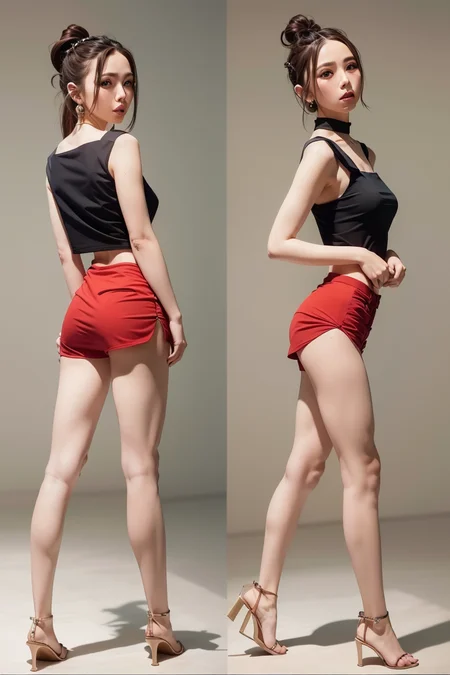


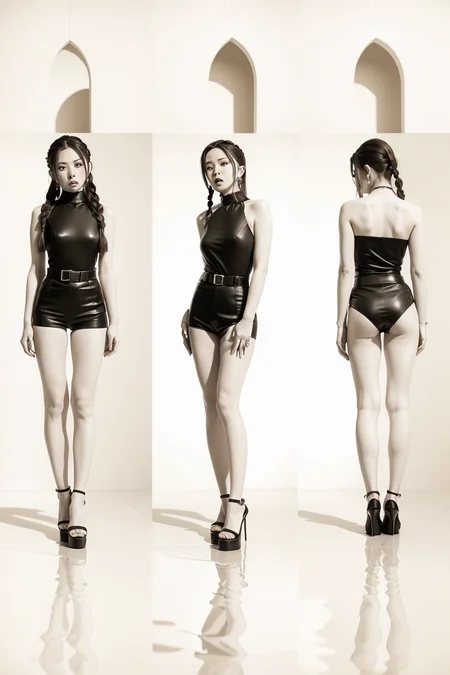
Super Pose Book Vol.1
for use with ControlNet
BACKGROUND:
This is a pack of 30 poses curated to help you make a pose magazine
These poses are made for use with ControlNet and have been tested SFW and NSFW
USAGE RECOMMENDATION:
txt2img Setup:
Aspect Ratio 3:2 OR 1152 (h) x 768 (w)
Sampling steps 20-50
CFG Scale 5-12
Sampling Method: Euler A (others work too)
ControlNet Setup:
Download ZIP file to computer and extract to a folder
Inside you will find the pose file and sample images
Inside the automatic1111 webui, enable ControlNet
Load pose file into ControlNet, make sure to set preprocessor to "none" and model to "control_sd15_openpose"
Weight: 1 | Guidance Strength: 1
Click big orange "Generate" button = PROFIT! :)
==========================================
Note: Using different aspect ratios can make the body proportions warped or cropped off screen. This is normal, to avoid this issue make sure the aspect ratio of the txt2img and ControlNet pose image are the same.
ControlNet here: https://github.com/Mikubill/sd-webui-controlnet
ControlNet pretrained models: https://huggingface.co/lllyasviel/ControlNet/tree/main/models
OR smaller file version of same models prepared by theally: https://civarchive.com/models/9251/controlnet-pre-trained-models
Put the ControlNet models (.pt, .pth, .ckpt or .safetensors) inside the models/ControlNet folder
==========================================
Please leave me a review or post images of your creations.
If I get good feedback, I will release more volumes. Enjoy!
Check out my channel for other great models: https://civarchive.com/user/StevenMentor
The girl in the samples: https://civarchive.com/models/13006/gem-gloria-tang-gem
Description
30 poses including solo and front/back made for ControlNet. Samples included
FAQ
Comments (26)
TSF
Thank you so much! I hope next openpose update comes with hand/finger control so we won't have any finger issues anymore.
My pleasure, glad I can help. I think there is ControlNet model or hands already, need to find time to play with it but yes the fingers are always problematic.
They do, (in fact openpose135 supported finger posing since 2019). The limitation is comes on the side of how the image is generated from the latent representation.
https://cmu-perceptual-computing-lab.github.io/openpose/web/html/doc/md_doc_02_output.html
https://www.ri.cmu.edu/app/uploads/2019/05/MS_Thesis___Gines_Hidalgo___latest_compressed.pdf
You can create good hands by using multi-controlnet: https://twitter.com/toyxyz3/status/1629620938894643200
万分感谢!appreciate!!!
Eagerly awaiting the PRON version
Currently setting this up, how do I get the "control_sd15_openpose" model?
Hi there! Thank you for testing it out!
ControlNet here: https://github.com/Mikubill/sd-webui-controlnet
The control_sd15_openpose and the others are here: https://huggingface.co/lllyasviel/ControlNet/tree/main/models
Put the ControlNet models (.pt, .pth, .ckpt or .safetensors) inside the models/ControlNet folder
Here is a set of smaller file versions of the models by theally. Save a few GB of space: https://civitai.com/models/9251/controlnet-pre-trained-models
@tokyoidolsafk I got it working, thanks! Testing out custom poses and getting some fantastic results. Thank you very much for this game changer!
这个png动作文件怎么用呀,有无大佬知道的
how to use it,who can tell me
Hi! First make sure you installed ControlNet. Then use the PNG of the pose in it. There are many tutorials on how to install ControlNet for stable diffusion. The pose book has 30 premade poses for you to use.
Make sure you disable the pre-processor and set the model to OpenPose.
主要是不知道你卡在哪一步了。
如果你不知道controlnet是什么,建议你先去B站搜索并学习一下。
如果你知道了controlnet,并且成功安装了,那么你就能在生成界面看见需要加载图像的地方,把那些黑背景的火柴人图拖进去就行。
下面的参数需要选(无+OpenPose),这里是另一个门槛,你需要下载openpose模型,正好C站直接过滤controlnet,下载最多的那个打开,里面就有预制的模型和用法说明。
然后,把pth文件放在你安装目录下的controlnet/model文件夹里,这样重启界面后,你就能看见下拉菜单中有OpenPose了。
Does anyone know why controlnet doesn't show up after reboot?
update SD w and uninstall and reinstall controlnet extenstions
是不是拿邓紫棋练的啊?
安室娜美惠 他自己做的
真的好像邓紫棋经常做的动作
下载的姿势文件放在哪个文件里面呢?
good job
这个下载下来要放在哪个文件里面
放在controlnet里面,用模型openpose
j