
All videos/images in the showcase have metadata in them, so you can drag/drop them into ComfyUI to autopopulate the workflow without needing to download the zip/JSON.
A simple HunYuan workflow that works with ComfyUI's native HunYuan functionality.
This is a 2-stage workflow. The first stage is 480x272 low-resolution video generation, and the second stage is an upscaling/creativity stage that will upscale it into a 960x544 mid-resolution video and fix/change things depending on your denoising level.
You can quickly fine-tune your prompts by running them through the low-resolution portion of the workflow in ~30-60s depending on your graphics card. Then when you find a low-resolution video you like, you can continue to workflow to upscale it and get a better resolution output.
Blue nodes - Update these to point to your local models that you can download from here
Green nodes - Modify these to your heart's content. There are notes next to nodes to explain how your changes may affect the output.
Description
FAQ
Comments (11)
Thanks for this! Quick question: When you say: "You can quickly fine-tune your prompts by running the low-resolution portion in ~30-60s Then you can continue to workflow to upscale it" - So if the low res generation do not match with my prompt I can just simply [interrupt] the upscale isn't? is that the way that this was planned right?
Also, thanks for the mini prompt guide!!! It's a game changer to me lol
Yep! If you have the rgthree nodes installed, you can even right-click and run to that node (and stop), so you don't have to interrupt after it.
@ComfyTinker Oh!! wonderful! I didn't know that! fantastic, thanks!
great and very well explained workflow. thx a load!! Unfortanetly i still don`t get it :/ In which scenario would I leave the basic seed and change the upscaler seed? And while I have rgthree installed but am unable to find the node I can run to only upscale, what is the exact name? Sorry for the trouble, trying to get better :)
@mAIght I can help with that - Let's assume you have the workflow working - And you already have typed your prompt.... so INSTEAD of click on QUEUE you can go and do right click on the Video Combine Node and hit Queue Selected Output Nodes (rgthree) so that basically means that it will run and stop Right there on that specifc NODE instead of whole process. Hopefully this make more sense to you. Even you can see this screnshot for a better refernce: https://i.postimg.cc/wxcGmSmN/rgthree.png
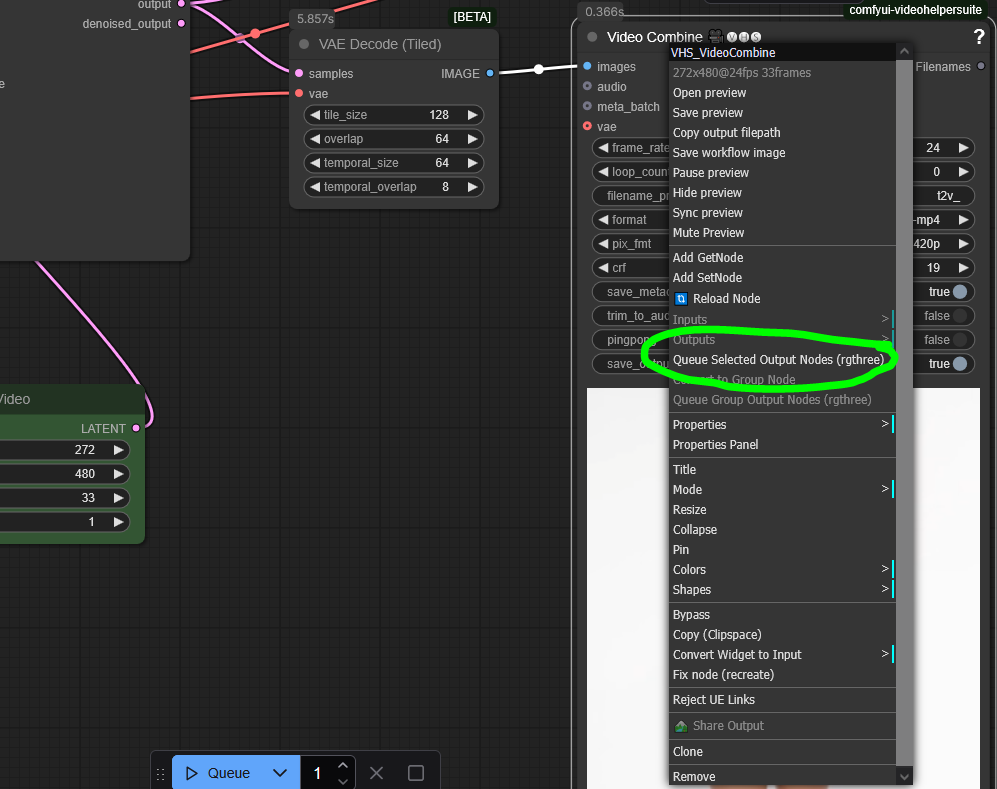
@Xavis oh wow, perfect explanation. Thx for the pic as well. Found it :)
I noticed some people are moving to a LORA loader that allows specific blocks. You're using a traditional LORA loader. Have you tried the other style out to see if they're effective or not?
That's more of a RAM saving measure than anything else, from my understanding. The value of this flow is more so the prompt template and the 2 stage approach. Feel free to mix and match.
Getting a missing node error for: "TeaCacheVidGen", but there are non in comfyui manager. Is there an external link to download?
I believe it's just ComfyUI-TeaCache? I haven't updated my ComfyUI in awhile, so let me tinker for a moment. Have you updated your ComfyUI in awhile as well?
@ComfyTinker I've updated ComfyUI, yea. I installed missing nodes, but TeaCache still has a red ring around it and I can't find it anywhere in the list. Very weird.