


Workflow for making images look realistic.
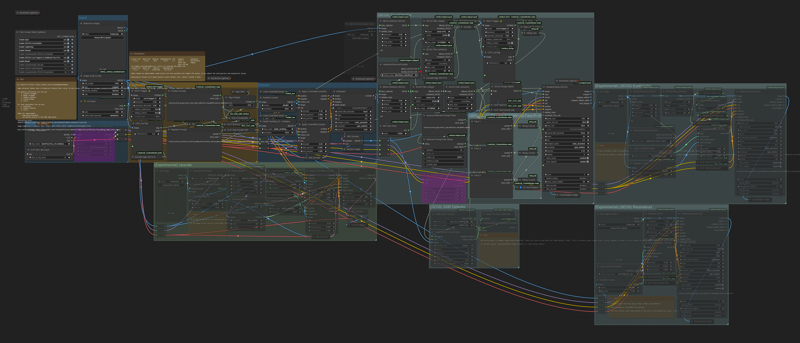
Models & Folders:
Base - TAME Pony: The Authenticity MachinE - (ComfyUI\models\checkpoints)
ControlNet - ControlNet Union SDXL ProMax 1.0 - (ComfyUI\models\controlnet\xinsir)
BBOX - face_yolov8m - (ComfyUI\models\ultralytics\bbox)
SEGM - Anzhc Eyes -seg-hd - (ComfyUI\models\ultralytics\segm)
SAM - sam_vit_h_4b8939 - (ComfyUI\models\sams)
Upscale - 4x-UltraSharp - (ComfyUI\models\upscale_models)
Tagger - JoyTag - (ComfyUI\custom_nodes\Comfyui_joytag\checkpoints)
Authors of the original images:
Frieren – @_ZENA09
Guts – Kentaro Miura
Ellen Joe – @Kimsanlee6
Goblin – someone (I lost the source >_<)
Description
FAQ
Comments (14)
Hey, I cant find KSampler_A1111 node, could you give me hand?
Download the workflow again and try
@V01 thanks, but I have encounter another issues (beside missing models):
Prompt outputs failed validation: Return type mismatch between linked nodes: exclude_tags, received_type(STRING_PROMPT) mismatch input_type(STRING) Return type mismatch between linked nodes: removeTag, received_type(STRING_PROMPT) mismatch input_type(STRING) Required input is missing: addTag Required input is missing: addTag BNK_CLIPTextEncodeAdvanced: - Return type mismatch between linked nodes: text, received_type(STRING_PROMPT) mismatch input_type(STRING) UltralyticsDetectorProvider: - Value not in list: model_name: 'None' not in [] WildcardPromptFromString: - Return type mismatch between linked nodes: prefix_all, received_type(STRING_PROMPT) mismatch input_type(STRING) CXH_JoyTag: - Required input is missing: addTag WD14Tagger|pysssss: - Return type mismatch between linked nodes: exclude_tags, received_type(STRING_PROMPT) mismatch input_type(STRING) CXH_JoyTag: - Return type mismatch between linked nodes: removeTag, received_type(STRING_PROMPT) mismatch input_type(STRING) - Required input is missing: addTag CR Load LoRA: - Failed to convert an input value to a FLOAT value: strength_model, Elsa Ultimate Version-1 (9 outfits) - Elsa Ultimate Version 1.0, could not convert string to float: 'Elsa Ultimate Version-1 (9 outfits) - Elsa Ultimate Version 1.0' - Value not in list: lora_name: '784375845881040665' not in (list of length 166) BNK_CLIPTextEncodeAdvanced: - Return type mismatch between linked nodes: text, received_type(STRING_PROMPT) mismatch input_type(STRING) string_util_StrConcat: - Return type mismatch between linked nodes: s2, received_type(STRING_PROMPT) mismatch input_type(STRING) string_util_StrConcat: - Return type mismatch between linked nodes: s2, received_type(STRING_PROMPT) mismatch input_type(STRING) string_util_StrConcat: - Return type mismatch between linked nodes: s2, received_type(STRING_PROMPT) mismatch input_type(STRING) Text Concatenate: - Return type mismatch between linked nodes: text_b, received_type(STRING_PROMPT) mismatch input_type(STRING) - Return type mismatch between linked nodes: text_a, received_type(STRING_PROMPT) mismatch input_type(STRING) UltralyticsDetectorProvider: - Value not in list: model_name: 'bbox/face_yolov8m.pt' not in [] string_util_StrJoin: - Return type mismatch between linked nodes: sep, received_type(STRING_PROMPT) mismatch input_type(STRING)
@sivsuc Download this model and set the "CR Load LoRA" nodes to Bypass mode (right-click on the node)
@sivsuc I changed some nodes in the new version. Everything should work now
brothar, what can i say, thanks so much, i was looking something to replace the chatgpt, u save 20bucks monthly. Just a question
how does works the node Wildcard Prompt from String??
when i first tried run i got empty separator and i had to bypass to work
This is a bug. This node should look like this example: https://imgur.com/a/Ld16XKA. Do you have the latest version of Comfy?
What version of ComfyUI are you using? The workflow includes nodes that don't work with the latest version, and the creator has said they dont intend to fix it.
Tested on the latest version - no errors. If you mean the "WAS Node Suite", the ComfyUI Manager changelog recommends switching to the "WAS Node Suite (Revised)" fork.
@V01 Thank you! I got it to work!
I am a little confused on how to properly change the parameters. Am I supposed to alter the values on the parameters text box? It has a bunch of additional text in there, and it doesn't seem to do anything when I do change the values listed. Would you be willing to give me a little direction?
Edit: I found them on the control net panels. The find on page function didn't recognize them as actual text, but following the node lines helped me find them
@joshuahiersekorn96475 The parameters need to be changed in the corresponding nodes. Here are pics of those nodes: https://ibb.co/JwMzdYMG https://ibb.co/CLDMDjz