Style Strength Controller
Or overfitting effect reducer. A handcrafted LoRA. (No joke).
NOTE: Forget about v0.1. It is alpha version.
Use v1. It's much better and stabler. Supports all tools. All info in this page has been updated for v1.
What can this LoRA do?
This LoRA can reduce the style of your base model. Or amplify it if strength < 0 and you want something crazy.
This lora will not bring any side effects to the style.
I like the style, why would I reduce its strength?
The real purpose of this LoRA is to reduce overfitting effects and bring creativity back, by just reducing the style a little bit.
Overfitting effects?
Because model was trained too hard, and the dataset has bias.
E.g.:
noticeable bias. E.g.: Always too bright/dark, generating same faces / things / backgrounds.
too sensitive to some prompt words.
What's the effect of this LoRA?
The effect mainly depends on what your base model looks like. You should test it and feel yourself.
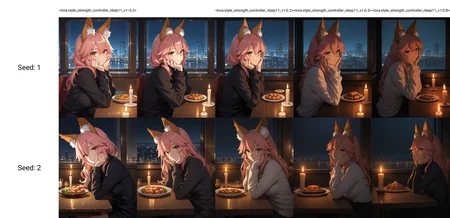
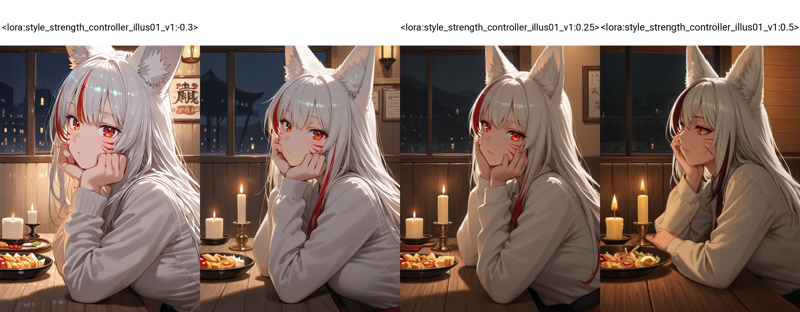
Here is a example on Hassaku XL v2.1fix. Notice that
This base model has a noticeable bias towards high brightness, (and signs/paintings on wall, shiny reflections...)
So at strength -0.3, the model completely ignores the prompt word "dark". Because you amplified the style and bias as well.
At strength 0.25. Model has much less bias on brightness and feels more natural. Notice the table and wall "wooden" textures. Less weird reflection. The style doesn't noticeable change.
Strength 0.5 is for reference, weaker style and less bias (looking at viewer, signs/paintings on well, etc). More natural.
 This LoRA can also stabilize other LoRAs, avoid "burn" effect caused by super overfitted LoRA.
How to use?
Just apply it as normal LoRA.
Find the best strength for your model. Start around 0.2. Super overfitted model may needs > 0.5.
Working strength is around -0.5~1.
You don't have to set the patch strength for text encoder. This LoRA does not patch it.
Some styles heavily affect CFG scale. So you may also need to adjust the CFG scales because the style strength changed.
What's the training data? Why it has zero side effect on style?
This LoRA is "calculated/calibrated" directly from SDXL and Illustrious v0.1/NoobAI ep11. No training process.
It merges 1% SDXL into the model. (The mathematical direction of this LoRA is pointing to a merged model with illus/noobai and SDXL of 0.99:0.01, at all transformer layers)
Final words.
If you want to reduce overfitting effects. In fact, you should not use this LoRA.
This LoRA is for fixing problems that should not be here at the first time.
If you find this LoRA is really useful. You should consider to remove some problematic LoRAs or change the base model. Instead of relying on this "dirty fix".
Description
FAQ
Comments (24)
Does it improve style loras? I didnt get it
Depends how would you define "improve". This LoRA mainly for reducing overfitting bias.
@reakaakasky so i can make Style lora 2.0 and with your lora it will overfit it?
@alexsmileface de-overfit it. If this LoRA strength > 0.
@reakaakasky does still work for sdxl? also which version
I was pleasantly surprised. Using this LoRA seems to significantly reduce the drifting noise and instability that often occur during the early steps of generation with Noob AI.
Thank you for sharing!
What strength you are using?
@brahianvalles
So far, I like using it at a strength of 0.05-0.07.
@brahianvalles It mainly depends on how strong style your base model has.
For example, vanilla NoobAI, I would use ~0.1. Other models, especially have strong AI style, sometimes need >0.5.
Hey this things rocks! fixes a lot of bad things in certain models and improves complex lora combinations you should continue improving it.
Really cool and useful thing. Thanks for your work!
I like this. A bit of a hidden gem. It also seems to help remove side effects from other LoRas
This works like black magic... amazing lora
This is an absolute gem of a LoRa hidden behind a technically correct but still confusing name. One would think from the name it is there to just controll style, one of the many often wonky modifyig LoRa on this site.
What it actually is: Probably one of the most useful tools I have ever had the pleasure of finding, even if I first skimmed over it and just downloaded it in a LoRa collection spree.
Then I did one of my "throw it at the wall" generation runs to see what fun results I get, and one gen suddenly spit out accurate animal pictures instead of the furry ones i was actually experimenting with.
Had to go back and experiment to lock down which LoRa did that, or if it was just an accident from like ten of them combining. And it was this one.
And with more testing, there is some seriously impressive stuff this lora can do. I dont know what kind of black magic you used to make this, but damn. It has become one of my absolute go to LoRa.
Because outside the 0-0.5 range and it controlling the "Style" it can do a lot more. It can create some incredible effects and when used right massively change how the prompt is influencing the model. Improoving prompt adherence to an at times ridiculous degree, and especiallly improoving cohesion and composition. Like getting some awesome angles, focusses and poses I did not expect to ever manage without specialised LoRa. As well as help with pushing generations more into photorealism. And if you go heavier on the weights, and mix it with other LoRa, you can create some very interesting and wild stylistic results.
10/10 LoRa, would reccomend any time. This is one of these very few LoRa on this side that hide behind a super generic name, but actually are incredible "multitools" that can do so much.
Thanks for the feedback.
Naming is hard... It was called "overfitting effect reducer", but I thought 98% users won't even know what is "overfitting", so I changed it to a more simple name.
This lora is actually your best lora when used correctly
This LoRA looks great, I wanted to try it but failed. Maybe it's just me or I missed something, but this LoRA does not show up in my LoRA list.
I am using A1111 WebUI and WAI-NSFW-illustrious-SDXL v15. With the same steps, the illus01 v0.1 shows up in LoRA list, but the latest illus01 v1 does not. Both of 2 versions show up in Stable Diffusion v1-5 Model.
My workaround is switching to SD1.5, edit the LoRA metadata to be SDXL forcibly.
i'm using WAI-NSFW-illustrious-SDXL v14 and its not showing up for me either, can you pls tell how you did that? or can you share the improved file? the one written forcibly to SDXL?
haven't been using a1111 for ages...
iirc, you don't have to select LoRA from that built-in tab every time. Even if it doesn't show, you can still copy paste the file name (without the "safetensor" suffix), and it will find the file to load.
@reakaakasky hm that would make sense, that's a lifesaver thank you!
this happen to me too, i use reforge and can only input by typing in the prompt
What's the difference between this and your stabilizer?
Edit: never mind, you covered that in its description, but I still wouldn't mind a different explanation
I'm also curious what would be the effect of using both this lora and the stabilizer at the same time... like, what would be the intended or expected outcome?
Im hearing lots of people manage to stop loras bleeding from one another, but whenever I use this my results end up looking horrible, any advice on how to use this?
If your base model doesn't have much overfitting adding this with a low negative weight will greatly amplify your artist tags and style loras. It's great.
Details
Files
Available On (1 platform)
Same model published on other platforms. May have additional downloads or version variants.