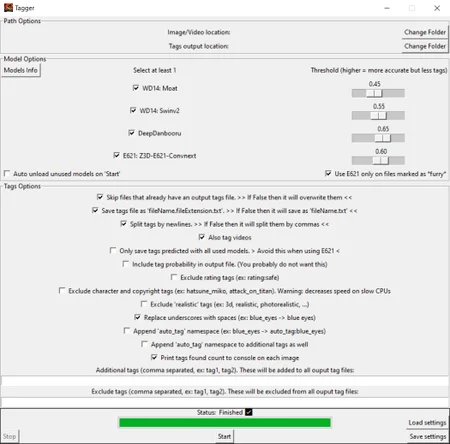
(yeah I keep re-using the same previews so they are outdated. I'm too lazy to make new ones)
Actual models supported:
WD Swinv2-V3
WD14 Moat
DeepDanbooru
Z3D-E621-Convnext
Thouph-eva02-vit-large-448-8046 (another E621 model)
What is this script for?
To batch auto-tag images/videos with booru tags.
Its mostly meant for people who have huge amount of imgs and use a decent program to navigate through them using tags. Something like Hydrus Network (open source).
But nothing stops you from using it for any other workflow - including (ofc) LoRA training.
Can it be used to tag real photos/videos?
Yes but please keep in mind the nature of the model's training sets and the tags they were used to train on (boorus).
It can still work decently well on real people photos for tags specific to the description of the person and their clothes/nudity, but when it comes to scenery and real life objects - its not that great.
I advise you to separate anime from real life images and tag the real ones with higher thresholds.
The script strikes a nice balance between speed and compatibility by using .onnx models with DirectML (which means it runs on GPU and is pretty much compatible with any NVIDIA and AMD GPUs)
It offers compatibility with a very wide range of image formats and every popular video codecs as of 29-10-2023.
Supported video formats: [".avi", ".wmv", ".mp4", ".m4v", ".m4p", ".webm", ".mkv", ".mpeg", ".mov"] - plus animated gifs.
Keep in mind that with videos, 15 evenly spaced frames are selected and individually tagged then their results are merged for the final output - this means that tagging videos with this script is only effective for small duration videos (less than 6min).
Requires minimum 4GB VRAM to be able to load all models at the same time. Only about 2GB if loading only 1.
Installing:
- First make sure you have a valid python version (v3.9.x ~ v3.11.x) installed and added to PATH.
- Install FFMPEG and make sure its properly installed and added to PATH by running cmd and typing the command: FFMPEG - it should display your FFMPEG's INFO - not an error.
Look for guides online on how to do it - it only takes 2min.
- Run the 'install.bat' file OR you can set it up in a different env if you are experienced with python.
If you don't use 'install.bat' then keep in mind that mmcv needs to be installed with 'mim' - not pip. Hence its not in requirements.txt. And don't forget the provided .whl for DirectML support.
Updating:
Future updates will not include the models - they are downloaded automatically if you don't have them.
Just download the latest version, drop the files at your existing install location, overwrite them and possibly run the install.bat at least once before running the script.
How to use?
Just execute 'run.bat' and a UI will show up.
You can also run it with commands, type '--help' for a list of available commands.
Models are automatically downloaded the first time you use them but if any download link gets broken than you can get them from here: https://drive.google.com/file/d/1_VC0kMqFQU8z9kwWPD8GKK9OglsN6arx/view
You can easily check the url of the models through the script with a text editor to double check their authenticity if you want.
Please report any bugs you find.
Description
Added chinese language support for the UI - courtesy of: lyw0990116
FAQ
Comments (5)
I tried adding a Simplified Chinese option, which can be found here. You can load it by placing it in the Languages directory, which is very convenient.
https://drive.google.com/file/d/1Z8BlPygOS7SADcY9BQpmU-DAsPrXevsy/view?usp=drive_link
Would be really useful to add metadata like model name or loras or prompt to the tags, so we could browse them without opening Auto1111
After you've installed the UI How big is each model download?
Hello, I don't understand English, so I used GPT to translate the issue I encountered. After I followed the steps to complete install.bat and FFMPEG, when I run run.bat, my computer prompts me 'This app can't run on your PC,' and the CMD window displays: 'Access denied.' I don't know where the problem is.
The installer won't work if you have python 3.11.x. is there a way to run it anyways just to see if it will work?
Looks like we don't have an active mirror for this file right now.
CivArchive is a community-maintained index — we catalog mirrors that volunteers upload to HuggingFace, torrents, and other public hosts. Looks like no one has uploaded a copy of this file yet.
Some files do get recovered over time through contributions. If you're looking for this one, feel free to ask in Discord, or help preserve it if you have a copy.
Details
Available On (1 platform)
Same model published on other platforms. May have additional downloads or version variants.