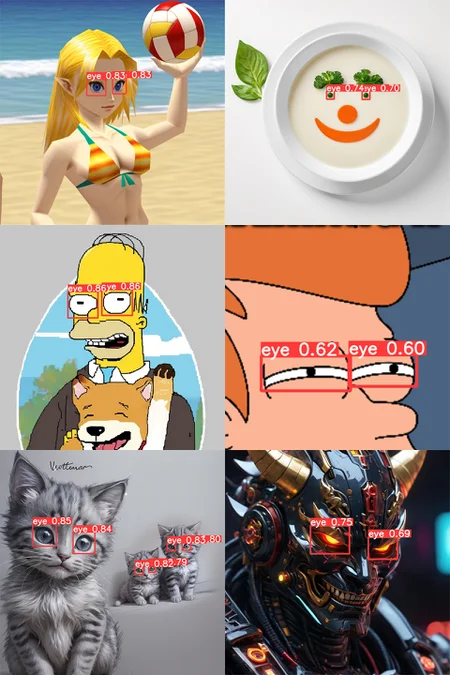
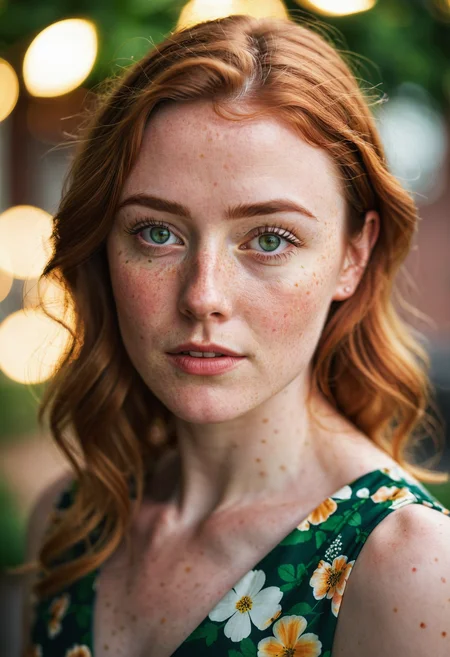
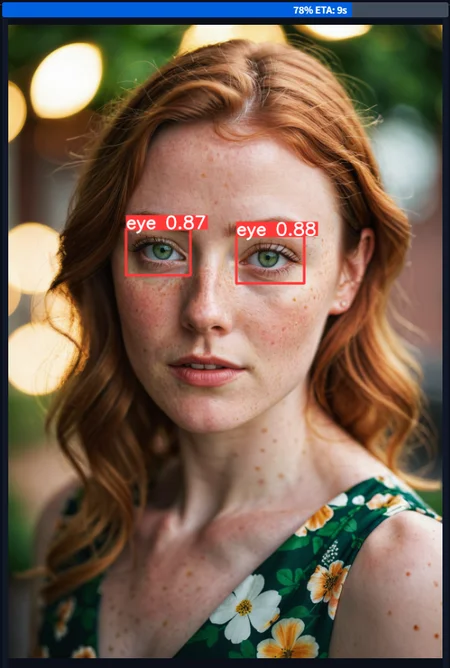
Eyeful | Robust eye detection for Adetailer and ComfyUI for any digital images.
Version 2️⃣ Update:
The most thorough and powerful eye detection is back and better than ever with a massive v2 update. By prior request and to fulfill multiple needs better, the model has been retrained twice, in both paired eyes and single eyes for any use cases, with a much bigger data set.
Dataset: ~7600 custom annotated images.
Training: ~440 Epochs per model, with 60 total runs to tune hyperparameters.
Sleep lost: A bunch.
🖌️ The rules for detecting eyes are carefully honed to select for things people would want to in-paint or highlight, to attempt to avoid false positives:
Match:
☑️ Pairs or individual eyes on any face like structure
☑️ Beady black eyes like animal eyes
☑️ No eyes, but bright highlights in a space where eyes would be e.g. under a hood
☑️ Side-facing eyes if sclera is visible
☑️ (For paired) Single eyes if only one is visible
Ignore:
❌ Goggles, sunglasses, or any types of visor
❌ Skull-like eye sockets or holes, absence of eyes
❌ Flat black eyes with no highlights
About: Eyeful is a custom trained YOLOv8 model meant to be used with ADetailer or any other bbox/detection compatible plugin for Automatic1111 or ComfyUI. This network can also be run completely standalone with Ultralytics.
Detection: This model has a robust custom training dataset, and a custom training pipeline that means it can detect eyes that are in various styles such as painting, artistic, 3d, realistic, anime, manga, even some pixel art.
Settings
Detection Confidence Threshold: >0.40
Model Location (A1111): Extract zip into models/adetailer folder
Model Location (Comfy): Extract zip into models/ultralytics/bbox folder
Failure Cases: There are reasonable limits where an eye may be too stylized or abstract to be highlighted without introducing too many false positives in the training, so this model tries to straddle the line of what you likely would consider an eye worth highlighting, human-like animal eyes: yes, sunglasses: no, etc.
Extreme closeup images will trigger multi-detections if the whole frame is eyeball, but at that point you shouldn't be using this model anyway.
Description
v2: Individual Eyes Version
Expanded data set and split for individual and paired eyes
More intense training and iterations
Battery of tests
FAQ
Comments (28)
If you would like to create a version of this using segmentation Id be happy to help annotate!
Thanks! That would be quite the undertaking, with about ~7500 annotated images I would hope there's a way to derive segmentation masks automatically from enough BBoxes, redoing 7500 masks would be painful :D. I haven't looked into those techniques in mmdet yet
I get the feeling new techniques like Yolo-World will be outmoding these separated models in the near future, 'Segment Anything' is close but something instead trained on full face segmentation.
Works like a charm with ComfyUI's ADetailer on default settings, whereas the most downloaded ones here on civitai don't. Good job thanks
That's great, thanks for the compatibility report! I have only barely used any of the detailer nodes in Comfy so it's good to know for anyone else that there isn't an issue with ultralytics or anything.
Really good job man, much more robust than some of the other models that you can find on this site. Thank you very much and congrats on a job well done.
Thanks, I appreciate that!
As I've said on other comments, if you see an art or photo style or scenario it behaves really poorly in, feel free to drop a message here and it could make a future v3 even better for us all. This was made out of frustration with other checkpoints missing what obviously seemed like eyes in manga, cartoons and so on, so every little bit helps.
INCREDIBLE !!!!
Gotta admit that CiviTai not detecting this when its used is actually bothering me. I use this for literally, every, thing. Its such a perfect detection function and it barely uses any resources when doing generation locally. The fact its barely findable because of the type of thing it is is just sad. This deserves WAY more recognition.
That's very kind of you, I appreciate it :D
Unfortunately as you say the model doesn't really get auto linked via metadata on Civit, so I've just on occasion been manually associating images where I've used it. I see you added one as well, thank you for that!
Can I use this to detect just the left eye, and then use it again in another tab to detect just the right eye, so that I can give them separate prompts? I figured this might help me do heterochromia more reliably.
So for Comfy or Onsite-gen I'm not sure how to accomplish that same thing, but in Adetailer for Forge/A1111 you can do this by writing two prompts in the one detailer with a [SEP] in between.
So you could use the v2-Individual checkpoint which looks for all eyes in a scene, then write "some prompt, green eyes [SEP] some prompt, red eyes" for the prompt. And then set "Mask only the top k" in the Detection settings to 2 so it only looks for the two largest detected areas in the scene (presumably the main subject's two eyes).
@32Bitshifter That is excellent to hear, thanks so much for your detailed reply!
super great work
Bravo! Very Nice Work. Thank You :)
It works great! However it seems to me it doesn't work with Asian eyes (Chinese, Japanese, Korean, etc.). When it fixes Asian eyes it turns them into Western eyes.
This is likely a style bias of the overall (SDXL or Illust, etc) model you're using for image generation if the view happens to be zoomed in on just the eyes, the little Eyeful model from this page is really just a detector and points out 'where' to inpaint.
What I've done to fix problems like this before is lean strongly into the prompt and negative prompt. It feels silly to put "..., korean, asian ethnicity, realistic eyes" in the Detailer's prompt and "..., european, egyptian, cartoonish, staring, crazy" into the negative prompt, but you gotta do what you gotta do. A diffusion model won't judge.
32Bitshifter thank you, I really appreciate your reply and your work!
It detect the eyes but it is skipping the pupils which is what I want it to improve...
??? Pupils are inside the eyes. If the eye changed at all so did the pupil.
@32Bitshifter I guess I have to show you a example... here: https://files.catbox.moe/f7zbuz.jpg
It detect the eyes, "fix" around the eyes but skip the pupils.

@bielzimdag346 This model exclusively detects the entire box around the eyes, solely. Both eyes being selected means it completely worked, and the rest is your masking settings with whatever software you are using.
nice work!
Quick question, haven't had the chance to try it out yet but in the past with other detector models I've had trouble with eye occlusion(hair covering part of the eye, face angled away from viewer) I noticed in one of you demo pics it looked like it handled it very well can the model do that easily or will there need to be adjustments?
I tried to train this model to very aggressively find eyes as long as at least one is visible and open (for the paired model), there is data in the dataset of anime images with hair in between or overlapping/occluding one of the eyes (it should highlight the visible one, even the paired model), people wearing masks with eye holes, front view but one eye closed, and so on. I've found it pretty reliable to target what you'd want to inpaint. If you find an image that it should be detecting a pair of eyes and failing, I'd be interested to see it!
@32Bitshifter alright thank you once I'm done with work I'll try and reach out if I have a eye occlusion case it can't detect
@32Bitshifter an update so far, very good, I deliberately gave some images where I expected it to fail, but it did not, I'm gonna really try to test further though, thank you for your hard work
I have some question , i try to use eyedetailer, but what are the best settings for using sdxl checkpoints like lustify in facedetailer somehow its alot of testing but for example treshold , steps cfg, crop factor i dont know what are the best settings
The same settings one would do for slight img2img or inpainting, which means it depends on the sampler. Something like Euler A, 0.38 diffusion strength, 28 steps. Crop factor I don't know about because I think that's a ComfyUI plugin thing.