


Read the version details and recommendations in the "About this Version" section first.
LoRA, trained at Civitai based on furry artist Tyunre
or known as tyunre13 / ombrelune
Support the artist using these links:
https://www.patreon.com/Tyunre
https://www.furaffinity.net/user/tyunre
https://itaku.ee/profile/tyunre
https://bsky.app/profile/ombrelune.bsky.social
https://subscribestar.adult/tyunre
https://ombrelune.miraheze.org/wiki/Main_Page
1) Always use the tag by tyunre
2) This LoRA was based on the Illustrious
3) Even though the Illustrious base model is used, some other models may have some inconsistencies in the images, especially in the eyes and hands, if used in Civitai, use some Embedding / Face Fix to get better results. For those who use Comfyui, the best results will be with some Hirefix / DDetailer to improve the image of the character's face.
4) LoRA weight change in Civitai is at your discretion
5) To better use Lora in Civitai, I recommend using VAE (SDXL VAE) to reduce errors in the details of the hands and eyes.
6) Check first for a model compatible with your chosen image, some models affect Lora in the final result of the image generation for some types such as: furry, human, realistic images, etc. Therefore, the same model may not always be suitable for different types of images.
7) If you want to force the image generator to use the Lora weight you chose, use the following tag in the positive prompt:
Illustrious (v1.0)
<lora:Tyunre_Style_Lora_Illustrious:1>Note: the number at the end of the Lora name (1) refers to the Lora weight. In image generators, we have a weight slider, but if you want to "force" it, use the same number as the image generator slider in the positive prompt, for example:
Illustrious (v1.0)
Civitai slider = 1

positive prompt: <lora:Tyunre_Style_Lora_Illustrious:1>
8) I added tags related to the artist's best-known characters, if you want an image close to the character, don't forget to enter the character's name, I will leave examples of prompt positive right below each character:
N'aschi Ombrelune
by tyunre, n'aschi ombrelune (tyunre), furry, furry female, anthro, otter, mustelid, animal nose, pink nose, snout, animal ears, pink eyes, glowing, glowing eyes, ear piercing, fangs, grey fur, black fur, body fur, two tone fur, black hair, purple hair, two tone hair, long hair, slightly chubby, thick thighs, veiny breasts, 1girl, solo, completely nude, gigantic breasts, huge breasts, sagging breasts, large areolae, nipple piercing, black fur, breast rest, dark nipples, carrying, collar, tray, looking at viewer, upper body, black backgroundSirocco Ombrelune
by tyunre, sirocco ombrelune (tyunre), furry, furry male, anthro, jackal, anubian jackal, canine, animal nose, snout, animal ears, otoko no ko, femboy, green eyes, yellow eyes, heterochromia, (fluffy hair:1.4), ear piercing, grey fur, body fur, thick thighs, wide hips, short tail, 1boy, solo, ass, jewelry, looking at viewer, lying, on front, bracelet, completely nude, gold, sharp fingernails, green fingernails, indoors, palace, bedroom, bed, pillows, blurry backgroundSarma Ombrelune
by tyunre, sarma ombrelune (tyunre), furry, furry female, anthro, domestic dog, canine, animal nose, snout, animal ears, green eyes, piercing, ear piercing, nipple piercing, grey fur, body fur, white hair, braided hair, medium hair, slightly chubby, thick thighs, tail, 1girl, solo, futa, futanari, large breasts, dark nipples, long penis, veiny penis, erection, foreskin, huge testicles, precum, veiny penis, completely nude, piercing, green nails, freckles, looking at viewer, open mouth, teeth, saliva droolingAlbe Ombrelune
by tyunre, albe ombrelune (tyunre), furry, furry female, anthro, felid, pantherine, animal nose, snout, animal ears, teeth, purple eyes, ear piercing, nipple piercing, grey fur, body fur, white hair, black hair, two tone hair, braided hair, very long hair, muscular female, abs, thick thighs, 1girl, solo, black pussy, huge breasts, veiny breats, pussy juice, clitoris piercing, pussy piercing, glowing, glowing eyes, female pubic hair, freckles, pussy focus, spreading, spread legs, looking at viewer, looking down, from belowZephyr Ombrelune
by tyunre, zephyr ombrelune (tyunre), furry, furry female, anthro, linx, feline, animal nose, snout, animal ears, blue eyes, piercing, ear piercing, nipple piercing, fangs, grey fur, body fur, white hair, long hair, slightly chubby, thick thighs, tail, 1girl, solo, greyscale, monochrome, gigantic breasts, nipples, breasts apart, veiny breasts, pussy, solo, tattoo, piercing, completely nude, from below, black background, simple backgroundAlize Ombrelune
by tyunre, alize ombrelune (tyunre), furry, furry female, anthro, deer, animal nose, snout, animal ears, blue eyes, earrings, horn, antlers, grey fur, body fur, white hair, medium hair, slim, thick thighs, 1girl, futa, futanari, solo, medium breasts, covered nipples, bulge, fishnets, navel, tattoo, pubic tattoo, holding condom, jewelry, fishnet pantyhose, freckles, striped bikini, bedroom, indoors, from below, looking at viewer, looking down, cowboy shot, seductive smile, teeth, glistening body, shiny bodyNote: The artist uses several well-known furry characters (cartoons, movies, comics, etc.), but in the training I left Lora flexible and malleable to be adapted / mixed with other Loras. My recommendation is that you use a character-specific Lora so that the final result is satisfactory.
Below is an initial configuration, but any other type of configuration is up to you:
ILLUSTRIOUS
Model
Artofura | Furry mix - Illustrious++ - v2.0
Lora
Tyunre Style Lora v1.0 (illustrious) - 0.5 ~ 1.0 (Preferably 1)
Advanced
CFG Scale - 3.0 ~ 9.0 (Preferably 5)
Sampler - DDIM / Euler a / Euler / Heun / DPM2 / DPM++ 2M Karras / Uni PC (Preferably Euler a)
Steps - 20 ~ 60 (Preferably 30)
Clip Skip - 1/2
VAE - SDXL VAE
Prompt (Positive)
masterpiece, best quality, amazing quality, very aesthetic, high resolution, ultra-detailed, absurdres, newest, scenery, depth of field, scenery, volumetric lighting, by tyunre, furry, furry female, anthro, skunk, 1girl, solo, doorway, lingerie, mature female, multicolored body, purple body, purple hair, pink hair, short hair, gradient hair, medium breasts, erect nipples, pussy, clothing, seductive smile, translucent clothing, slim, wide hips, cowboy shot, front viewPrompt (Negative)
neck tuft, tuft, fluffy, nose piercing, nails, claws, tatoo, markings, bad quality, worst quality, worst detail, sketch, censorGeneral Observations:
If possible, give credit to the author Tyunre while using this LoRA.
Do not sell or commercialize this LoRA.
Do not remove metadata from images generated by LoRA.
Description
About this version
More distant images may show some artifacts, distortions or disproportions in the face when generating images in Civitai, which is why the recommendation of this LoRA is to use characters closer to the image or use some Embedding / Face Fix to reduce errors in the face.
Example Images - (https://civitai.com/posts/19796210)
FAQ
Comments (16)
Awesome style!
Can you please share your workflow for the preview images?
Hello, I use TensorArt for the gallery images, in this case if you use ComfyUI for example, just drag the image and it will show the workflow used
homer_26 I've tried dragging the image into ComfyUI, but it doesn't load any nodes, it just tells me that several custom nodes are missing, can you please provide a workflow json file?
Hokanti Could you tell me the name of these nodes that ComfyUI says are missing? In my case, I only get the image metadata because I use image generation in TensorArt, just like Civitai. There is the option to use ComfyUI, but it is different from the local ComfyUI and also uses twice as many credits. Since I create a lot of images, I don't use ComfyUI for the gallery images. However, by default, TensorArt uses some type of standard node, but I can't confirm which ones because I don't currently use ComfyUI.
homer_26 Oh I was under the impression you used ComfyUI since it lists that as one of the tools you used for the preview images of the Illustrious version of the LoRa.
Here are the Nodes that are shown to be missing when I drag one of the preview images into ComfyUI in attempt to load the workflow:
ECHOCheckpointLoaderSimple,
LoraTagLoader,
YoloDetectorProvider,
FaceDetector_ad,
InpaintCrop_ad,
InpaintStitchOneImage_ad
Even then, ComfyUI usually shows you the incomplete workflow, in this case, it doesn't and just returns to whatever workflow I was using before dragging and dropping the image.
Your images seem much cleaner than what I'm generating in ComfyUI, I've used Facedetailer but it changes the style a little and I'm not confident that's how you achieved the quality in your images. I've looked at the images generated from the community as well and although close, most aren't as clean as yours.
Hokanti I discovered that TensorArt uses some custom/outdated nodes, so you might not be able to find the right node. If possible, check out this thread; I think you might be able to find the nodes to replace the missing ones:
https://www.reddit.com/r/comfyui/comments/1j8l4cg/i_beg_you_please_help_me/?tl=pt-br
Hokanti In my case, I use these TensorArt settings in case you want to replicate them in FaceDetailer and Upscaler:
https://i.postimg.cc/Cxt4qX2t/image-01.png
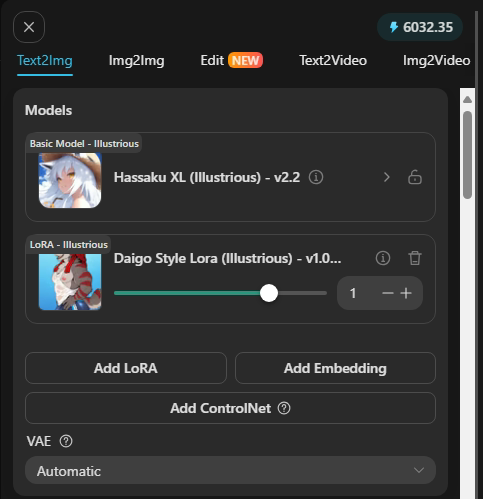
https://i.postimg.cc/GhXKcHxb/image-02.png
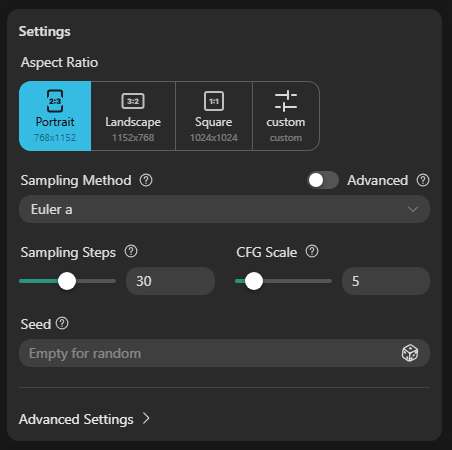
https://i.postimg.cc/mghwhBmC/image-03.png
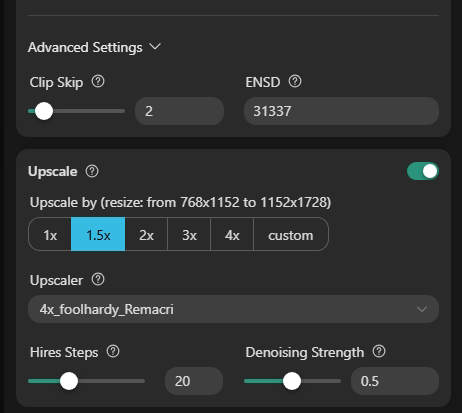
https://i.postimg.cc/wBmQcF8B/image-04.png
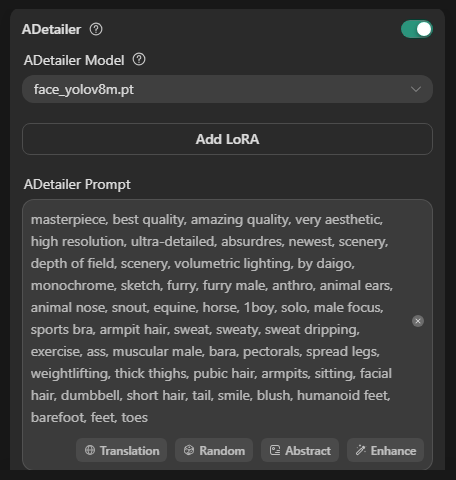
https://i.postimg.cc/pTMY08RJ/image-05.png
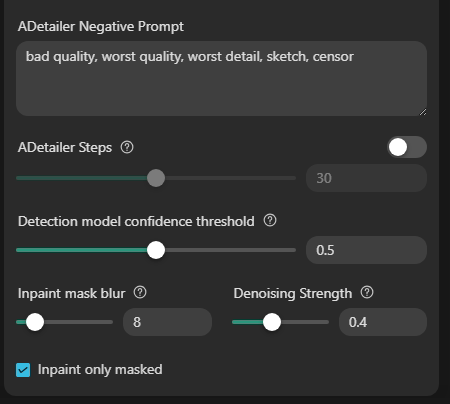
Just a note:
For upscaling, I use the 4x_foolhardy_Remacri upscaler because it's Civitai's default. To avoid image compatibility issues, I always use this model. Sometimes, depending on the Lora and the model, this upscaler can be a bit "rigid." I recommend the R-ESRGAN 4x / R-ESRGAN 4x Anime6B / 4x-AnimeSharp. However, I always recommend checking the model's description, as it will tell you which upscaler is best for perfect images.
Another note:
Civitai uses the default ADetailer "face_yolov8m.pt." My recommendation is the face_yolov9c.pt model (for better facial recognition and a new model) / face_yolov8s.pt
Hokanti If you want, I have some workflows in case you want a specific one, on my profile here at Civitai (home page) there are some articles with downloads for the workflows, you can update the nodes since they are outdated
homer_26 Understood, I'll consider all you've said, thank you for taking the time to reply.
Hokanti You're welcome, I'm available whenever you need me 😁✌️
Looks great, works great
I'm glad you liked Lora 😁✌️
Hi Homer_26, can you please port this to Anima?
Hi @Hokanti, for now I'm prioritizing LoRA requests, but as soon as the request queue clears up a bit, I'll go back to porting all the LoRAs from Illustrious to Anima.
@homer_26 Thank you for your response, I look forward to the ports 👍
Details
Files
Available On (1 platform)
Same model published on other platforms. May have additional downloads or version variants.