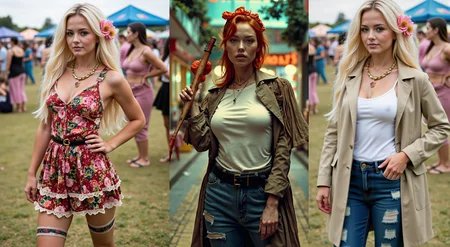
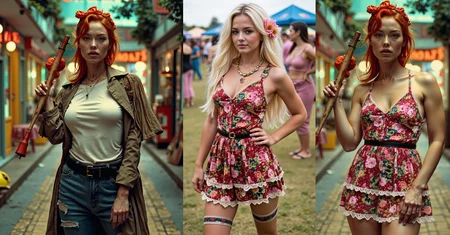









Flux-Kontext Try-On Workflow !
version 2.0
* compartimentalized workflow
* supports flux-nunchaku
* manually offloads Flux and Phi models from VRAM to cpu
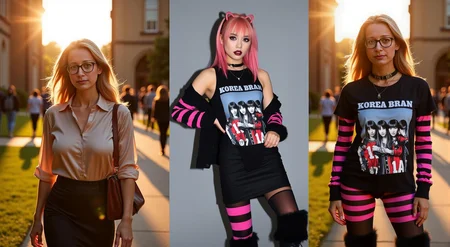
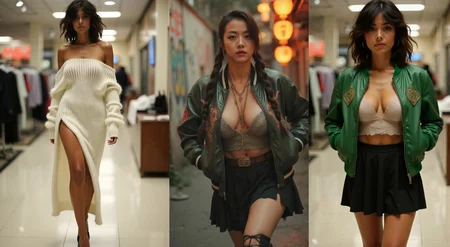
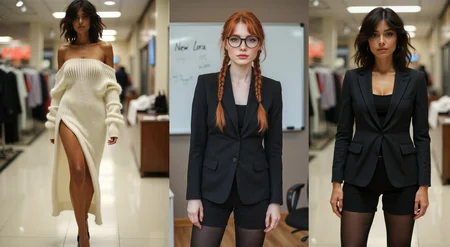
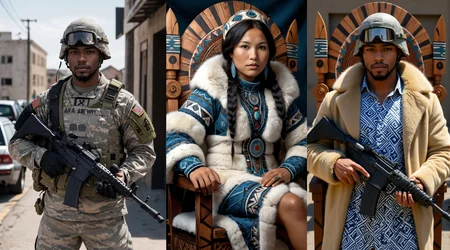
Here is my clothing transfer workflow. All you need are two images:
an image of the subject you want to dress on
an image with the clothes you want to transfer
There's no need for prompting as it should work out of the box. To be honest It took me a LOT of trial and error to figure it out. It's a bit complex, but it does the job and it works most of the time.
Word extraction from images
I use both Florence2 to extract captions about the image and Phi to sort out the mess. FluxK wants a very specific prompt and that's how we do it, in a lazy way so it's pretty much automatic :)
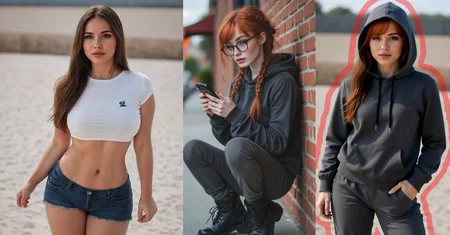
Subject outlining
Using ClipSeg and stroking mask contours, it helps Flux Kontext... or maybe not ! but still I make a circle around my subject to be clear to FluxK who I want in the final image
2-step Method
It follows a two steps process
Dress up in a swimsuit: I haven't found a better way to remove sleeves and leggings and prevent them from showing on the end product otherwise.
Transfer clothing from any image to your subject
Consistency
It's at the same time quite impressive and sometimes disappointing. Sometimes it's perfect sometimes it botches the job and sometimes certain images will refuse to work for some reasons:
difference of scale and angle between images
you didn't provide an image with a great size and resolution (I left some info on the topic)
fluxk doesn't understand the clothing
the clip-l doesn't understand the name of some items
the most likely reason: it's for your own good (check the section below)
SFW
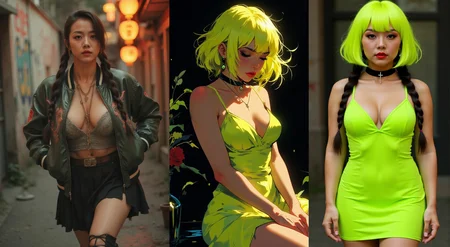
Flux Kontext will do everything in its power to keep it SFW, and the great part is that it's unlikely to produce offending results, even if input images aren't SFW to start with (check the examples for that). Some type of clothing will not work. Private parts (Crotch, nipples and the lower-exterior part of the cups) must be covered, however input images will be treated regardless. It tends to extend the fabric over these areas to still allow you to process the image.
Feedback is welcome!
(in Progress v3.0 - update 2025-09-25)
[x] improving the offload/recall nodes to detect/ignore unsupported models
[x] improving prompts for better fidelity and better transfer overall: Simpler is better Flux can get confused with too much info
[x] removing red outline step: replaced by a red box
[x] replacing Phi by another model: Gemma3:4b
[x] added an optimisation step on the target to prevent replacing face and body of the subject.
[~] developing caching nodes for a consistent workflow. Will be quite handy in many workflows.
[~] removing experimental fluff (compartimentalisation)
[~] cleaning up new workspace

Abandoned:
[.] using a fashion fine tune of Florence2: The only one avaialble is worse!
Description
Initial version
FAQ
Comments (12)
No complaints? Is it working for everyone? ;)
(*Solved*) I aggressively clear VRAM and models. You can always skip the node or untick "disable all models" if you are comfy with vram.
I also rely on "Context" nodes as a mean to mute some steps, they don't help with flux kontext
seem it's for expert to use.😎
I've too many missing Node, and seem not support Nunchaku
blacklabe188 you're an expert in nunchaku compared to me, let me have a look at it later on.
lnknou you're expert, I am a lucky newbie. Fortunately, Flux kontext was released when I was learning, and Nunchaku was released a few days later. I am still working very hard to learn how to build workflows.
lnknou What excites me is that I have successfully reduced the time it takes to generate an image from 2 minutes to 15-25 seconds. Powered by Nunchaku & Workflow
blacklabe188 I just tested nunchaku with it, it's blazing fast and it works just as well.
BlackLabe188 have you tried again with nunchaku? I tested it myself with it (it kinda feels slow now using the gguf q5_1 version of fluxk ;)
lnknou not yet, I build my 19sec/per pic, your workflow too many node i haven't and my comfyui desktop can't found those node to install it, , giving up 😭
@BlackLabe188 back from holidays, i'm refining a much simpler version, I will push when ready
@lnknou I keep monitor on this model, nunchaku-qwen-image , If it runs fast, I might take a break on Flux, try Wan2.2
(solved) The Phi LLM is problematic here: it doesn't unload itself, it fills up the VRAM and won't budge. I'm looking for a solution but it's not easy (comfy-unload-model doesn't remove it and deleting the "model" breaks the workflow)
I fixed the problem with Phi using 8GB of VRAM and put a pull request with a working fix on the github of the maintainter.
Looks like we don't have an active mirror for this file right now.
CivArchive is a community-maintained index — we catalog mirrors that volunteers upload to HuggingFace, torrents, and other public hosts. Looks like no one has uploaded a copy of this file yet.
Some files do get recovered over time through contributions. If you're looking for this one, feel free to ask in Discord, or help preserve it if you have a copy.