Error: Can't find mmproj file for 'Qwen2.5-VL-7B-Instruct-Q3_K_M.gguf' (matching:'qwen2.5-vl-7b-instruct')! Qwen-Image-Edit will be broken!
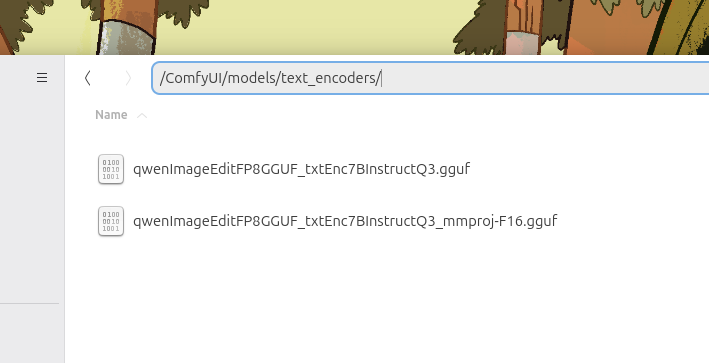
Rename the mmproj-F16:
Make sure the downloaded text encoder has the correct file naming (whatever_text-encoder.gguf paired with whatever_text-encoder_mmproj-F16.gguf)
Demo: https://chat.qwen.ai/
Text encooder FP8: https://civarchive.com/models/1864281?modelVersionId=2110105
Workflow GGUF: https://civarchive.com/models/1881851/qwen-iamge-edit-gguf-lightning-4steps-comfyui
This FP8-optimized (e4m3fn) conversion of Qwen-Image-Edit, now fully compatible with the latest Qwen-VL image editing features! Leveraging Alibaba's advanced multimodal AI, this model enables seamless text-guided image manipulation, perfect for precise edits, prompt-based adjustments, and creative refinements. The model is mirrored here for convenience.
Description
Text encoder: Qwen2.5-VL-7B-Instruct-Q3_K_M
FAQ
Comments (6)
am started getting black image in output. am using gguf
I believe it's because of Sage Attention. what tool do u use? ComfyUI? portable or github version? ask Grok or Gemini about how to start your tool without it,
Does fp8 model fit in 16 gb vram
easily, you can run full distilled FP8 without any problems, much better than regular FP8
Is the clip model the same for image and edit?
[Uploaded the mmproj-f16 related to the 'instruct' text encoder. see the screenshot in the description] I tested the Edit model with the Qwen-Image text encoder when it was released and observed a different behavior from GGUF 'instruct.' I'm not sure because right now the ComfyUI implementations for Qwen-Image-Edit are not bug-free, especially when it comes to GGUF. The size of the image overrides the prompt, and normally you would think something is wrong with the text encoder, CFG, or steps. unsupported image sizes are something you need to pay attention to, even if the text encoder model is correct.