
We are excited to introduce Qwen-Image-Edit, the image editing version of Qwen-Image. Built upon our 20B Qwen-Image model, Qwen-Image-Edit successfully extends Qwen-Image’s unique text rendering capabilities to image editing tasks, enabling precise text editing. Furthermore, Qwen-Image-Edit simultaneously feeds the input image into Qwen2.5-VL (for visual semantic control) and the VAE Encoder (for visual appearance control), achieving capabilities in both semantic and appearance editing.
Key Features:
Semantic and Appearance Editing: Qwen-Image-Edit supports both low-level visual appearance editing (such as adding, removing, or modifying elements, requiring all other regions of the image to remain completely unchanged) and high-level visual semantic editing (such as IP creation, object rotation, and style transfer, allowing overall pixel changes while maintaining semantic consistency).
Precise Text Editing: Qwen-Image-Edit supports bilingual (Chinese and English) text editing, allowing direct addition, deletion, and modification of text in images while preserving the original font, size, and style.
Strong Benchmark Performance: Evaluations on multiple public benchmarks demonstrate that Qwen-Image-Edit achieves state-of-the-art (SOTA) performance in image editing tasks, establishing it as a powerful foundation model for image editing.
Showcase
One of the highlights of Qwen-Image-Edit lies in its powerful capabilities for semantic and appearance editing. Semantic editing refers to modifying image content while preserving the original visual semantics. To intuitively demonstrate this capability, let's take Qwen's mascot—Capybara—as an example:
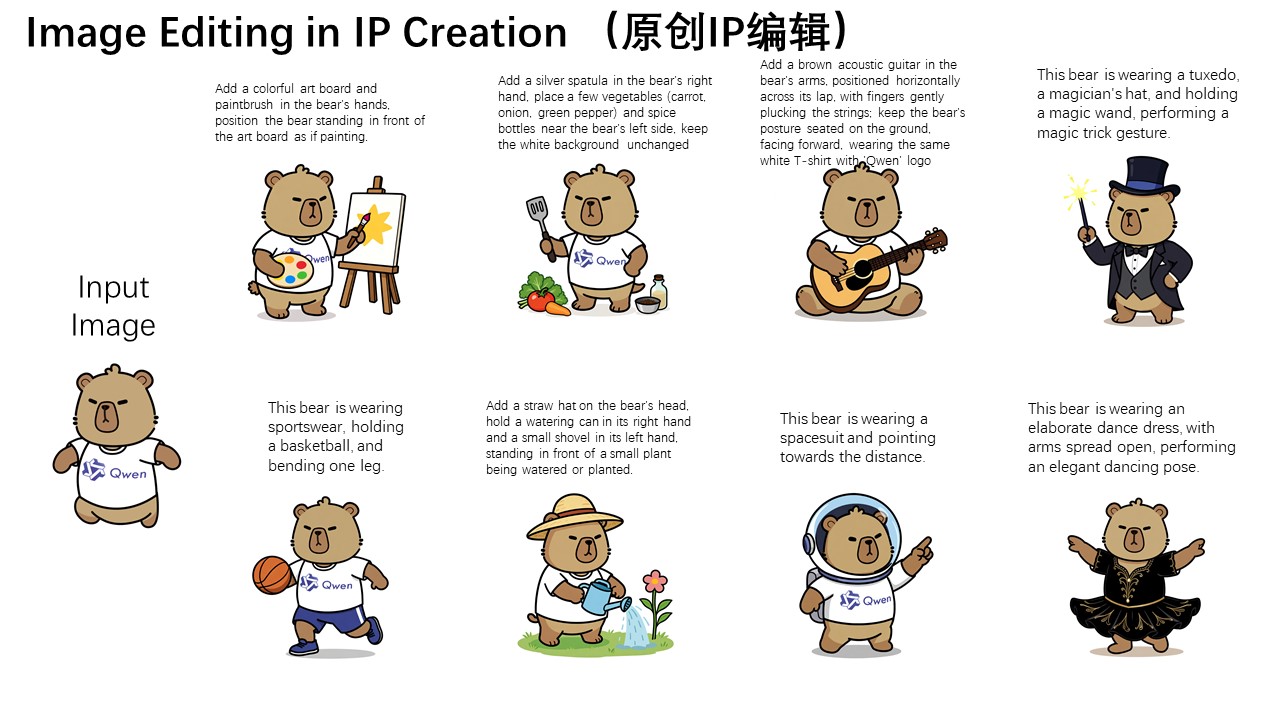
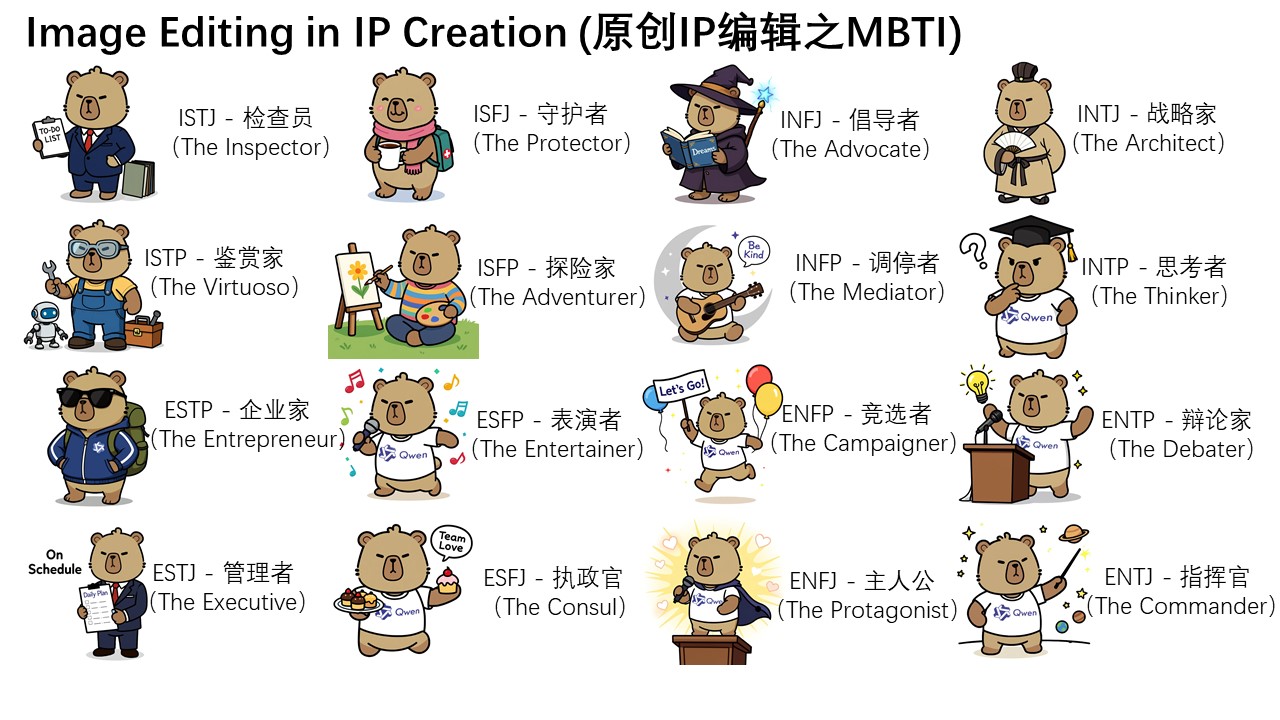
As can be seen, although most pixels in the edited image differ from those in the input image (the leftmost image), the character consistency of Capybara is perfectly preserved. Qwen-Image-Edit's powerful semantic editing capability enables effortless and diverse creation of original IP content. Furthermore, on Qwen Chat, we designed a series of editing prompts centered around the 16 MBTI personality types. Leveraging these prompts, we successfully created a set of MBTI-themed emoji packs based on our mascot Capybara, effortlessly expanding the IP's reach and expression.
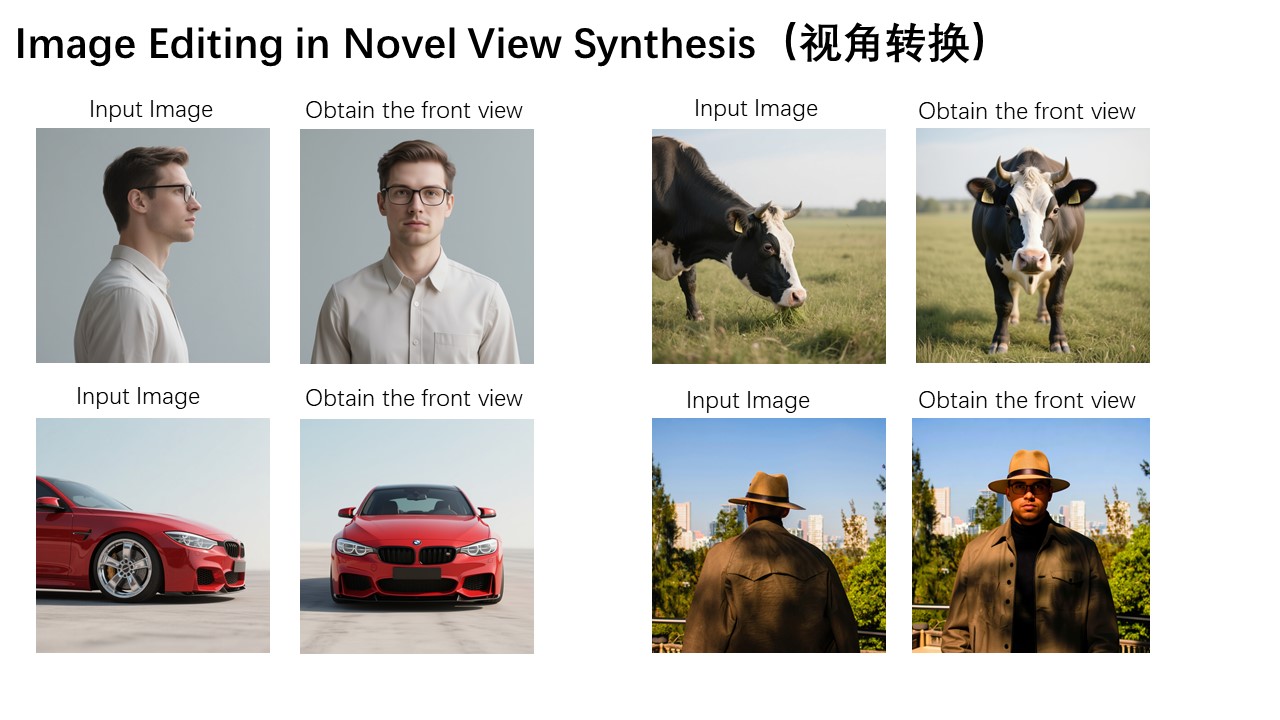
Moreover, novel view synthesis is another key application scenario in semantic editing. As shown in the two example images below, Qwen-Image-Edit can not only rotate objects by 90 degrees, but also perform a full 180-degree rotation, allowing us to directly see the back side of the object:

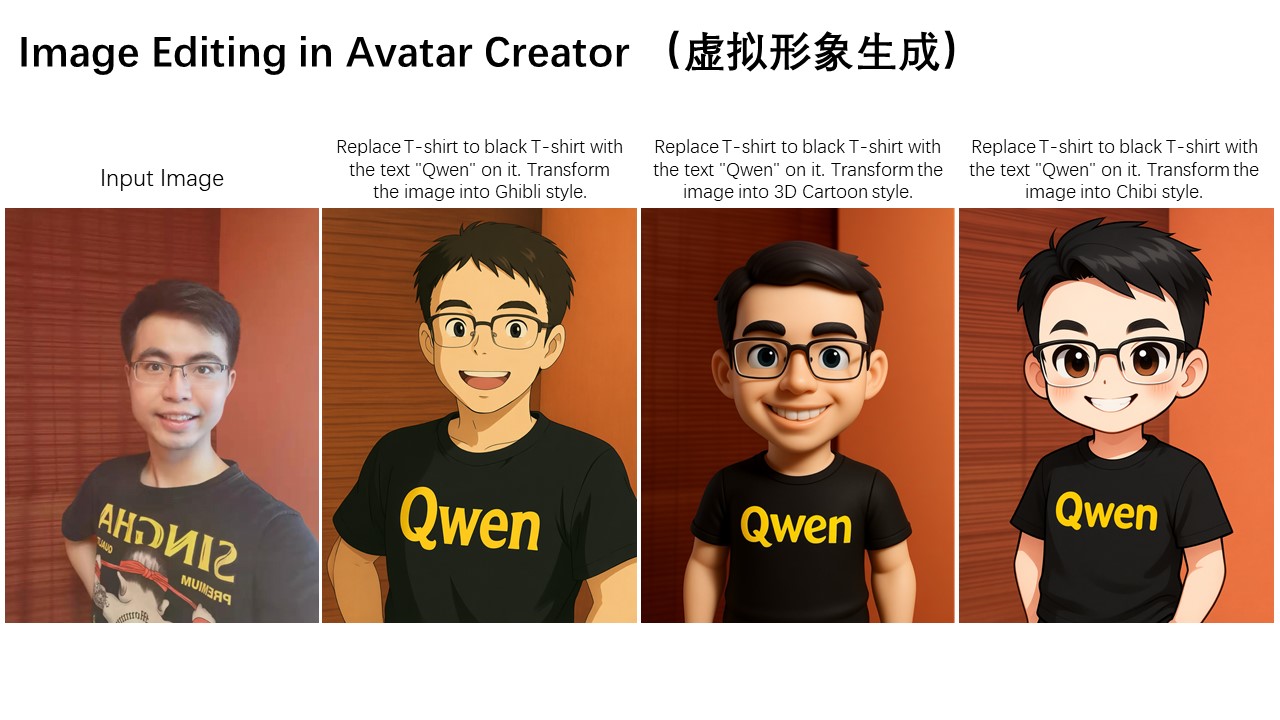
Another typical application of semantic editing is style transfer. For instance, given an input portrait, Qwen-Image-Edit can easily transform it into various artistic styles such as Studio Ghibli. This capability holds significant value in applications like virtual avatar creation:
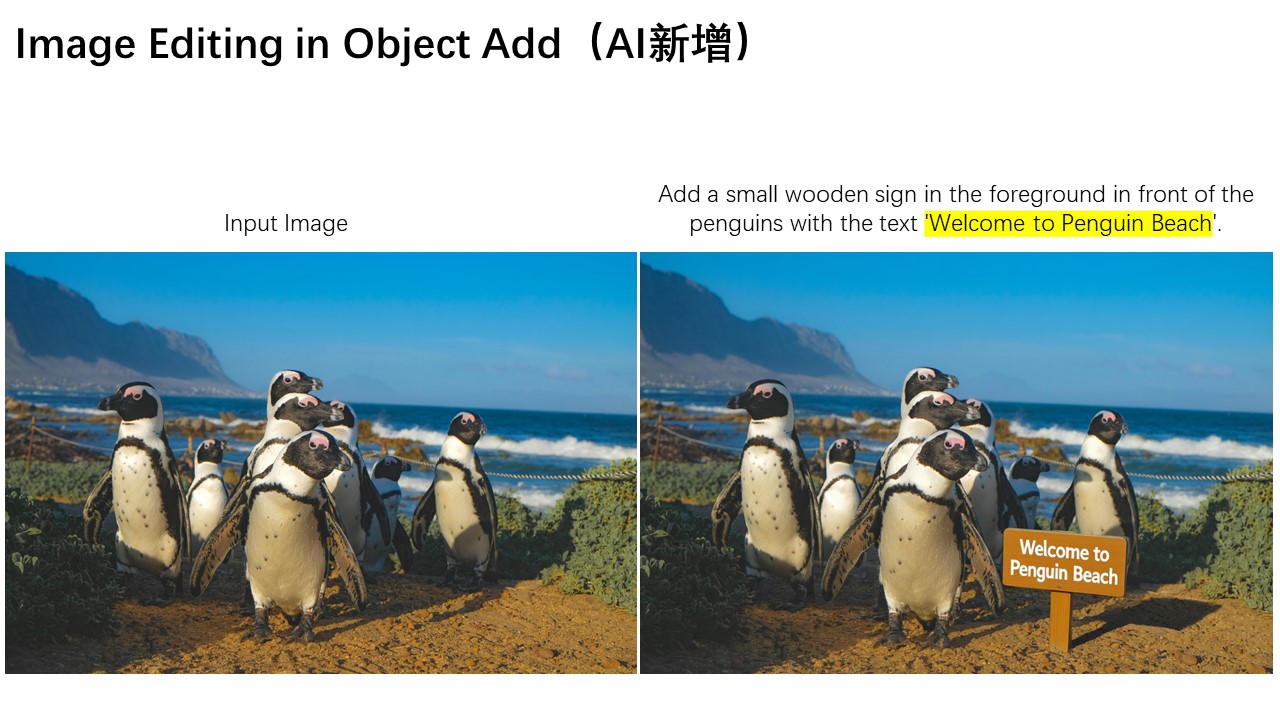
In addition to semantic editing, appearance editing is another common image editing requirement. Appearance editing emphasizes keeping certain regions of the image completely unchanged while adding, removing, or modifying specific elements. The image below illustrates a case where a signboard is added to the scene. As shown, Qwen-Image-Edit not only successfully inserts the signboard but also generates a corresponding reflection, demonstrating exceptional attention to detail.
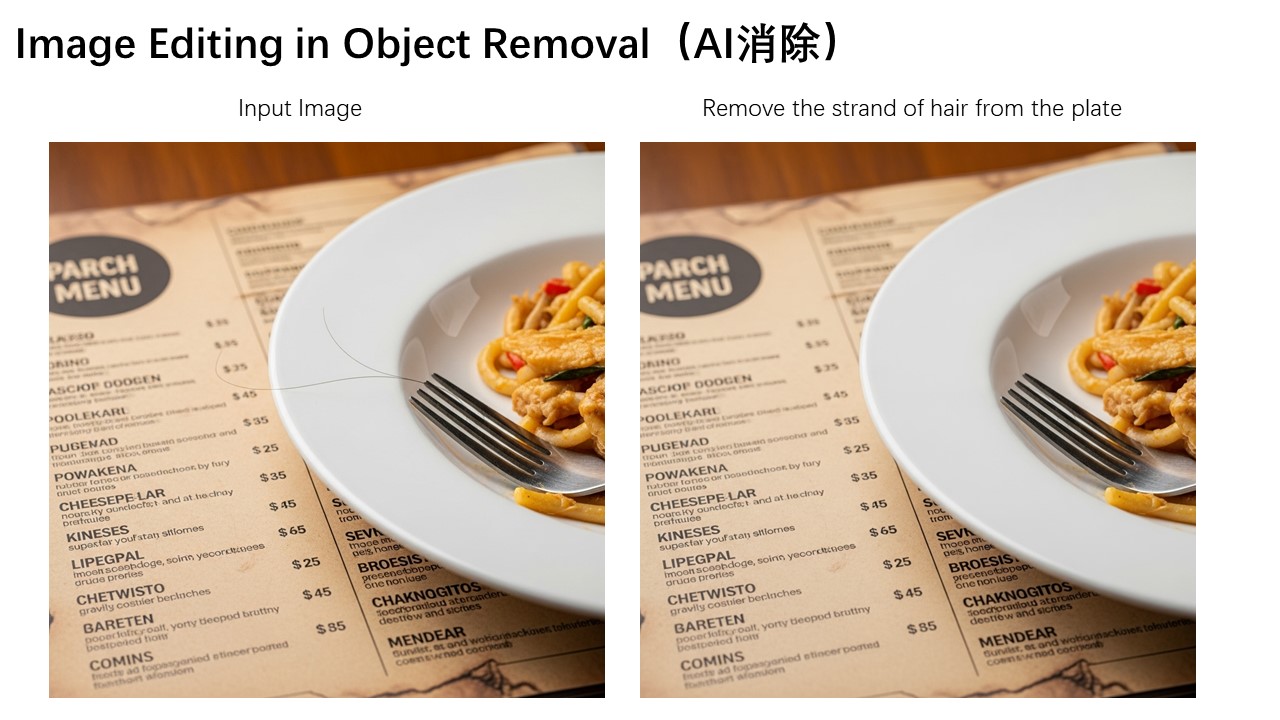
Below is another interesting example, demonstrating how to remove fine hair strands and other small objects from an image.
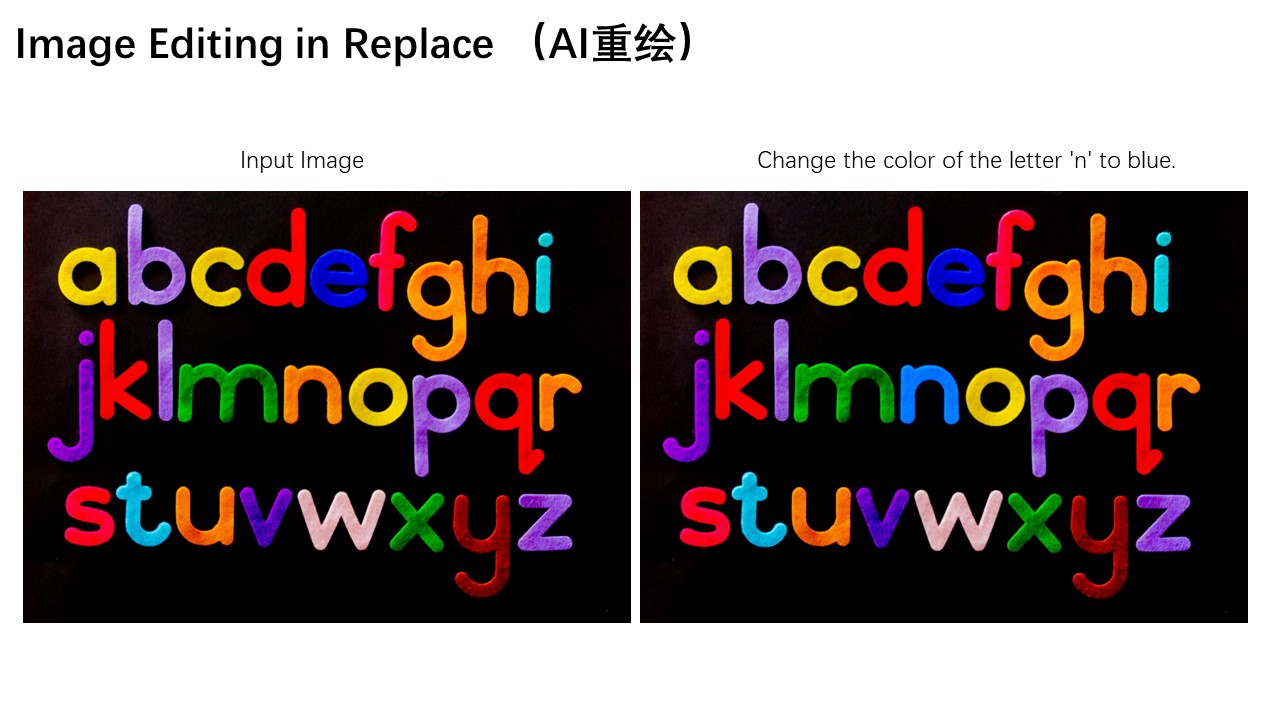
Additionally, the color of a specific letter "n" in the image can be modified to blue, enabling precise editing of particular elements.
Appearance editing also has wide-ranging applications in scenarios such as adjusting a person's background or changing clothing. The three images below demonstrate these practical use cases respectively.


Another standout feature of Qwen-Image-Edit is its accurate text editing capability, which stems from Qwen-Image's deep expertise in text rendering. As shown below, the following two cases vividly demonstrate Qwen-Image-Edit's powerful performance in editing English text:


Qwen-Image-Edit can also directly edit Chinese posters, enabling not only modifications to large headline text but also precise adjustments to even small and intricate text elements.

Finally, let's walk through a concrete image editing example to demonstrate how to use a chained editing approach to progressively correct errors in a calligraphy artwork generated by Qwen-Image:

In this artwork, several Chinese characters contain generation errors. We can leverage Qwen-Image-Edit to correct them step by step. For instance, we can draw bounding boxes on the original image to mark the regions that need correction, instructing Qwen-Image-Edit to fix these specific areas. Here, we want the character "稽" to be correctly written within the red box, and the character "亭" to be accurately rendered in the blue region.

However, in practice, the character "稽" is relatively obscure, and the model fails to correct it correctly in one step. The lower-right component of "稽" should be "旨" rather than "日". At this point, we can further highlight the "日" portion with a red box, instructing Qwen-Image-Edit to fine-tune this detail and replace it with "旨".

Isn't it amazing? With this chained, step-by-step editing approach, we can continuously correct character errors until the desired final result is achieved.


Finally, we have successfully obtained a completely correct calligraphy version of Lantingji Xu (Orchid Pavilion Preface)! In summary, we hope that Qwen-Image-Edit can further advance the field of image generation, truly lower the technical barriers to visual content creation, and inspire even more innovative applications.
License Agreement
Qwen-Image-Edit is licensed under Apache 2.0.
Original Text and Models: https://huggingface.co/Qwen/Qwen-Image-Edit
Description
qwen_image_edit_bf16
FAQ
Comments (56)
Wow this gonna be game changer to eventually replacing photoshop hehe. But how do we use this? Is there any Workflow and instruction?
I'm uploading everything you need to run this offline in ComfyUI - and I'll write a full Qwen guide asap!
if this replaces photoshop for you then youre not really using photoshop lmao. photoshop definitely still has purpose. it definitely replaces adobe's trash ai though. but even SDXL is better than their ai.
Update Comfy and use the default one!
comfy only? how bout us who don't use comfy? 🤨
We'll have it available for on-site use soon, I believe. Keep an eye out for updates!
@theally i meant locally 😊
@emotionaldreams4 I'm afraid that Comfy is king nowadays. Auto/Forge are practically abandonware, and none of the other UI are updated quickly enough to leverage the latest models.
@theally i use swarm(it has comfy but i ignore it. not a fan) .....oh well, guess qwen isn't for me...thanks anyway
edit: its eems the recent update of Wan2GP(which i do use a lot) has Qwen option now. so i'll take a look there...
ComfyUI standalone is incredible and once y ou get used to it you'll never go back to anything else. The amount of support it gets and the nodes like RES4LYFE (best sampler suite in the world by far) and others that help speed up and make generations adhere to prompts aren't available on other platforms.
Trying out comfy inside of swarm isn't the same thing at all.
@DaddyWolfgang i use swarm for images only. i dont use the comfy area. i also have comfy standalone too. but i ignore it. i moved on to making mostly videos in framepack studio and wan2GP now
U dont need comfy, u can also run it in DiffSynth
@denrakeiw is there a graphical interface to run that? plus havng a hard getting this this intalled
I hate Comfy with the passion of a thousand burning suns. It's a pile of gimmicks that interfere with creativity. A1111 and Forge were intuitive and you could forget about them and focus on your creation.
Comfy forces you to pay attention to it instead. Fantastic for programmers but lousy for artistic creativity.
@Starboar Not even fantastic for programmers. A nightmare for programmers because you have to spend the majority of the coding time juggling python environments when updates or nodes break dependency chains.
So how much VRAM is needed for local use?
It works on my 5060ti 16 GB very slow tho (11 s/it). There is a lot of RAM offloading going on during generation. If you have less than 64 GB RAM it might not work, because the RAM usage is >40 GB for me.
Hopefully Nunchaku adds full Comfy support for this, then much more people will be able to use it.
@Silvicultor Thank you very much for your feedback. Are you using the fp8 version or bf16?
@JoyDopamine It is fp8 version. And I'm running it on a consumer GPU ;-). But you need enough system RAM to offload. You also have to keep in mind that there is also the text encoder (that is a 7b LLM - in fp8 still 9 GB big!). The text encoder can be offloaded after encoding is done but that all needs to be stored somewhere. And "somewhere" will mean system RAM. Pretty sure if you have less than 32 GB you will get overflow to pagefile/swap, then generation would take forever.
@Silvicultor Thank you for your professional answer. I think this model should be designed and minor issues should be easy to fix, but I estimate that the real person system might not be very good. I'll wait for technical support from nunchaku!
It runs fine on a 16GB GPU with 64GB RAM- just ensure to launch Comfy with the nocache argument (to prevent doubling up of RAM use), and maybe place some memory release nodes in your workflow. The model is too big for only 32GB of RAM tho- RAM is cheap, is essentially for non-LLM AI (only with LLMs do you want the model kept in VRAM), and really speaking get 128GB if you can!
32Gb. for accurate weights
there's already quantised version of this available just search quen image edit gguf. i've been using this and so far i like this more than flux kontext
I run it with 32 maxed out
150tb vram
@puzzlehead1993
Ok, i'm really out of loop with QWEN, i still use FLUX.
Could you tell me what QWEN model (for generation & edit), i should use with this setup?
AMD Ryzen 9 5900X
ASUS TUF Gaming GeForce RTX 4070 Ti SUPER OC 16GB
64Gb RAM
@Silvicultor Ohhh this explains why I'm OOMing with 32gb ram and 16gb vram. ppl were making it out like it was doable :( guess i'll be stuck with kontext till nunchaku
@minthe Yes, with 32 GB RAM it's problematic to use fp8. But Nunchaku devs are working on it, then (almost) everybody will be able to use Qwen-edit. The txt2img model (Qwen-image) is already full supported. And Qwen-edit support is their next goal afaik.
@zerocool22 That's a very similar setup to what I have (5060ti 16 GB + 64 GB RAM). So I'm pretty confident you can run fp8 with both Qwen-image and Qwen-edit. fp8 is very slow tho, because of the RAM offloading. Qwen-image is already supported by Nunchaku. So you can also try the int4 version, it will fit in 16 GB VRAM without offloading.
@Silvicultor How does you activate the offloading?
I have the 5060ti 16gb and 32gb ram. sadly qwen crash my comfyui. I have changed my page file to like 75gb. So it should use that to offload. But maybe im forgetting some setting
@noyboy You normally don't have to activate it. Comfy will do it on it's own if required. The problem is the 32 GB RAM, that is not really enough for Qwen in fp8. And pagefile is not a sufficient replacement for the lack of system RAM. Even if Comfy wouldn't crash it would be extremely slow. I strongly advice you to use Nunchaku fp4 Qwen model. The fp4 SVDquant will fit fully in VRAM (usage 14-15 GB) and then the only thing that needs to be stored in system RAM would be the text encoder (9 GB).
@blobby99 Remember when you said RAM is cheap? :p
NSFW loras when? :)
Hoping to get training options on-site soon!
It changes the subject face even if I prompt for safe the face.
I haven't had that experience - you can see from the example images I was able to maintain faces pretty well.
I've had the same experience. Though I'm using someone else's workflow that might not be setup correctly. If you got your workflow from a youtuber's channel like I did then that could be why too. I've watched other people use it and it seems to be keeping the subjects face intact so I think it's the workflow I"m using.
deepbeepmeep wrote on his github: "Best results (including Identity preservation) will be obtained at 720p. Beyond you may get image outpainting and / or lose identity preservation. Below 720p prompt adherence will be worse." So it seems that resolution of input image is the key here.
If You use Qwen_Image_Edit-Q4_0.gguf. Don't do that! He is "broken". It generates in poor quality, including face replacement. Better take Q4_K_M. It might be useful to someone.
You guys have to try this lora. It makes QwenEdit useful.
https://civitai.com/models/1939453/qwenedit-consistance-edit-lora?modelVersionId=2195045
Can it be used with MPS on macbooks?
works in drawthings there is even a 8 steps lighting lora
Did you get a full answer on this?
@adjeicyril477 nope :)
Weren't there a lot more comments here yesterday?
Keep getting this error:
Sizes of tensors must match except in dimension 0. Expected size 361 but got size 362 for tensor number 1 in the list.
Any ideas?
lora mismatch - I've seen similar errors when using loras for wan2.2 in other video generators -specifically wan5B
Anyway to use this in Colab? Or some other Notebook?
When can we expect NSFW LORA support?
it has loras already
When will Qwen's i2i be implemented in Civitai's image generation feature?
Can Qwen-Image-Edit produce text-2-image the same as Qwen-Image? In other words, why would I need Qwen-Image for T2I if I have Qwen-Image-Edit? (I'm trying to decide which to download if not both) Thanks!
both are different i guess..one is used for T2I another is used for img2img (Qwen-Image-Edit)
I'm getting the error "Could not detect model type" even though I've tried every model type it's recognized within the node, what can I do?
Very powerful model that can do wonders