


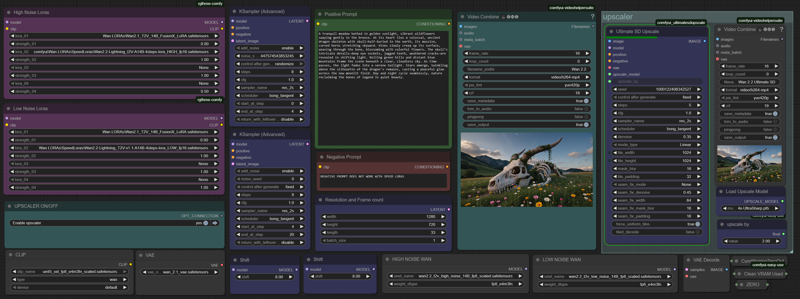
Wan 2.2 Text 2 video with Ultimate SD Upscaler. Amazing crisp videos up to 4k in resolution thanks to tiled upscaling.
Description
FAQ
Comments (23)
Great work! Where's I2V version of the same?
Just ignore the first part of the workflow until the Ultimate upscaler, use a video load node and pipe the images from that into it.
KEep the WAN models etc in the nodes at the front loaded. just deactivate the first set of ksamplers which would generate the t2v
Dont bother if you're just making something for fun, Im on an RTX 4090 and it takes 30+ minutes to upscale a 4 second video....sigh...
Only usable by professionals that absolutely must have a professional video.
Did you expect to render 4k video in 1 minute? :) YOu can render in 72p and upscale to 1080p. no need to go for 1440p. or render lowers res and upscale to 720p
@protector131090 I used the default settings in your workflow, apparently they were set to 4k.
Greetings. I'm sorry but I don't actually get it. I load the workflow but don't see where to generate the video in the first place, don't see the model loader? Or are you supposed to load an already created video? If so, I don't see where? Probably is late and I'm tired lol. Care to explain how to use it?
probably you are tired. Model loaders are in bottom line of the workflow. Promt is GREEN, SETTINGS are blue.
My crippled overheating undervolted underclocked RTX3090 was having a hard time, but it worked, after 42 minutes (for a 2 seconds video haha...) Still, my first ever 1440p output of an A.I generated video on my PC, thanks for the worfklow
for my undervolted 4090 it takes 35 sec per frame.
@protector131090 knowing that a 4090 is roughly twice the compute power of a 3090 my was probably double, although I think it was actually 50 (but model swapping too a bunch of time)
That this method works is fantastic and unexpected. BUT it is clear the workflow is triggering un-needed memory issues. Because there is no temporal dimension, and frames can be processed one-by-one, each finished frame should be moved to a temporary file using a batch method. Then the render time would be optimal given any VRAM amount.
In other words, literally treat the video as a series of images. Accumulate the upscaled images in a folder, and then convert that folder back into the upscaled video as a final stage.
Never ever rely on Comfy memory management when possible. It is the wrongest, most hopeless attempt at memory management I think I have ever encountered, and the result of so much pain and frustration for users.
if you do this (treat video like series of images) - you will get inconsistency. The only reason its consistent - its cause it loads all the frames in memory.
Super slow
Haha, yeah, no shit! This is a super complex thing for a GPU to calculate, buy/rent bigger gpu!
Yeah, it's slow, but the results are incredible. Looking at the difference between the original video I generated and the Ultimate Upscaled one is amazing. Takes me around 35 minutes on my set-up for a 1440p video of 5 seconds with lightning loras.
Too slow if you are just goofing off, sure. But if you have a video clips you really want to shine or are using for a project? Absolutely worth it.
Hi, which Utrasharp upscaler did you use? theres a few on huggy and im not sure which
just search civitai. you can download it here
SDUpcale should take foreeeeever... Right!?
SDupscale to 2560x1440 with default WF-settings took ~10 min on my 5090. Pretty decent though!
Same. And I think it needs some memory clear bc even on my 5090 it pooped out the second run. Not sure it's worth it either (introduced a lot of background artifacts).
Can it be used to upscale (& enhance) just 1 image instead of whole video?
yes, change upload video for load image
@protector131090 There is no upload video node, your workflow is text to video. Thank you for your help
Any advice how I can use this workflow with an Upload Video and a Meta Batch Manager node?