You can click on the link below to try it out directly. If the effect is good, you can deploy it locally
https://www.runninghub.ai/post/1965873068382031873/?inviteCode=1cqzbf7a
Fan benefits,register to get 1000 points,daily login 100 points,play 4090!Experience the super power of 48G.
This workflow utilizes Kontext's powerful single image editing feature, with the help of the enricos nodes cutout plugin, to merge 2 or up to 8 images into one image in advance, and adjust people, objects, backgrounds, and sizes to maximize the level of image fusion in Kontext. It allows two people to be on the same screen, and the background can also be replaced.
Instructions for Use:
1. Set parameters
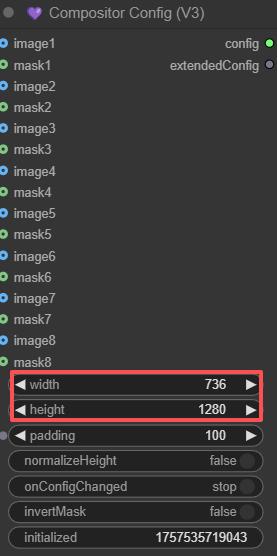
💜 Compositor Config (V3): Set the resolution for generating images
Translate Text (Advanced): Fill in your prompt words
Leave everything else as default.
2. Instructions for use
Load background and item images. If more images need to be fused, you can continue to copy the art venture node. After completion, run it once first, and then the cropped image and background will be merged 💜 Compositor (V3), At this point, you can adjust the size and position of the item and background, and then click run again after the adjustment is complete.
Download link for manual composition adjustment plugin: