

Use with workflow: https://civarchive.com/models/2065461?modelVersionId=2337222
🎉 ✨ UPDATE - Version 2 Now Available! (21 Oct 2025) ✨ 🎉
🚀 New Model: next-scene_lora-v2-3000.safetensors
What's New in V2:
🎯 Trained on higher quality data for significantly improved results
💪 Better command responsiveness - the model follows your prompts more accurately
🖼️ Fixed black bar artifacts - no more unwanted black borders on generated images
⚡ Overall enhanced performance - smoother transitions and better cinematic flow
Recommended: Use V2 for all new projects.
📥 ComfyUI Workflow: https://civarchive.com/models/2065461?modelVersionId=2337222
🧠 What This Model Does
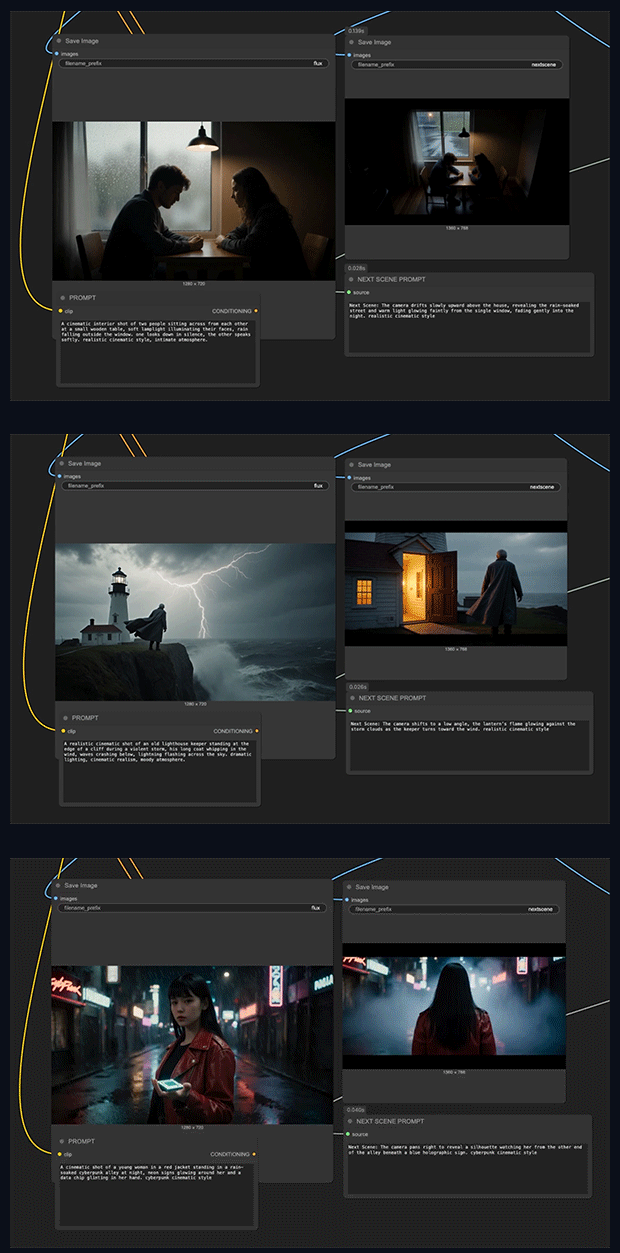
This LoRA brings cinematic storytelling continuity into AI image generation workflows.
Each output frame functions as the "Next Scene" in an evolving visual narrative, maintaining compositional coherence while introducing organic transitions such as:
Camera movement: Dolly shots, push-ins, pull-backs, and tracking moves
Framing evolution: Wide to close-up transitions, angle shifts, reframing
Environmental reveals: New characters entering frame, expanded scenery, spatial progression
Atmospheric shifts: Lighting changes, weather evolution, time-of-day transitions
Examples of Cinematic Logic:
"Next Scene: The camera pulls back from a tight close-up on the airship to a sweeping aerial view, revealing an entire fleet of vessels soaring through a fantasy landscape."
"Next Scene: The camera tracks forward and tilts down, bringing the sun and helicopters closer into frame as a strong lens flare intensifies."
"Next Scene: The camera pans right, removing the dragon and rider from view while revealing more of the floating mountain range in the distance."
______
next-scene-qwen-image-lora-2509 is a LoRA adapter fine-tuned on Qwen-Image-Edit (build 2509), purpose-built to generate cinematic image sequences with natural visual progression from frame to frame.
This model enables Qwen Image Edit to think like a film director—understanding camera dynamics, visual composition, and narrative continuity to create shots that flow seamlessly into one another.
🧠 What This Model Does
This LoRA brings cinematic storytelling continuity into AI image generation workflows.
Each output frame functions as the "Next Scene" in an evolving visual narrative, maintaining compositional coherence while introducing organic transitions such as:
Camera movement: Dolly shots, push-ins, pull-backs, and tracking moves
Framing evolution: Wide to close-up transitions, angle shifts, reframing
Environmental reveals: New characters entering frame, expanded scenery, spatial progression
Atmospheric shifts: Lighting changes, weather evolution, time-of-day transitions
Examples of Cinematic Logic:
"Next Scene: The camera pulls back from a tight close-up on the airship to a sweeping aerial view, revealing an entire fleet of vessels soaring through a fantasy landscape."
"Next Scene: The camera tracks forward and tilts down, bringing the sun and helicopters closer into frame as a strong lens flare intensifies."
"Next Scene: The camera pans right, removing the dragon and rider from view while revealing more of the floating mountain range in the distance."
⚙️ Usage Instructions
Basic Setup:
Load Qwen-Image-Edit 2509 as your base model
Add a LoRA Loader node and select
next-scene-qwen-image-lora-2509Set LoRA strength: 0.7 – 0.8 (recommended)
Structure your prompts with "Next Scene:" prefix for optimal results
Example Prompt:
Next Scene: The camera moves slightly forward as sunlight breaks through the clouds, casting a soft glow around the character's silhouette in the mist. Realistic cinematic style, atmospheric depth.
Pro Tips:
Begin prompts with camera direction for stronger continuity
Specify lighting and atmospheric changes for mood consistency
Chain multiple generations to create sequential storyboards
Works particularly well with landscape and establishing shots
next-scene-qwen-image-lora-2509 is a LoRA adapter fine-tuned on Qwen-Image-Edit (build 2509), purpose-built to generate cinematic image sequences with natural visual progression from frame to frame.
This model enables Qwen Image Edit to think like a film director—understanding camera dynamics, visual composition, and narrative continuity to create shots that flow seamlessly into one another.
🧠 What This Model Does
This LoRA brings cinematic storytelling continuity into AI image generation workflows.
Each output frame functions as the "Next Scene" in an evolving visual narrative, maintaining compositional coherence while introducing organic transitions such as:
Camera movement: Dolly shots, push-ins, pull-backs, and tracking moves
Framing evolution: Wide to close-up transitions, angle shifts, reframing
Environmental reveals: New characters entering frame, expanded scenery, spatial progression
Atmospheric shifts: Lighting changes, weather evolution, time-of-day transitions
Examples of Cinematic Logic:
"Next Scene: The camera pulls back from a tight close-up on the airship to a sweeping aerial view, revealing an entire fleet of vessels soaring through a fantasy landscape."
"Next Scene: The camera tracks forward and tilts down, bringing the sun and helicopters closer into frame as a strong lens flare intensifies."
"Next Scene: The camera pans right, removing the dragon and rider from view while revealing more of the floating mountain range in the distance."
⚙️ Usage Instructions
Basic Setup:
Load Qwen-Image-Edit 2509 as your base model
Add a LoRA Loader node and select
next-scene-qwen-image-lora-2509Set LoRA strength: 0.7 – 0.8 (recommended)
Structure your prompts with "Next Scene:" prefix for optimal results
Example Prompt:
Next Scene: The camera moves slightly forward as sunlight breaks through the clouds, casting a soft glow around the character's silhouette in the mist. Realistic cinematic style, atmospheric depth.
Pro Tips:
Begin prompts with camera direction for stronger continuity
Specify lighting and atmospheric changes for mood consistency
Chain multiple generations to create sequential storyboards
Works particularly well with landscape and establishing shots
Description
FAQ
Comments (17)
I was wondering if this would end up here from huggingface. It's such a great idea for a lora. Wan and Qwen Edit have SO much potential as creative tools due to stuff like this.
The examples are too fuzzy, I can't read the example prompts. Can you (or someone) provide the text of the example prompts?
Lots of examples in the description now.
Example Prompt:
Next Scene: The camera moves slightly forward as sunlight breaks through the clouds, casting a soft glow around the character's silhouette in the mist. Realistic cinematic style, atmospheric depth.
Examples of Cinematic Logic:
"Next Scene: The camera pulls back from a tight close-up on the airship to a sweeping aerial view, revealing an entire fleet of vessels soaring through a fantasy landscape."
"Next Scene: The camera tracks forward and tilts down, bringing the sun and helicopters closer into frame as a strong lens flare intensifies."
"Next Scene: The camera pans right, removing the dragon and rider from view while revealing more of the floating mountain range in the distance."
I've been waiting for something like this. Thanks!
Edit: I've tested it and this lora solves something I struggled with, in qwen-edit-2509. It literally understand camera movement, now.
do you have a workflow? also have you tried with GGUF?
@justinfoushee526 workflow was added today.
Share workflow also bro
I can't get this to work, the change is always very small. Could you post your workflow as well, to compare the settings? Thanks!
Use a standard Qwen 2059 image edit template and a add a lora node of your choice and add the lora.
workflow and example prompts added now. plus v2
Thank you, now it is working!
It's a very good model. In actual tests, it can maintain better consistency when changing nsfw postures. However, it's best for the other nsfw model to maintain a higher weight loading; otherwise, it may cause some deterioration to the pussy
Which loras do you use for nsfw in Qwen Edit? I was not able to make it work so far, it always distorts my images or put clothes on the characters
I tried I really do, but I don't see any real improvement over just prompting without your Lora.
The Idea is really good but maybe it needs a little more training IDK.
I even used your workflow your values, and you get the same result deactivating the lora node.