


What Is It?
This LoRA is trained to provide a bottom-heavy body type to your image generations. It has been tested with standard 1girl prompts but not tested with NSFW, or groups. It may have effect on faces and image style will lean towards a candid type but this can be overcome with prompting.
How To
All generations in the samples are used with this LoRA applied by itself, and a face detail node. Generated using euler/beta @ 32 steps OR res_2s/bong_tangent @ 20 steps. You may notice at strengths near 1.0 and higher the model can cause some issues with hands, backgrounds. I've left these in the examples.
Suggested Weight: 0.4-1.0 depending your need for cheeks.
Training Notes
Trained with 10 captioned images at 768, 1024. No effort was made to train NSFW concepts.
While I have been able to use this in comfyui with no keyword applied at all, psxchk, psxcheeks and bottom heavy ohwx_woman are in the training data.
Krea training is still experimental, I found it required a lot of bumping the FluxGuidance and was very much prone to affecting overall composure. I will continue to work on a V2 to see if I can isolate these issues.
Flux Krea Grid: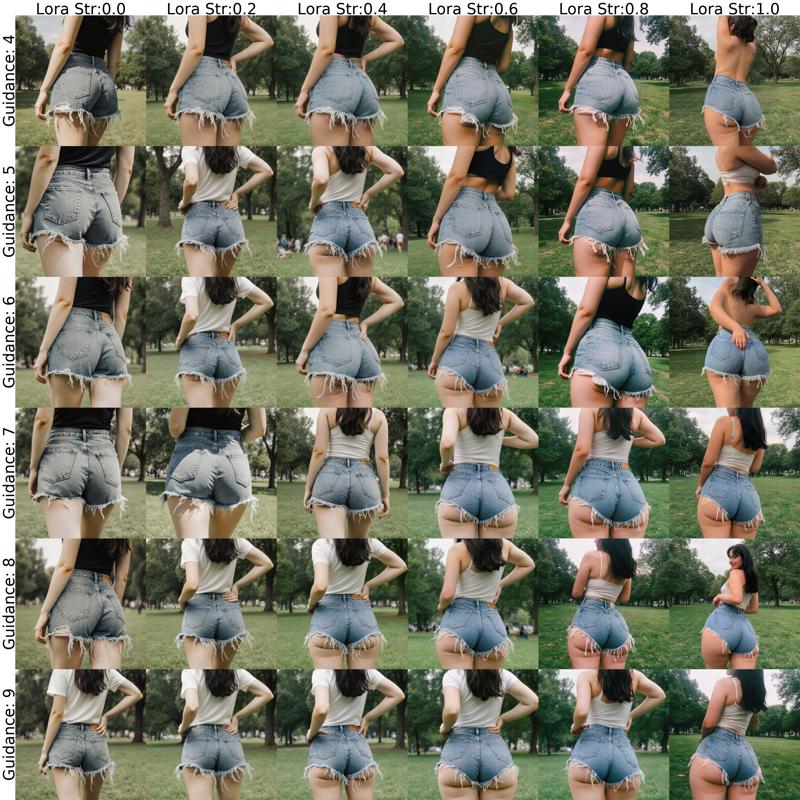
Description
FAQ
Comments (6)
When I do 32 steps with the Z Image version, the image isn't very crisp at all. Why are yours crystal clear?
i only do 9 steps euler/beta with a face detailer. All i can recommend is make sure you have the shift set to at least 3
@DirtMcGirt you can try shift at 7 too 😊
This looks great!!..Kudos. However, when I tried to use it with z-image turbo, I get the "Lora key not loaded" error. I triple checked and I am using the correct file. Any ideas why is not working? Thanks
this was fixed for me with an update to comfyui
for me to fix it, select your lora loader, ctrl-c to copy it then ctrl/shift V to paste it again with all connections then delete old one. reslect your lora