Hey y'all!
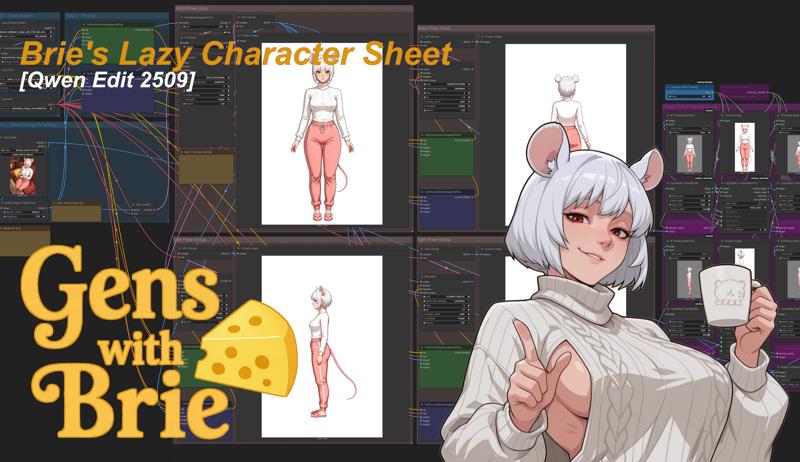
Take whatever character you have and generate a character sheet with this simple workflow!
While it works if you're trying to generate a plain-old character sheet, this is actually a precursor workflow to 3 other workflows that I will be making using two special loras by (at)tori29umai on Twitter. Those three workflows are the newest versions of my Lazy Character Fusion, Lazy Character Repose, which also needs my Lazy Character Dummy workflows.
V 2.1
Minor tweak, replaced RemBG with Inspyrenet
GGUF version for maximum flexibility: use any of unsloth's GGUF models. (Q6_K and BF16 recommended, Q8_0 gives me errors sometimes)
AIO version for NSFW access: use any of Phr00t's AIO models. (V18 NSFW or SFW recommended)
V 2.0
Same but upgrade to the GGUF version of Qwen Edit 2511
Minor prompt tweak to improve 'left' and 'right' panel consistency.
V 1.0
The workflow is based on the normal Qwen Edit 2509 workflow, same models too.
The output format is a character sheet in the format needed for my Lazy Character Fusion workflow, which also needs my Lazy Character Dummy workflow.
Inputs:
Character Image
Best if fully visible, forward-facing, but otherwise fairly flexible.
The prompts do not need to be adjusted, but for the first prompt you can add minor details like a type of shoes for instance if its cut off in the initial image.
Outputs:
Full Character Sheet
Character Sheet + Original Image.
For the models, check the notes within!
This workflow is honestly quiet simple. There's some additional notes in the workflow for minor adjustments and quirks.
Stay Cheesy Y'all!~
Brie Wensleydale
Description
This is the character sheet workflow adjusted for the All-in-One model by Phr00t. It's an all-in-one model, so vae, text encoder, acceleration loras as well as other loras are baked in. Also, there's both SFW and NSFW versions, the latter of which was my focus of this version.
FAQ
Comments (22)
"It just works" 👌💋, Great WF!
Huzzah!
'utf-8' codec can't decode byte 0xa0 in position 63: invalid start byte
I translated this from Japanese, so I apologize if there are any unnatural parts.
I tried to run this on StabilityMatrix without changing the nodes, but I got the above error
and it stopped after creating the front view.
Please let me know if there's any reason for this. I'd also be happy to send you a report
if you'd like.
Well, I've never used Stability Matrix before, so this is likely a Stability Matrix issues.
I can confirm that this particular workflow works on multiple local installations, as well as on RunPod, on both 4090 and 5090 systems.
So I'm not sure how to help aside from suggesting you just install the Comfy portable version, which is almost a one-click solution.
As a heads-up, LayerStyle is having issues for a lot of people on Comfy (inc me), which breaks this workflow. Looks like there's issues with some random package versions and some transformers calls are breaking installs. Running into it myself and was about to try to strip all of layerstyle out of the 2.1 workflow to try to get past that issue, but wanted to let you know it was happening.
Specifics: LayerStyle causes a "ImportError: cannot import name 'pipeline' from 'transformers'" message. It's been on their issue log for 4 months without getting touched, despite frequent updates. Doesn't seem to affect everyone, so it's probably a specific transformers version issue.
Just wanted to let you know, in case others say generic things like, "doesn't work." :)
Thank you for the input. Yeah, from my end, Later Style still works fine.
This isn't even the first Layer Style related issue. There's previously some issue with RemBG as well.
Its really unfortunate, because its quite useful, but I need to look into how to remove it.
Thanks! IS it possible to feed it multiple images at once so that it has a better idea?
No, only a forward image is acceptable for this workflow.
Its a great workflow. Something i find continuosly challenging is generating a character sheet that can really capture the aesthetics of the character adn or proportions. Anotehr usage tip I would add is that its best if the initial image you supply si very tall Otherwise the height of the character will be reduced
Correct, the initial image should indeed be tall.
And its not without flaws, because while the front can usually keep most of the style, there is minor style loss on all the other directions.
Can't really solve it, although, maybe FireRed 1.1 (which is a Qwen model), might be easy to test since you can just swap it out.
@slipperygem the front view keeps the style because qwen hardly changes the front view as that is what we supply. Not a dig on you but the front view looking nice is the least important (because the original shot is pretty much front view already)
@slipperygem I just tried firered 1.1. I saw in its demo pics it seems to only showcase realistic people. I tested it and it looks like at least for anime styles its not great. At the very least, at tall resolutions, it stretches on the character. Its possible that it does well on more normal "square" resolutions but I have no interest as I am making character sheets.
@DK360 Yeah, I know.
Style loss is the thing I'm trying to fix, I'm working and essentially done on a big new repose workflow, but I wonder if it was worth it or did I just fall down some silly Rabbit hole.
@slipperygem pleased keep me updated on your progress.. character likeness is the absolute goal. and did you try firered?
@DK360 Yeah, for sure. My big chunky SDXL-based Qwen RePose workflow I'm going to prep for release along with a simple compositing workflow. They're not perfect, but they are open source and are good enough for making key frames for vids, which is what I want.
If you want to keep track of my progress, you can follow my X @SlipperyGem.
Thanks. Worked on a RTX 2060 = 6vram
AIO Versions don;t work. Load Checkpoint node doesn't see any version of Phroot's .saftensors
They can work, but I need to change the load checkpoint node to some other one that can load the checkpoint.
Its honestly an easy fix, but I'm both super busy and abroad right now so I don't have the time. I will try to take a look and make the Civit Red versions of these when I get back to my proper computer in the middle of the week.
@slipperygem Oh no! Sorry my bad! I meant to update this comment, but forgot. (also busy) The problem was actually on my end. ComfyUI was looking in its "check points" folder. Which is normal. I am using Stability Matrix so i was putting the models in the wrong folder. Once I moved things around it got sorted out. Stability Matrix has a dir "models/stable diffusion/" that it points its ComfyUI installs to. So once I move the models around things starting working.
So its a lot of my own problem that would be easily solved if I stopped using Stability Matrix, however it keeps everything nice and organized which i really like. Especially when it come to anything based in python. I hate how python just install crap wherever it wants.
Anyway sorry for not updating I'm an idiot. The work flow is greatly appreciated and worked great one I figured out I was the problem. lol Thanks!
I couldn't get Inspyrenet to work so i had to replace it with RemBG... go figure, but it works perfectly now. cheers
Yeah, I need to update this, people keep saying RemBG yields problems. Glad to hear it works for you.
Yeah, I need to update this, people keep saying RemBG yields problems. Glad to hear it works for you.