


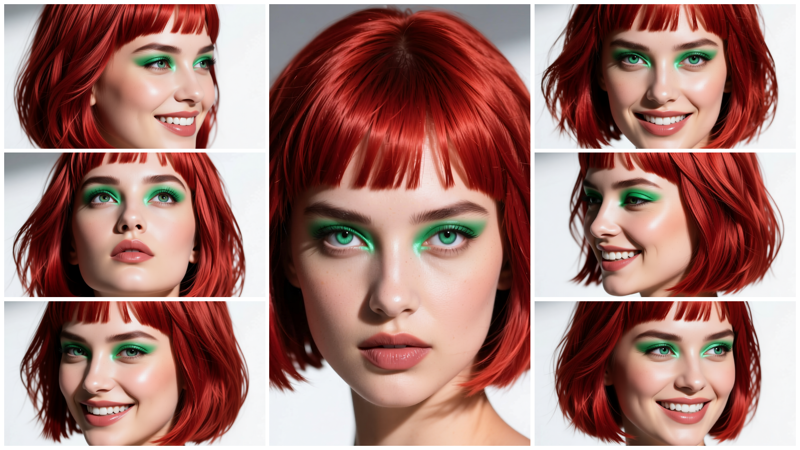
This is a quick workflow I was already working on last summer. I decided to complete it as it was almost ready. And to make it cleaner, I used subgraphs (although I am not a big fan of them).
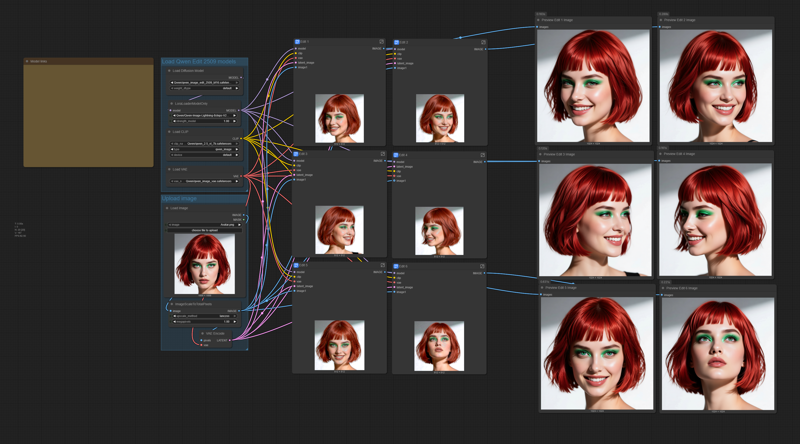 The workflow is self-explaining. You will have all the links to the model files in the workflow.
Just load the portrait you want to replicate, and modify (if you want, and the way you like) the 6 positive prompts. Do not use negative prompts, they are useless in the workflow.
Try to use the best quality photograph you can for the loaded portrait, and try to load an image with a resolution larger than 1024x1024. The workflow will resize it.
You may use the output images for training a LoRA, just generate as many different poses and expressions as you may need for training.
You can also use the workflow to create consistent images, the only limit is your imagination (as KelevraQuakenstein pointed out in the comments, thanks mate!).
This workflow was tested on a Rtx 5090 GPU, if you have a smaller GPU and have out-of-memory issues, you can try to use the FP8 model for Qwen Edit 2509 model and the text encoder:
If these are still too big, you may need to try the quantized GGUF models.
Description
Small update:
now the wf will generate 8 images;
added "save image" nodes;
updated the prompts as suggested by KelevraQuakenstein (thanks!);
removed the "negative prompt" input as it was useless (the wf use cfg 1.0).
FAQ
Comments (26)
this workflow is crazy,, i naerly choked on my ramen. is like magic. thank so much :)
Thank you! 🙏
(☞゚∀゚)☞ HIT THE LIKE BUTTON (thumbs up) ฅ^•ﻌ•^ฅ --everyone seems happy, don't forget to show some love
Thanks! 🙏
Thank you for this, it really works well. As others said, excellent for lora datasets
Your latest version is even better. I have posted an image below. I added a separate image editing window to the workflow.
This will allow for replacing or removing the background, changing the subject's pose, and more, without needing to alter the prompt in other editing windows.
along with a fast group bypasser to quickly enable or disable specific aspects of the workflow.
Keep up the great work. /Bow
Good ideas! And thanks again!
Great additions Kel and much tidier that than the mess I made of Ten's wf
Can you share the workflow please?
@StyleYourself you should be able to use the image he posted to get the workflow.
@Tenofas Sorry but for some reason I'm not able to see any image. Be kind and reply with the link to that specific image. Thanks
@StyleYourself https://civitai.com/images/108828505
@KelevraQuakenstein Thank you
Tenofas Strikes again! Great work flow, tip sent your way
Hey mate, this might just be me failing since everybody loves it but it's taking forever on my 4090 using the fp8 scaled model, any tips? I can use the model fine normally but here I get stuck on the first or second generation.
You think I have to separate the samplers and just do one by one ? Any help would be appreciated.
I realize this might not be very helpful, and I apologize for that.
I'm using the qwen_image_edit_2509_bf16.safetensor.
I also own a 4090, and it takes roughly 7:59 minutes to complete, from start to finish. I recommend ensuring that comfyui and all the nodes are up to date. My comfyui installation also has Sage and Flash-Attention installed.
Be careful when updating, though: If you are using an older workflow that you enjoy, updating Comfyui can break it.
Also, you can disable individual edit windows by highlighting (clicking on) them, holding "ctrl," and then pressing "B." They will turn purple. To enable them, repeat the same process.
This Is weird. Check your ConfyUI version and the Front end version, and let me know. You cold also try with GGUF models, but with a 4090 the fp8 should run fine.
Thank you for making this workflow. It's going to make character LORA generations so much easier.
Thank you for an excellent native workflow!
I encountered one issue with which gguf could be used. Q3 K M does not yeild results for some reason (I already had this gguf and im not sure where i got it).
Q4 does produce the expected results and Q4 (11.9gb) does not OOM on a 12gb 3060.
GPU used 3060 12gb
GGUF used Q4 (from https://huggingface.co/QuantStack/Qwen-Image-Edit-2509-GGUF )
Vanilla comfyui run time for workflow (748.89s) 12 mins 40 sec.
It is still 9 images. Unfortunately it generated only 1 correctly, 1 added glaglasses 👓 which wasn't in the promt and the rest of 7 was exactly as the imput image. 😔 What I'm doing wrong?
what version of ComfyUI and its frontend are you using?
I experienced the same issue. Running the latest version of ComfyUI via Stability Matrix
EDIT: I'm using the qwen_image_edit_2509_fp8_e4m3fn.safetensors model now instead of the generic Qwen image edit model and getting much better results.
Everything works perfectly. But does it have to be with the full models? Can't FP8 models be used? I have 24GB of VRAM and 64GB of RAM and it's slow because I download almost everything to RAM and it's at 92% usage.
I took the liberty of making a few small changes to this beautiful workflow:
I set the LoRA to 4 steps, removed the negative prompt from all Ksamplers, and added "conditioningZeroOut" (with LoRA 8 steps and 8 steps, the negative prompt could create noise). And of course, I changed it from 8 steps to 4.
Anyway, it's a truly excellent workflow, simple yet very effective!
is it still good? would you mind sharing it with me bro?