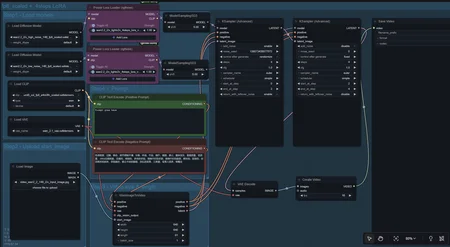
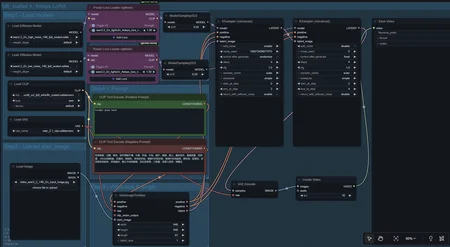
Image to Video Workflow for easy setup with multiple custom loras
- INSTRUCTIONS -
This workflow is mainly for beginners who just want something easy to setup and go, I've found that most custom workflows are incredibly hard for new people to understand (myself included).
I've written all the instructions you'll need to setup and start generating your creations.
Step 1:
Download the zipped .json file from here then once you got it you'll unzip and extract it
You're going to want to locate your Comfy UI session folder on your computer and place the json file directly within the workflows folder, now finding this initially can be tricky so here's the path you wanna use:
This PC/Local Disk (C:)/Users/ [your user name]/AppData/Local/Comfy-Desktop

When you install Comfy, you have the option to do a cloud based session or create your local session that you name, so if you haven't done that, just create a new session and then when you go to this path above, you just click on the one that has the session name, ignore the others for now
Step 2: Drop the workflow in your workflows folder using this path below
C:\Users\your user here\AppData\Local\Comfy-Desktop\your session name here\ComfyUI\user\default\workflows

Once you drop it in, it should look like the image above
Step 3:
Launch Comfy UI and sign into your local session
Go to the workflows tab, it should be under models

Then Click and load the workflow, once you do you'll see this:

If Comfy UI gives you errors and says "missing models/nodes etc." Don't panic because that's expected to happen
Step 4:
You'll go to the error tab, look for an option that says "download all" and click on it
What will happen is that comfy UI will then download any and all the resources that are relevant to the workflow such as; models, checkpoints, custom nodes and anything else it picks up, once it's done downloading you should see the top right download notification will be green, that means that it's completed and you'll need to restart Comfy UI,
ALWAYS RESTART WHEN INSTALLING ANYTHING NEW IN COMFY UI
Once you've restarted the program, it should now work
Below is a simple visual guide on how the workflow steps function:

Everything is already wired and ready to go, all you have to do is just plug in the following;
The input image
Whatever loras you want to try
Positive prompt
Some beginner tips that may help;
ALWAYS use the most high quality images you can, upscale if necessary
For this workflow I would not mess with the Ksampler nodes unless you know what you're doing otherwise you may get all kinds of ugly outputs
If you get blurry videos and you haven't messed with the Ksamplers it's most likely because the image you used is low/poor quality or one of the loras you added is causing conflict (in which case just lower or higher the custom lora strengths until it comes out smooth, do NOT adjust the lightning loras strengths), I recently reinstalled everything and I was able to get this workflow up and running with solid gens the same day by using high quality images for my inputs
Wan 2.2 base model is limited to 6 second creations, this means that if you try to extend the duration passed 6 seconds it will either reset the starting position of the image or it will slow down the pace of the video, if you're looking to extend the duration you'll need to find a custom workflow that was built with that in mind.
Higher width/height dimensions are limited to your PC's capabilities and the workflow, I'm currently running this on an 5060 16GB which can do most things in good quality but after a certain point comfy UI will crash if there's not enough memory, this is partly to do with the fact that this workflow is setup to only use 4 steps and maximize speed, if you want higher visual fidelity I would suggest trying a different workflow with higher steps
Can't find your inputs or outputs? Search for this folder "ComfyUI-shared", they recently moved them all here so if you're trying to find your creations open it and it'll contain the folders for your "input" and "output" files
Where to put downloaded Lora's This is more so general knowledge but when you download loras, you want to specifically place them in this folder path below:
C:\Users\your username\AppData\Local\Comfy-Desktop\your session name\ComfyUI\models\loras
That's really it, if you have any general questions feel free to ask away in the comments, I'm not an expert by any means but I'll do what I can, best of luck and enjoy!
Description
FAQ
Comments (13)
Merci beaucoup de penser aux débutants comme moi ! :-)
Cool, thanks
I used your workflow, but the video it generates becomes very blurry in the last few frames after running.
Hmm I'll have to see what loras and setup you've got, if you want feel free to dm me on here or reddit and I'll see what I can do.
If you can dm me a screenshot of your workflow and I'll see what I can do to help!
@KabobFan Thank you. If I ask you a simple question, will it be better if I adjust the sampler for the problem with blurred images??
@smashdm6860958 So in my experience I haven't done any adjustments with the Ksampler nodes when using this workflow and it's been fine for me.
This works really well, thank you. I'm not even trying to do anything too spicy but this removes some of the roadblocks to general performance issues I was having with my characters.
Bro this is great I'm exactly at that point where I'm barely understanding LoRas and stuff but getting results, thanks man. Would love to colaborate and learn together if you keep producing.
That's great to hear, glad it's working for ya!
I got your setup and everything is good and I found some loras but i don't know if there are keywords or something i need to type in the prompt to trigger the trained video. I know its all there but i can't make it do what the safetensor files are supposed to do. Thanks Sorry
So it depends on the loras themselves, check what they put in their descriptions to trigger the lora and save a text document for each Lora you save including the name of the lora, the filename, description, triggers etc and throw them in their own folder so you have a reference when you need it. That's how I keep track of all mine because there's just way too many trigger prompts to remember lol
Looks like we don't have an active mirror for this file right now.
CivArchive is a community-maintained index — we catalog mirrors that volunteers upload to HuggingFace, torrents, and other public hosts. Looks like no one has uploaded a copy of this file yet.
Some files do get recovered over time through contributions. If you're looking for this one, feel free to ask in Discord, or help preserve it if you have a copy.