


🦁 Civitai Prompt Beast
V1.0 | READ the 'How to use' , don't skip it
Civitai Prompt Beast is a powerful ComfyUI custom node designed to fetch, filter, and randomize prompts directly from the Civitai image gallery. It is perfect for finding inspiration, testing models with real-world prompts, or exploring trending styles.
Download -> unzip -> save your API key in civitai_key.txt, or as an environment variable CIVITAI_API_KEY, or in the node's API field (if you know what you're doing) -> place the folder in:
/ComfyUI/custom_nodes/restart the ComfyUI and search for Civitai Prompt Beast
How to Use
Get your API Key: Go to your Civitai User Settings and generate an API Key.
Secure Setup (Recommended):
Create a file named civitai_key.txt inside this node's folder.
Paste your API key inside.
Leave the api_key widget in ComfyUI empty. This ensures your key is not embedded in shared workflows or image metadata. (unless you use a save node that doesn't share the metadata)
Configure the Node:(Optional)
Query: Enter search terms ("cyberpunk", "anime portrait").
Base Model: Select the architecture (SDXL 1.0, Pony, etc).
Sort/Period: Choose how to find the best images (e.g., "Most Reactions" over "Month").
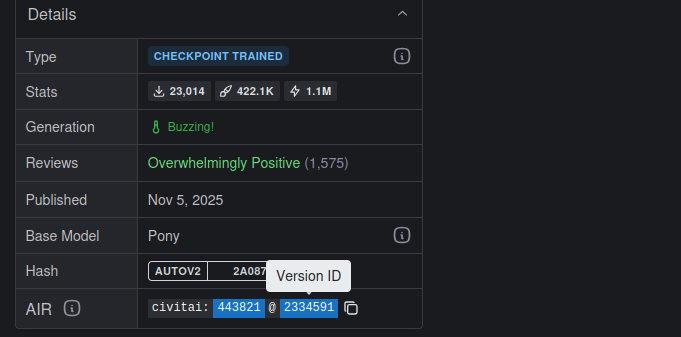
Model/Version ID: Copy a specific ID from a Civitai URL to scrape prompts only from that specific model.
(I f you have the psych for dealing with GitHub, feel free to publish it and add it to the ComfyUI custom node repository. How?
Fork the ComfyUI-Manager -> edit the custom-node-list.json -> commit )
Description
FAQ
Comments (12)
Hey. I keep getting the following error. What did I do wrong?
API Error: 500 Server Error: Internal Server Error for url:
Hi, I just tested the API, and it’s working fine for me. are you running the node with default settings or have you changed them? 500 error usually indicates a server-side issue, but it can also happen with the API if the user sends a bad request (else 400). If you are using custom settings in the node, please take a screenshot
@sweetmax797 First off, thanks for the quick reply. You are talking about the settings for prompt beast, correct? If so I changed some of the settings and got the error. I restored default and got the error again. The 1.0 version works fine but 2.0 doesn't.
@Enraken you're welcome, I did some more testing, and everything on my end works just fine. as I mentioned, the 500 error is server-related, and without more information, I can't find a way to help you out. Did it ever work, or you faced the error at first try? check if your API code is correctly saved in the text file or generate a new one but pay attention to copy & paste.
@sweetmax797 It never worked. Got the error since the beginning. I checked API and made another one none of them fixed the issue for me.
Seems to be a problem on my end since you even tested it and it worked for you. I'll just stick to manually adding the prompts for now. Thank you for your time .
@Enraken you're welcome,I'll check the API documentations, If find anything related to this issue, I'll inform you. good luck,
@sweetmax797 Hey. Tested it today and it worked like a charm! I think it was because of a DNS I was using I'm not sure. Either way, thanks a lot!
@Enraken hi, glad to hear that,, you're welcome :)
when you choose ZimageTurbo as base model, it return" API Error: 400 Client Error: Bad Request for url: https://civitai.com/api/v1/images?limit=100&query=woman&sort=Most+Reactions&period=AllTime&baseModels=Z+Image+Turbo"
the other base models work very good. can you fix it? thanks.
Thank you for the bug report. I'll fix it and re-upload it. Meanwhile, you can manually edit line 21 in node.py and replace 'Z Image Turbo' with 'ZImageTurbo,' restart the ComfyUI. it seems I accidentally switched the key and value order.
Does anybody can post only a simple txt with this prompt?