


New Mecha style for Flux.2 Klein 9B!
With the 9B version of Klein being more widely used that the 4B version, i did a quick attempt at training it. I can make it run on my poor setup using a GGUF quant, but boy it is slow. Anyway, here it is and the showcase pictures include some of the cursed stuff the model sometimes does for the sake of transparency regarding its capacities. Nonetheless, it works nicely for my rare needs of edit :D
(Done using ai-toolkit, i stop the training at half the total steps, reworked a bit the last saved checkpoint using a n_average merge of previous epochs and restarted it before doing a final merge of epochs to get something more smooth).
New Mecha style for Z-Image-Turbo V2!
This time, i did a training using Z-Image De-Turbo, an undistilled version of ZIT. I also raised the LR to 0.0002 and made a 64 dim LoRA before reducing the rank to 32 and carefully merge it with the previous LoRA. I also removed the trigger word, the only constant remaining is the fact that it was training on "Digital illustrations" with an "anime-like" "semi-realistic style".
This helped me achieve better results even if i raise the CFG to 1.2 (distilled models don't have a CFG and should be used with CFG = 1, aka no negative prompt).
All showcase pictures are made with 9 steps, CFG 1.2, Euler/Beta (aka Smoothstep in stable-diffusion.cpp) using the Q4_K quant, the ablitered version of Qwen3-4B for the TE and the regular VAE, plus a flow shift at 3. They got an img2img pass at 0.5 denoise with the same parameters to smooth some details.
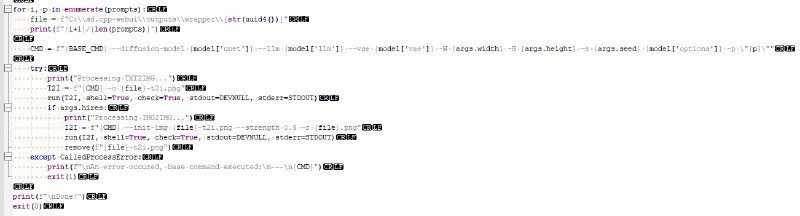
Below a part of my ugly python wrapper script to parse multiple prompt ;-)
Enjoy! 💜
New Mecha style for Flux.2 Klein 4B!
This is a very first attempt at training a LoRA for Flux.2 Klein 4B! It was done using ai-toolkit using the 4B-Base version, but all pictures are generated using the distilled version here.
All showcase pictures are done using the Q4_K quantized version and stable-diffusion.cpp, first by doing a txt2img and then a img2img to sharpen the result a bit.
This is a very first test and i still prefer ZIT, but the img edit capabilities are interesting and i wanted to have a version of the model that new my style (i'll probably try to train a better version later).
Here is demo of the img edit. The source image was made using ZIT and my LoRA:
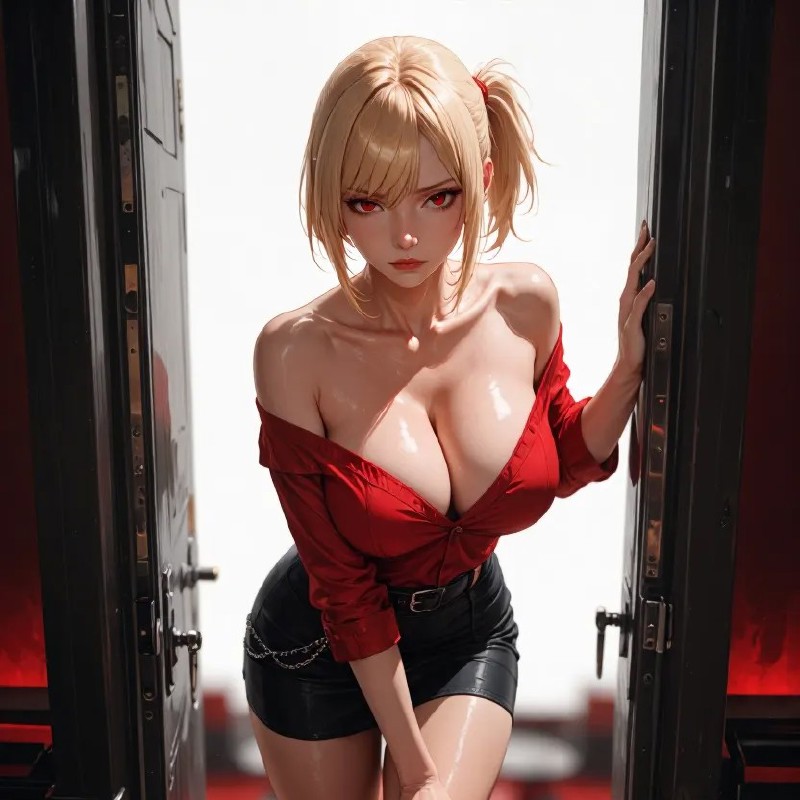
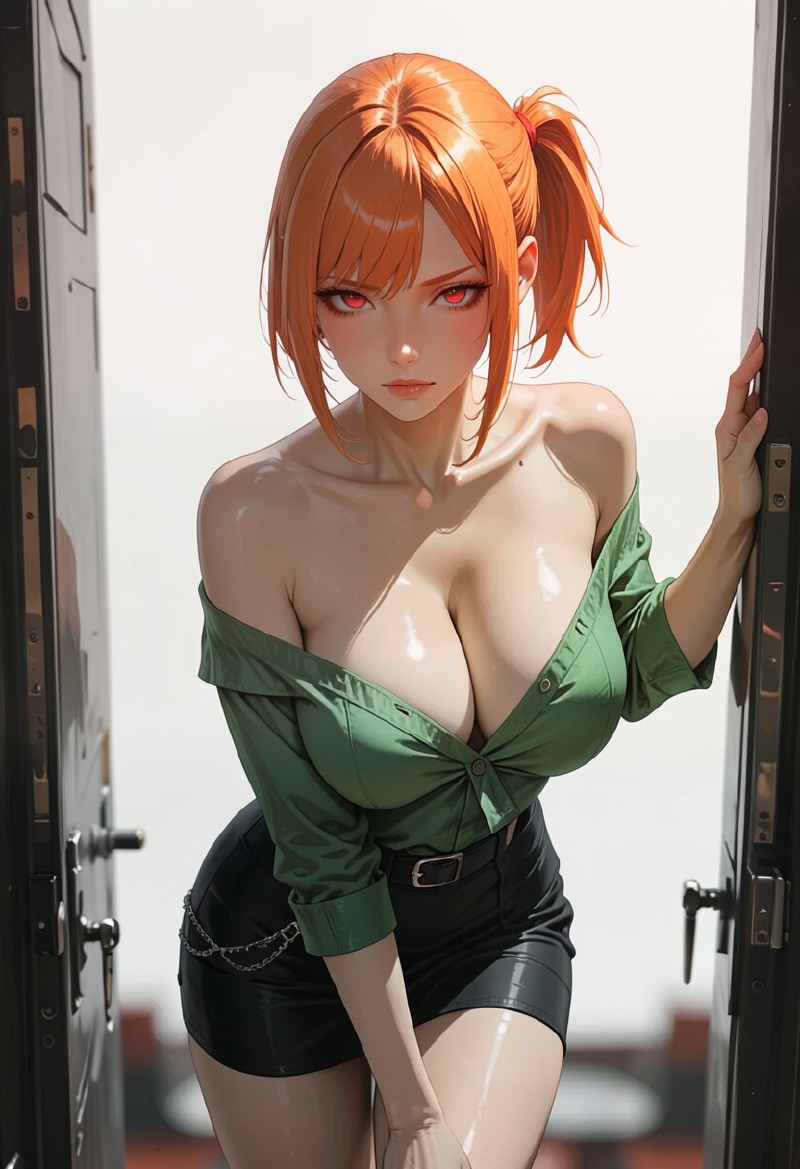
And with this prompt and even a different resolution of 832x1216,
Change the girl top from red to green and her hair from blonde to orange <lora:new_mecha_klein4b:0.8>I got this picture 😁 (ok, it's a very basic test, but i'll try more stuff and at least, i am happy this run locally on my GTX 1060):
New Mecha style for Z-Image-Turbo!
This is a one shot test to allow me (and everyone of course) to test ZIT stuff with New Mecha style. Works best with 8-10 steps.
Trigger: Start your prompt with "NewMecha style illustration." followed by something (this can be altered) like "This is a highly detailed, digital illustration of a...". You can add "anime-like" if you wish for a flatter look or "CGI" if you want more 3D.
This LoRA was trained using ai-toolkit default config (since the on-site training is failing hard on ZIT) and a dataset of 250 pictures generated using New Mecha and captionned using JoyCaption.
Since this is a dataset of Illustrious pictures, the overall result is a bit under what ZIT supposedly can render, but lowering the LoRA weight and adding more stuff is the goal (that's why on-site i put 0.8 as the max weight).
The showcase was done by captionning my usual showcase pictures using JoyCaption too and the ugliest Gradio + Diffusers app ever (to avoid paying Yellow Buzz):
import gradio as gr
import torch
from diffusers import ZImagePipeline
from uuid import uuid4
from PIL.PngImagePlugin import PngInfo
from datetime import datetime, timezone

device = "cuda"
dtype = torch.bfloat16

pipe = ZImagePipeline.from_pretrained(
    "Tongyi-MAI/Z-Image-Turbo",
    dtype=dtype,
).to(device)

pipe.load_lora_weights(
    "./output/new_mecha_zit",
    weight_name="new_mecha_zit_000002750.safetensors",
    adapter_name="new_mecha",
)

pipe.set_adapters(["new_mecha"], adapter_weights=[0.8])


def generate(prompt, seed, steps):
    generator = torch.Generator(device).manual_seed(seed)

    image = pipe(
        prompt=f"NewMecha style illustration. {prompt}",
        num_inference_steps=steps,
        guidance_scale=1,
        width=832,
        height=1216,
        generator=generator,
    ).images[0]

    im_path = f"./im-outputs/{uuid4()}.png"

    metadata = PngInfo()

    timestamp = datetime.now(timezone.utc).strftime("%Y-%m-%dT%H:%M:%S.%fZ")

    ressources = 'Civitai resources: [{"type":"checkpoint","modelVersionId":2442439,"modelName":"Z Image","modelVersionName":"Turbo"},{"type":"lora","weight":0.8,"modelVersionId":2507250,"modelName":"(ZIT) New Mecha style","modelVersionName":"v1.0"}], Civitai metadata: {}'

    metadata.add_text(
        "parameters",
        f"NewMecha style illustration. {prompt}\nNegative prompt: \nSteps: {steps}, Sampler: Undefined, CFG scale: 1, Seed: {seed}, Size: 832x1216, Clip skip: 2, Created Date: {timestamp}, {ressources}",
    )

    image.save(im_path, pnginfo=metadata)

    return im_path


demo = gr.Interface(
    fn=generate,
    inputs=[
        gr.Textbox(
            label="prompt",
            value="This is a highly detailed, digital anime-style illustration of a young woman in a black dress.",
            lines=6,
        ),
        gr.Number(label="seed", value=42, minimum=1, precision=0),
        gr.Number(label="steps", value=8, minimum=1, precision=0),
    ],
    outputs=[gr.Image(height=608)],
    flagging_mode="never",
    clear_btn=None,
)

demo.launch(server_name="0.0.0.0", server_port=8000)
Enjoy and please give me any feedback you feel like regarding this LoRA (that's probably the only one i'll make for ZIT, at least until i can generate locally instead of on a costly GPU instance).
Description
Posted on Civitai, upload found elsewhere are done without the author permission.
FAQ
Comments (8)
finally an anime lora for klein. im excited to bring out the full potential of the lora
Hope it does the work, i feel like it still need some adjustment, feel free to provide feedbacks! ❤️
ESSA LORA FUNCIONA EM FLUX.2 KLEIN 4B MESMO??
This version is the one working with Flux2 klein 4B: https://civitai.red/models/2227157/new-mecha-style-z-image-turbo-flux2-klein-4b-flux2-klein-9b?modelVersionId=2620506
I really like this style. However, I've found that unless I copy/paste the prompts from your sample images, I can't get the lora to activate without the trigger phrase. Not a big deal, just FYI.
Thanks for your feed back! Indeed, this current LoRA is part of my first few LoRA trained using NLP which i honestly suck at. I should try and do a V3.0 with a better caption with a singular activation trigger which should avoid what you experiment :-(
@n_Arno Hey sorry I was reading the description again and apparently I was hallucinating like an AI lol, I was reading the description for Z-image, not Klein. You didn't mention not having a trigger word for Klein so I take back what I said. Good lora for one of your first. Idk how to train loras other than character loras so I wouldn't know how hard this is. Keep at it though. I've been looking through some anime style loras for the past few hours and this is in my personal top 3 so far.
@bluejaystarter109 I have far more experience training Illustrious or ANIMA, ZIT and Klein still escape me due to the captioning needed full sentences instead of tags ^^;