


🎨 Z-Image-Turbo-Anime | 8-Step Anime Generation
Custom LoRA Merge • Enhanced Anime Style • All-in-One • FP8 & BF16
✨ What is Z-Image-Turbo-Anime?
Z-Image-Turbo-Anime is a custom anime checkpoint built by merging carefully selected and purpose-trained LoRAs into the Z-Image-Turbo base model.
This approach significantly enhances anime-style aesthetics while fully preserving the model’s ultra-fast 8-step generation speed.
All integrated LoRAs were specifically trained and fine-tuned to improve anime proportions, expressions, color richness, and stylistic consistency.
The AIO version uses a special, uncut text encoder, additionally adapted with a pre-defined LoRA file.
This setup improves prompt understanding and offers better responsiveness to German prompts, while English prompts still produce the most accurate and consistent results overall.
🎌 Z-Image-Turbo-Anime-AIO | 8-Step Anime Generation
Ultra-Fast • Enhanced Anime Style • All-in-One • FP8 / FP16 / BF16
✨ Available Versions
🟡 FP8-AIO (~10GB) – Efficient & fast
🔵 FP16-AIO (~20GB) – Maximum compatibility
🟢 BF16-AIO (~20GB) – Maximum quality
Key Features:
⚡ 8-step generation - Lightning fast anime art
🎨 Enhanced anime style - Custom LoRA merge
🔓 Partially NSFW - Many concepts work out-of-box
📦 All-in-One - No separate downloads needed
🎯 8GB VRAM - Works on RTX 4060
⭐ Euler A + Beta - Optimized sampler combo
🔄 Choose Your Version
🟡 Z-Image-Turbo-Anime-FP8-AIO (~10GB)
Best for most users!
Advantages:
✅ Half the file size
✅ Faster downloads
✅ Excellent quality
✅ Perfect for 8GB VRAM
✅ Recommended for testing & everyday use
Use if:
Testing the model
Storage space limited
Fast downloads needed
Everyday generation work
🔵 Z-Image-Turbo-Anime-FP16-AIO (~20GB)
Best compatibility across GPUs
Advantages:
✅ Native FP16 support on almost all GPUs
✅ Very stable and reliable
✅ High-quality anime output
✅ Ideal for RTX 2000 / 3000 series GPUs
Use if:
You want maximum compatibility
BF16 or FP8 is not optimal on your system
You are using older or mixed hardware
🟢 Z-Image-Turbo-Anime-BF16-AIO (~20GB)
Maximum precision!
Advantages:
✅ BFloat16 maximum precision
✅ Absolute best quality
✅ Professional grade
✅ For critical work
✅ Still works on 8GB VRAM
Use if:
Maximum quality needed
No storage concerns
Best of the best required
🎯 Quick Start
Installation
Download your preferred version (FP8 / FP16 / BF16)
Place the file in:
ComfyUI/models/checkpoints/Load it using the Load Checkpoint node
Generate 🚀
Recommended Settings:
Steps: 8-9
CFG: 1.0
Sampler: euler_ancestral ⭐
Scheduler: beta ⭐
Resolution: 832×1216 (portrait)
That's it! No separate VAE or Text Encoder needed!
📊 Test Results
All tests on RTX 4060 (8GB VRAM) • FP8 • 832×1216 • 8 steps • CFG 1.0 • Euler A + Beta
🔬 Test 1: Anime Portrait
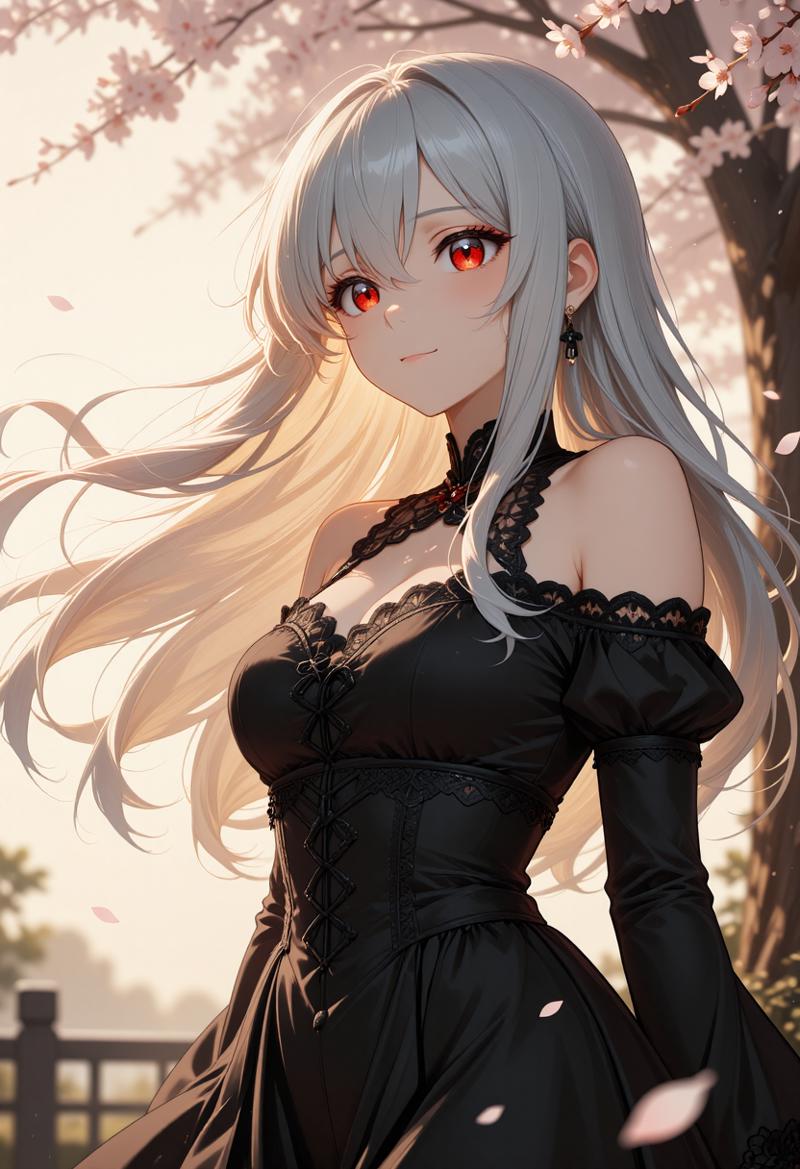
Prompt:
Beautiful anime girl with long silver hair flowing in the wind,
piercing red eyes with detailed reflections, wearing an elegant
black dress with intricate lace details. Cherry blossom petals
falling around her. Soft golden hour lighting from the side
creating warm highlights on her face. Serene expression, slight
smile. High quality anime art style, detailed face, sharp focus,
masterpiece quality rendering.
Time: ~21,5 seconds
Use Case: Character portraits, profile pictures, avatar art
🔬 Test 2: Dynamic Action Scene

Prompt:
Anime warrior in dynamic battle pose, wielding a glowing blue
katana with energy effects trailing behind the blade. Long black
hair whipping through the air, intense determined expression.
Wearing traditional samurai armor with modern sci-fi elements.
Dark battlefield background with dramatic lightning strikes.
Motion blur on sword swing, particles and sparks flying. Epic
anime action scene, cinematic composition, detailed artwork.
Time: ~21,5 seconds
Use Case: Action scenes, game art, promotional material
🔬 Test 3: Anime Landscape

Prompt:
Breathtaking anime landscape of a Japanese countryside at sunset.
Rolling green hills with rice paddies reflecting orange sky.
Traditional wooden shrine with red torii gate on hilltop. Fluffy
white clouds painted in pink and gold. Small stream winding through
the valley with wooden bridge. Studio Ghibli inspired art style,
peaceful and nostalgic atmosphere. Highly detailed background art,
professional anime scenery, wallpaper quality.
Time: ~21,5 seconds
Use Case: Background art, wallpapers, visual novel scenes
🔬 Test 4: Character Design

Prompt:
Anime character design of a young male wizard with messy blue hair
and bright green eyes. Wearing a long white coat with gold
embroidery and magical runes. Carrying an ancient spellbook with
glowing pages. Confident stance with one hand raised showing
magical energy orb. Clean white background for character sheet.
Full body visible, detailed clothing design, fantasy anime style,
professional character concept art.
Time: ~19,6 seconds
Use Case: Character design, concept art, game development
🔬 Test 5: Romantic Scene

Prompt:
Romantic anime scene of a couple watching fireworks together on
a summer night. Girl in beautiful yukata with floral pattern,
boy in casual summer clothes. Standing on traditional Japanese
bridge over calm river. Colorful fireworks exploding in the night
sky, reflections dancing on water below. Warm festival lights in
background. Tender moment, hands almost touching. Soft dreamy
atmosphere, beautiful anime romance scene, emotional artwork.
Time: ~19,4 seconds
Use Case: Romance illustrations, light novel covers, emotional scenes
💡 Prompting Guide
Natural Language Works Best!
Good Example:
✅ A mysteriousvBad Example:
❌ anime girl, purple hair, window, rain, tea, sweater, sad
Anime-Specific Tips
Character Details:
Anime girl with twin tails hairstyle in pastel pink, large
expressive eyes with star-shaped highlights, cute round face,
wearing a sailor uniform with blue ribbon. Cheerful pose with
peace sign, sparkle effects around her.
Action Scenes:
Intense anime battle scene, male protagonist with spiky black
hair unleashing powerful energy attack, glowing aura surrounding
body, dramatic speed lines in background, debris flying, epic
shonen anime style with dynamic perspective.
Atmospheric Scenes:
Lonely anime figure standing on rooftop at night, city lights
twinkling below, starry sky above, wind gently moving their
hair and clothes, contemplative mood, beautiful urban night
scenery, cinematic anime composition.
Prompting Tips
Do:
✅ Use natural language descriptions
✅ Be detailed (100-300 words optimal)
✅ Include lighting and mood
✅ Describe pose and expression
✅ Add atmosphere details
✅ Specify art style references
✅ Include quality tags (masterpiece, detailed)
Don't:
❌ Use only tag-style prompts
❌ Add negative prompts (not needed)
❌ Write very short prompts
❌ Include conflicting styles
🎨 What Makes This Different?
vs Original Z-Image-Turbo
Aspect Original Anime Version Style Photorealistic Anime/Illustration Best Sampler res_multistep euler_ancestral ⭐ Best Scheduler simple beta ⭐ NSFW Limited Partially capable Use Case Photos Anime art
Custom LoRA Merge Benefits
🎨 Enhanced anime face rendering
✨ Better hair and eye details
🌸 Improved anime aesthetic overall
⚡ Same fast 8-step generation
🔓 More flexible content generation
🔧 Installation Guide
Step 1: Download Your Version
Option 1: FP8-AIO (~10GB)
Download: Z-Image-Turbo-Anime-FP8-AIO.safetensors
Recommended for most users
Excellent quality with efficient file size
Option 2: FP16-AIO (~20GB)
Download: Z-Image-Turbo-Anime-FP16-AIO.safetensors
Best compatibility across GPUs
Stable and reliable FP16 precision
Option 3: BF16-AIO (~20GB)
Download: Z-Image-Turbo-Anime-BF16-AIO.safetensors
Maximum precision
Professional-grade image quality
Step 2: Place File
ComfyUI/models/checkpoints/
└── Z-Image-Turbo-Anime-FP8-AIO.safetensors
└── Z-Image-Turbo-Anime-FP16-AIO.safetensors
└── Z-Image-Turbo-Anime-BF16-AIO.safetensors
Step 3: Load & Generate
Open ComfyUI
Use the Load Checkpoint node
Select Z-Image-Turbo-Anime-AIO (FP8 / FP16 / BF16)
Set:
Steps: 8–9
CFG: 1.0
Sampler: Euler A
Scheduler: Beta
Write a detailed natural-language prompt
Generate amazing anime art 🎨
✅ No separate VAE or Text Encoder needed — everything is fully integrated.
⚙️ Optimal Settings Comparison
⭐ For Best Anime Results (Recommended)
Steps: 8–9
CFG: 1.0
Sampler: euler_ancestral
Scheduler: beta
🔁 Alternative (Also Works Well)
Steps: 8–9
CFG: 1.0
Sampler: res_multistep
Scheduler: simple
Recommendation: Start with Euler A + Beta for the best anime aesthetics.
🙏 Credits & License
Base Model
Developer: Tongyi Lab (Alibaba Group)
Architecture: Single-Stream Diffusion Transformer (6B parameters)
Algorithm: Decoupled-DMD + DMDR
License: Apache 2.0
Anime Conversion
Custom LoRAs: Created specifically for this merge
Focus: Enhanced anime aesthetics
Versions:
FP8 (efficient)
FP16 (maximum compatibility)
BF16 (maximum quality)
Resources
Original Model:
https://huggingface.co/Tongyi-MAI/Z-Image-TurboComfyUI Integration:
https://huggingface.co/Comfy-Org/z_image_turbo
📈 Version History
v1.0 – Initial Anime Release
🎨 Custom LoRA merge for anime style
🟡 FP8-AIO (~10GB)
🔵 FP16-AIO (~20GB)
🟢 BF16-AIO (~20GB)
⭐ Optimized for Euler A + Beta
🔓 Partially NSFW capable
📦 Integrated VAE + Text Encoder
✅ Tested on RTX 4060 (8GB VRAM)
Download, load with "Load Checkpoint", and generate beautiful anime art in seconds! 🎨
Description
! Update ! FP16 version released
Why an FP16 version?
FP16 is natively supported by most older GPUs — especially NVIDIA GPUs below the 4000 series. This makes the FP16 version the best and most compatible choice for users running older hardware.
The other two versions, BF16 and FP8, are recommended if you are using an NVIDIA 4000 series GPU or newer, as these architectures are optimized for those formats and can take better advantage of them.
In short:
FP16 → best compatibility for older GPUs
BF16 / FP8 → best choice for NVIDIA 4000 series and newer
This update simply gives everyone the option to use the version that fits their hardware best.
FAQ
Comments (24)
Any list of specific characters supported? Or what place can i look into? Like for danbooru in other checkpoints
No man, all of the models that are currently variations of Z-Image-Turbo are just some models with images stacked on top of the model to achieve different results, no finetune, just some extra training to add to the model and that's it, there's still nothing comparable to models that have a character list, the only characters supported are the ones the model knows, but I don't know how many it knows and it doesn't work good haha just like Qwen Image
@Suomsoh since i've seen some known character in the previews and exemple by other people i thought the model knew a few, there's no way to know then? That's fine, just wanted to be sure, thanks!
@kainnosgoth1988
The description said "All integrated LoRAs were specifically trained and fine-tuned to improve anime proportions, expressions, color richness, and stylistic consistency."
Maybe it's because these characters are included in these "integrated LoRAs" so they can be identified, especially for famous characters.
About "list of supported characters", it's actually hard to list them all. Not like Fine-tuned models based on Danbooru or something else, this one is a blackbox, so you are unable to sure if this character can be identified by this model or not.
By the way, you can check if those examples used extra LoRAs or something else.
@kainnosgoth1988 Another clarification: I did not add any new characters in this version. It can generate the same characters as the original model, for example Son Goku from Dragon Ball.
Example Text-to-Image prompt:
Son Goku, Dragon Ball anime style, spiky black hair, orange gi with blue undershirt, dynamic fighting pose, energy aura, highly detailed, anime, sharp lineart
I can’t say how many anime characters the original model supports, since there is no public list of the training data that was used.
looks like slop
Thanks for your feedback! I'll incorporate it into future versions 😅
Happy New Year!
Loras not based on this look broken and garbage. Is this normal lol.
Same. I tried loras trained on de-turbo model and turbo model with adapter. It always came with some weird issues, especially in aspect of following the prompts.
It's not a Fine-tuned model but a LoRA soup, catastrophic forgetting is expected. Nobodys knows what loras have been added to this one and what will conflict with these loras.
@HanaShiina That’s currently expected behavior. The weights in this model have been adjusted, and a LoRA essentially does the same thing. Because of that, conflicts can happen when stacking LoRAs.
You can try using a lower LoRA strength, for example 0.5, which often helps reduce these issues.
I am stunned. Old GTX 1080 here, 8GB vram, no fp8/fp16 support. And the BF16 does not just run well on my aged rig. It runs fast! Significantly faster than q4 ZiT, with even better results. Thank you so much!
Thanks for the feedback!
On a GTX 1080, BF16 isn’t actually executed natively. It gets internally cast to FP32, which is why it runs well on your card — the workload ends up being optimized FP32 rather than true BF16.
how does this one work? It does the exact same as base model, putting the same prompt will do a realistic image, and only if i use anime term will it use the generic anime generation that base zimage model does
@kainnosgoth1988 Hey, could you send me your prompt? I think you might be using the wrong model — it’s not possible for it to produce the exact same image as the original model 😊
Also, please make sure to use Euler-a as mentioned in the description; that could help as well.
You can use “anime” as a trigger word — it further enhances the anime look.
As a second note: it can happen that images look similar, since the training data was reduced to 1,000 images in this first version.
I’m already working on a v2, though.
@SeeSeeLP of course it's not the exact same, but it's still giving me the same realistic style as base model, and if i use anime style, manga style and other similar prompts like that, it gives me the same generic anime look as the base model, nothing is looking like the exemples in there, and i made sure i use the correct checkpoint... Maybe it will work better with your V2 hopefully, looking forward to it
@kainnosgoth1988 First of all, thanks for your feedback.
I can’t really say what’s going wrong on your side, since I’m not experiencing this issue myself.
You might want to try using this workflow:
https://civitai.com/models/2174008?modelVersionId=2544130
为什么我出来的图片是灰色图呢
你好!如果生成的图片是灰色的,可能是 设置或工作流 出了问题。建议你检查一下这些点:
确认 VAE 是否正确加载
检查 workflow 里有没有缺少或断开的节点
看一下 CFG、Steps、Sampler 等参数是否合理
如果使用的是旧的 ComfyUI,建议更新或用一个全新的 ComfyUI 版本测试一下
可以先用一个最简单的示例 workflow 试试,看看问题是否还会出现。希望能帮到你,祝你生成顺利!😊
This is how explaining what is what should look!
I cannot get this working on SDNext.
Great model ! do you know if it works with any control net ? thanks for sharing !
Does this model know anime characters and series?
keep going, its amazing🔥