


The Best Result: V1 Adapter Training
Style: Anime / Illustration
Trigger Word: aimaginedworlds
Base Model: Tongyi-MAI/Z-Image-Turbo
📖 My Story: The Road to the "Perfect" LoRA
I want to share my experience training this LoRA not just the final product, but the entire journey, because I believe transparency helps the community learn.
🚫 Attempt 1: The 1000-Image Dataset + V2 Adapter
I started big. I thought more data = better results, so I gathered 1000 images and used the newest adapter:
Result: Complete failure. The LoRA didn't capture the anime style at all. The outputs looked generic and lacked any personality from the training data.
⚠️ Attempt 2: Curated 100+ Image Dataset + V2 Adapter
I realized quality beats quantity. I carefully curated a smaller dataset of ~118 high-quality anime images with detailed captions.
Result: Better, but still not amazing. The V2 adapter seemed to struggle with strong style transfer. The outputs were "okay," but not the striking anime aesthetic I was aiming for.
🔄 Attempt 3: Trying Z-Image-De-Turbo
I switched gears entirely. I thought maybe training on the non-turbo base model would give me more control:
Model: ostris/Z-Image-De-Turbo
Result: Nothing amazing. While technically capable, it didn't produce the vibrant, stylized anime look I wanted. It felt "flat."
✅ Attempt 4: The V1 Adapter THE WINNER!
Out of frustration, I went back to the original V1 adapter. And guess what?
Adapter:
ostris/zimage_turbo_training_adapter_v1.safetensorsDataset: My curated 118 anime images
Result: AMAZING! This was the breakthrough. The V1 adapter, combined with the right settings, finally captured the anime style beautifully. Fast inference, strong style, and consistent quality.
Sometimes, the "old" version just works better.
💸 The Real Cost: What This Training Cost Me
Training LoRAs isn't free. Here's the honest breakdown of what I spent on Modal cloud compute to reach this result:
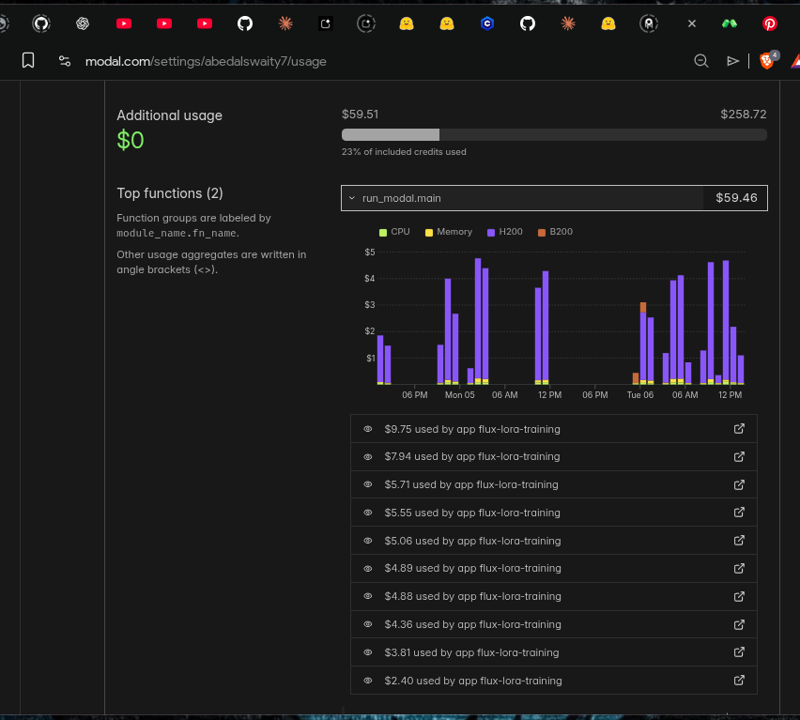
GPU Used NVIDIA H200
Total Training Runs 10+
Total Cost~$60
Time Invested Multiple
days of experimentation...
That's $60 and countless hours of debugging, testing different adapters, adjusting hyperparameters, and waiting for training jobs to complete, all to find the perfect combination.
⚙️ The Winning Configuration
Here is the exact configuration that produced the best results. Feel free to use it as a starting point for your own training!
job: "extension"
config:
  name: "aimaginedworlds_turbo"
  process:
    - type: "diffusion_trainer"
      training_folder: "/root/ai-toolkit/modal_output"
      device: "cuda"
      trigger_word: "aimaginedworlds"
      network:
        type: "lora"
        linear: 32
        linear_alpha: 32
        conv: 16
        conv_alpha: 16
      save:
        dtype: "bf16"
        save_every: 250
        max_step_saves_to_keep: 4
      datasets:
        - folder_path: "/root/ai-toolkit/training_data/aimaginedworlds"
          caption_ext: "txt"
          caption_dropout_rate: 0.05
          resolution:
            - 512
            - 768
            - 1024
      train:
        batch_size: 1
        steps: 5000
        gradient_checkpointing: true
        noise_scheduler: "flowmatch"
        optimizer: "adamw8bit"
        lr: 0.0001
        dtype: "bf16"
      model:
        name_or_path: "Tongyi-MAI/Z-Image-Turbo"
        arch: "zimage:turbo"
        assistant_lora_path: "ostris/zimage_turbo_training_adapter/zimage_turbo_training_adapter_v1.safetensors"
      sample:
        sampler: "flowmatch"
        sample_every: 250
        guidance_scale: 1
        sample_steps: 8
Key Settings:
Rank 32/Alpha 32: The sweet spot for style without overfitting.
V1 Adapter: The secret sauce!
5000 Steps: Enough for full convergence.
FlowMatch Scheduler: Native to Z-Image Turbo.
🚀 How to Use This LoRA
This LoRA was trained specifically for anime/illustration style. It works best when you keep prompts simple and let the trigger word do the heavy lifting.
✨ The Trigger Word
Just add aimaginedworlds at the start of your prompt:
aimaginedworlds, a girl with blue hair sitting in a cafe
That's it! You don't need complex prompting, the style is baked in.
🔌 Recommended: Z-Image-Turbo Prompt Template Node
For optimal results with this LoRA, use my ComfyUI-OllamaGemini node with the new Z-Image-Turbo prompt template:
It does magic prompting using Flux, Veo3.1, Qwen, Gemini, Banana Pro, Imagen4, and more!
❤️ Support My Work
Creating high-quality LoRAs takes real time, effort, and money. As you saw above, this project alone cost me ~$60 in cloud compute and days of experimentation.
If this LoRA helps you create beautiful images, please consider supporting my work. Even a small contribution helps me:
🖥️ Cover cloud compute costs for future models
🎨 Train more high-quality anime LoRAs
📚 Share my findings with the community
Every bit of support means the world to me and keeps me continue !
🛠️ Tools & Credits
This LoRA was trained using the amazing AI-Toolkit by Ostris:
🔗 https://github.com/ostris/ai-toolkit
If you're interested in training your own LoRAs, I highly recommend checking it out. It's powerful, well-documented, and actively maintained!
🙏 How You Can Help
If you found this useful, here are some ways to support:
💸 Support via PayPal — Help cover those GPU costs!
📢 Share your creations — Tag me so I can see what you make!

Made with ❤️, frustration, and a lot of GPU hours.
Description
FAQ
Comments (4)
Good job with the testing. What is your captioning workflow like for style loras?
i used gemini-cli to read images and generate prompts (gemini3-flash)
u can try vscode or antigravity also ... may u can use my workflow if u prefer comfyui https://civitai.com/models/737199/datasetprepare-gemini
I appreciate the howto