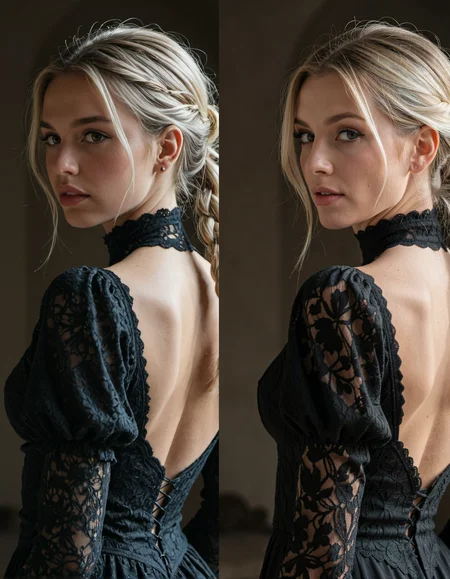
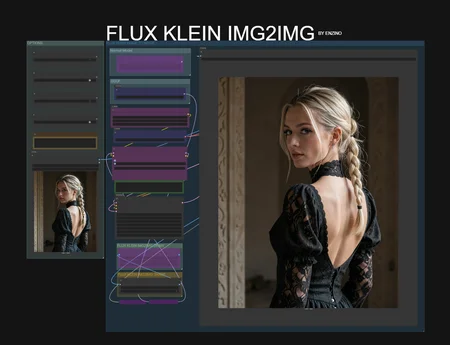
Flux Klein Img2Img Workflow
This workflow allows you to take an image generated with SDXL, Pony or other and refine it using Flux Klein in img2img mode.
🎯 Purpose
Keep the original composition, pose, and artistic intent, while benefiting from:
More natural rendering from Flux
Improved texture and lighting realism
Better anatomical consistency
Reduced SDXL artifacts
Cleaner skin and fabric details
⚙️ How It Works
1️⃣ Generate with SDXL (Pony or other model)
Define pose, framing, and artistic direction
Capture dynamic compositions
2️⃣ Send the image to Flux Klein (Img2Img)
Use controlled denoise strength
Preserve structure while enhancing details
Let Flux reinterpret lighting, textures, and depth
3️⃣ Final Output
More polished result
Balanced colors
Improved material rendering
Enhanced realism or stylistic coherence
🔥 Why Combine SDXL + Flux Klein?
SDXL (especially Pony variants) is excellent for creative poses and expressive scenes
Flux Klein excels at realism, material detail, and visual consistency
Together, they deliver the best of both worlds
🎛️ Recommended Settings
Denoise strength: 0.35 – 0.55 (adjust depending on how much reinterpretation you want)
Resolution: Keep original or apply light upscale
Guidance: Moderate, to avoid overcorrection