


Support me here via my Ko-Fi <3
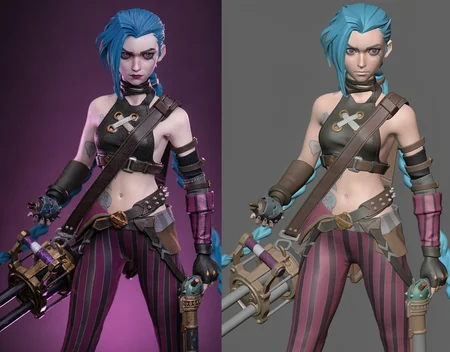
This is a LoRA trained or FLUX.2 Klein 9b that bundles in most of the parts of my Look Development series. This includes Material Preview mode, animation layout mode, & clay render/look dev model style all in one LoRA model.
Here's how to use it and descriptions of each mode:
Material Preview mode:
Turns the image into Blender's Material Preview mode, as if you hit the button to "see" the image in that mode. Useful for artists to see their models textured without the influence of key lights, only with a basic matcap and HDRI-based ambiance.
Use the following prompt to turn an image into Material Preview mode:
<llth>Turn the image into a preview render.Animation Layout mode:
Turns the image into the animation layout style, which is solid view but with basic colors assigned to the objects. No materials or textures are present, only rudimentary colors and the image's shape language, as well as a basic matcap for shading.
Use the following prompt to turn an image into Animation Layout mode:
<llth>Turn the image into a layout model render.Clay Render/Look Development model mode:
Turns the image into a clay render, which is the solid view of the objects. No materials or textures are present, only the image's shape language, as well as a basic matcap for shading.
Use the following prompt to turn an image into Clay Render/Look Development model style:
<llth>Turn the image into a look dev model renderFor all of these styles, use at strength 1. I haven't tested the base model of Klein yet, but it works great with the 4-step distilled version of Klein.
Description
Initial release.
FAQ
Comments (9)
What's the use case? Is blender required? I'm not sure if I understand, if I have a model in blender I can already see these sorts of views easily
From the Qwen Lora:
"This LoRA for Qwen Image Edit (non-plus, ie. original model) allows you to peer into what a scene might look like in it's animation layout phase. This can be useful as a learning opportunity, since this can give you clues on how the scene was actually animated, giving you insight on how it could have been done."
Seems useful if you're a 3D artist. you can take a reference and basically turn it into a simpler view to start making your model.
@SoyKaf without shading and lighting i think it's even better for image to 3d models like Trellis, Hunyuan 3d, etc.
use case is foolig customers that you worked hours and hours on 3d modelling.but you created it with single click (for architecture)
@astroaida lol I had to stop myself from commenting a variation of this initially.
bruh 💀💀
This is like the coolest thing I've seen on this site :0
works perfectly, thank you
Could you make flat light version, color pass mode ? Like no matcap specular in it ? Could be great for pbr workflow with realistic materials.