
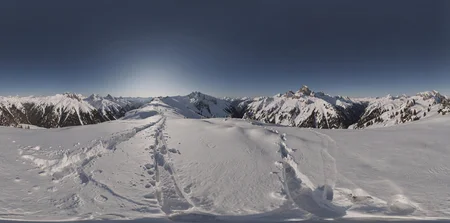


Trigger word is : HDRI 360 panorama
It will not produce the depth of a true HDRI. But can be used as environment texture, the perspective is correct, seams will occur on the edges, can't really do anything for that.
This LoRA can be used with Flux2Klein 9B.
Your inference settings should use a 2:1 aspect ratio, example (2048x1024)
4mp works (2560 × 1280)
This LoRA will be used for my blender addon's next update (already up) https://pgcrt.github.io/
Description
FAQ
Comments (8)
When this becomes true 32bit it'll be an absolute game changer
Nice! I was hoping for something like that for Klein 4B , but 9B will do. Thanks a lot
> seams will occur on the edges, can't really do anything for that.
https://github.com/leejet/stable-diffusion.cpp/pull/914
Not sure if there's an equivalent for other inference backends, but this one works pretty well with --circularx.
Oh there is always multiple ways to avoid it, but I said that to inform that this could happen out of the box, without additional hasstle ,) Most of the time the camera doesn't do 360 rotations anyway, and the seams can barely be seen in the reflections so it's fine enough
yeah you can. cut it in half, move the right half to the left side and the left half to the right side, inpaint the seam.
TIP: in image 2048x1024 for seam fix I usually put the image into gimp3. Then do layer - transform - offset x offset 1024 so - the seam appears in the middle. then paint over the seam with bright red brush and put back into the comfy , with same prompt but in edit and at start of promt I add "remove red", (or just sometimes inpaint with sd1.5), then paste back the image with fixed middle part and erase sides to avoid new seams which migh appear after such fix,
here in gimp I also test and view panorma - filter - map - panorama projection,
if it is nice next step is - seed vr2 to 4096x2048 and after seedvr then hat_x2 or dat_x2 upscaler to 8192x4096
i have a git repo with nodes and a workflow that can fix the seems
as a vfx artist of 20 years it makes me chuckle that people are still crying over uv seams. some things never change. for real, just clone stamp with offset in PS /gimp or if you are old and lazy like me, use this nodepack's panorama seamfixer node: ComfyUI-Panorama-Stickers