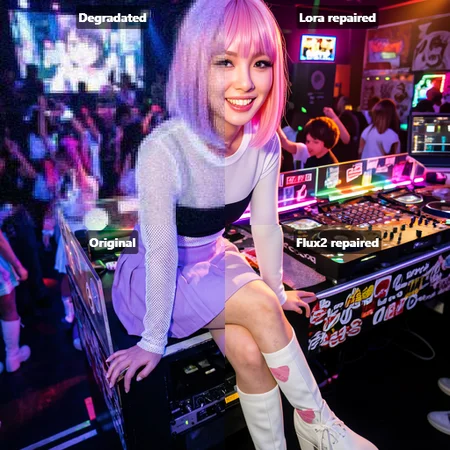
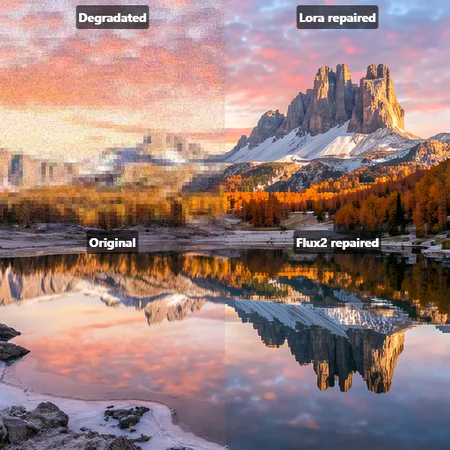
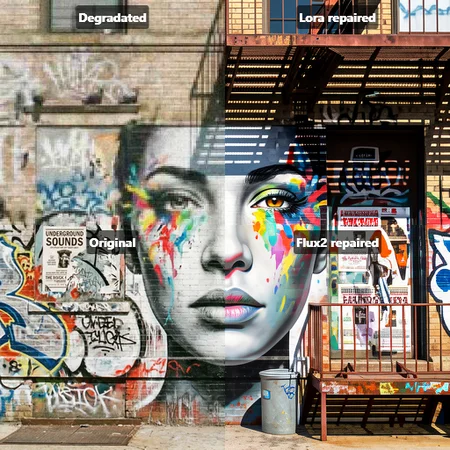
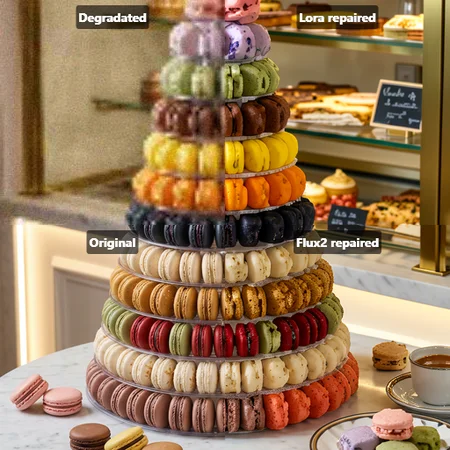

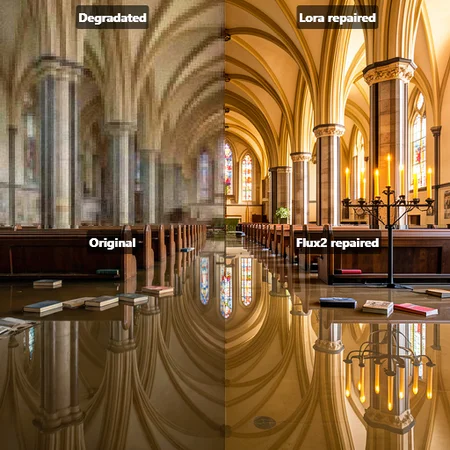
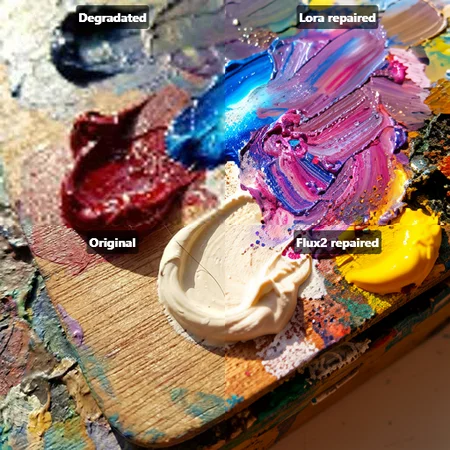
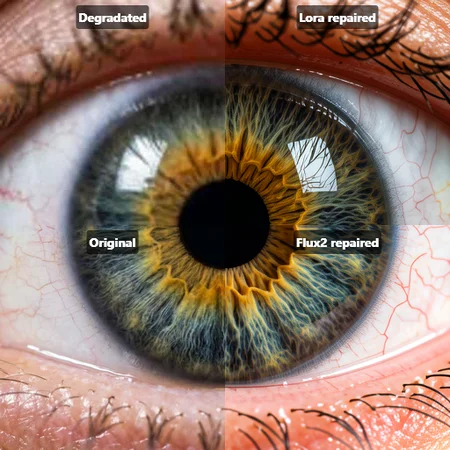
Fixed the issue, now it works with gguf models too
Image Repair Flux.2-Klein9B
Hey everyone! This is my second LoRa. So, I took the original idea from Link
How it works:
I trained this using a LoRA subtraction method (clean originals vs. degraded/pixelated versions). Because it extracts the exact "delta" of the degradation, it only targets the artifacts and noise without altering the core of image. It may not work with all images, on very complex detailed patterns it can hallucinate like the original flux2, try a different seed. Also, as you can see from the examples, the original flux2 saturation is poorly controlled.
Training details:
Latent: 512X512 (Also lora work with higher resolution and other aspect ratio)
I tried 1024 latent size when training, but OOM forced me to optimize the settings.
Lora rank: 16
Steps: 2000
Grad_accum: 4
Source images: 227 (all created in 2k/4k NanoBananaPro + Some Flux2.Kein9B)
These settings were before lora was weakened. She was initially retrained. this is 0.3 Strength of original train.
As with the author of the idea, all settings were created by a neural network (not chatgpt) and Python scripts were used for configuration.
Recommended Settings:
LoRA Weight:
1.0Trigger Words: make image high quality
CFG: 1
Steps: 4-6
I hope for positive feedback, but I hope you find this version useful.
Also think it can be improved further. Later, soon...
Do not use lora with the ImageScaleToTotalPixels node. Some image with this node is totally sh*t
Description
FAQ
Comments (32)
This model works amazingly well. Combine it with WWAA Batch Image Loader and you can upscale/edit and entire folder of images in one click.
LOAD LORA: klein\repair_image_Flux.2-Klein9B.safetensors: 1.0, 1.0, LBW=None, A=None, B=None, LOADER=None lora key not loaded: double_blocks.0.img_attn.proj.lora_down.weight lora key not loaded: double_blocks.0.img_attn.proj.lora_up.weight
I keep getting these errors running the lora in comfyui with Klein 9b gguf model. Am I doing something wrong or what is going on?
Chatgpt said:
The LoRA contains weights targeting specific layers Your currently loaded base model does NOT have those layers Therefore ComfyUI cannot apply those weights In other words: the LoRA was trained for a different model architecture.
i use flux-2-klein-9b-fp8
@Skirg So it wont work on the full model or distilled? thats a bit sad.
@ProARTcative check the other comment chain with more comments, someone used exact same model Op listed here, but got this error and we were thinking it could be some nodes in workflow that break it.. hard to say.
It's hard to tell how well this works from the split screen. I think it might help more people to understand if you showed 4 full images in the grid instead of 4 quadrants of one image. Right now, the "without lora" images look better to me, but they don't contain the most important part, so I know it can't really be judged based on these examples.
I know I can try it myself, and I will, but just letting you know why more people might not be downloading it.
it works. image is detailed and gets a colour fix.
It doesn't work. It doesn't affect the image at all.
Create a comparative workflow with and without LoRa, and you'll see.
It may not work well, but it still works. With such a small data sample and my resources, I tried to squeeze the maximum out of this training method. Maybe I should use a different training architecture
WWWonder, check comfy log if you have the same lora key not loaded error I did..
@Bliney
Yes, there are many lines with this error:
lora key not loaded: double_blocks.0.img_attn.proj.lora_down.weight
@WWWonder I'm using gguf version, maybe for some reason this Lora doesn't work with anything but the flux-2-klein-9b-fp8 model Skirg uses?
dont work "lora key not loaded"
i had those error once , was an onlin train from civitai 1 month ago (1 eday later they turned off flux2 online train)
@Bliney
I'm using flux-2-klein-9b-fp8, so that's probably not the issue.
@WWWonder damn.. then it's probably something in the workflow.. maybe we both use some nodes that cause problems.. maybe the lora loader itself?
@Bliney witch test this lora, i use base template without node "image to total pixel", and add "lora loader only"
@Skirg
@Bliney
QWEN AI claims that the double_blocks and single_blocks keys are typical for Flux.1 models.
This also applies to the error I'm getting in ComfyUI.
@WWWonder Chatgpt said something similar but I think it's just talking about old info, using flux 1 with SDXL lora or something, I'm 100% on flux2 klein 9b gguf (all other klein 9b lora's work correctly)
@WWWonder I know that no major model yet knows about the Flux2 Klein architecture. I managed to find the right parameters to train for Flux2. It took a while. Try another lora load nodes. Still, lora won't work for gguf anyway, if you use it.
@Skirg Well, I've tried a lot of options, with and without CLIP. And I use fp8.
Can you provide separate images with and without LoRa? With metadata.
Sorry, I used a basic template for tests. For the merged image, I used a third-party app, not comfyui. I just added Lora Loader after loading the diffusion model.
@Skirg Please just post any pairs of images with metadata. This could help identify the cause of the problem for many people.
Workflow?
Following for same.
Unfortunately, the new version still has the same "lora key not loaded" errors and does not affect the image in any way, just like the previous version.
maybe he could upload one image from comfy with the workflow ...
I looked into the "key not loaded" issue that cause this lora not to work properly on various versions of Klein 9B.
It's just a matter of keys being named a certain way that some lora loaders do not recognize.
Basically, you have stuff like: single_blocks.10.linear1.lora_up.weight when the lora loader expects something like diffusion_model.single_blocks.10.linear1.lora_B.weight.
You can simply rename the keys with a python script and it will work. If the author of this model needs some help doing this, I can show how.
fixed the problem, thanks for the help)
Thanks! I've got a few other LoRAs in my collection that do this, and I never realized how easy it was to fix.
Yes, LoRa now displays no errors in the console when used :)
Unfortunately, this LoRa has virtually no effect on the image. The difference between "with LoRa" and "without LoRa" is negligible.
Im pretty sure the point of this lora is to prevent iterative degradation?
When you edit image with flux 2 klein 9b, there is sliiiight color change even in image space where you dont make any changes. Then if you use that output pic and edit something else in it, itll introduce these changes again.
After 1 iteration, the "yellowing and discoloration//depixelation is minimal, less than 1%. Thanks to alpha editing build to model, which is alredy much better than most edit models out there, but its still there.
After 3 edits, youre looking at 2023's piss filter Dall-E on your hands xD