FOR Automatic1111 / WEBForge
how to use:
https://civarchive.com/articles/3990/inpaint-sdxl-for-the-manipulation-of-your-images
Inpaint_Jugger @KandooAI (confirmed thx)
original: https://civarchive.com/models/133005/juggernaut-xl
...
Inpaint_Pony - its the same model:
https://civarchive.com/models/341631?modelVersionId=497437
its not like that good like SDXL_inpaint, its a bit noisy, use Euler_a
...
you can make it yourself, eg modelmerger(a1111)
https://civarchive.com/articles/3990/inpaint-sdxl-for-the-manipulation-of-your-images
works even better than the normal inpaint function that all SDXL models have allready, so it works like the old SD15 ... ->
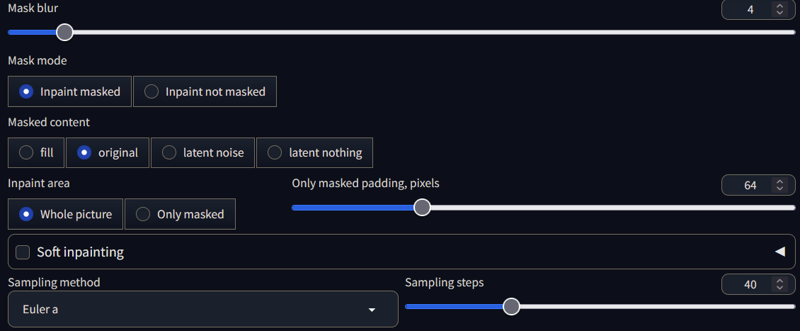
but if you dont want to wait for all new inpaint models i can suggest:
FooocusControl
https://github.com/lllyasviel/Fooocus
it downloads a lot of stuff and is also a stand-alone txt2img machine not as complex like automatic1111 but is has a great inpaint option (klick advanced).
eg. you can choose 4 images in different ways to create one image aslo masks also prompts
AND all normal models work you dont need an special inpaint model !!!
Description
FAQ
Comments (107)
Looking at the file size, it should be a full model with inpainting capabilities.
God bless you!! /\
Yeah thats fine with me :) Good work :)
THY !
hopefully someone can use it ;)
@sevenof9247 I´ll added you to the Suggested Resource List on the JuggernautXL CivitAI Page :) Also i linked your Model in the Description :)
Thank you. What is the difference between FooocusControl and Fooocus?
its the same
it's a fork of foocus expanding on it by implementing some mostly controlnet based functions. most of these can be used in other uis, too. there has e.g. been an experimental in/outpainting controlnet model available for over two weeks now compatible with all sdxl based checkpoints from destitech. you can download it here
@eurotaku
if i load the model
Creating model from config: D:\stable-diffusion\webui\configs\v1-inference.yaml
so normal inpaint in automatic1111 dont work
i have no idea with controlnet its to complicate fo me ^^
@sevenof9247 yeah, no idea if it really is supported by auto1111 already, as it relies on the devs of the controlnet devs to implement it i think. but still good to know there seems to be different approaches available
Did you bake in the inpaintingVAE or the regular base VAE ?
the regular i think ... i was happy that it worked (be cause without i saw some deinterlace effects)
Doesn't work for me. I updated a1111, updated 4 files.
Same here. I don't understand what "load this inpaint_model -> in cmd window it should be created with the sd_xl_inpaint.yaml file !" means (I don't have that file)) or what "its not final in automatic1111 (30.12.2023)". means. Is it supposed to load and work in 1.7.0?
I can't load it. It all ends in sadness, anguish, and RuntimeError: Error(s) in loading state_dict for DiffusionEngine:
size mismatch for model.diffusion_model.input_blocks.0.0.weight: copying a param with shape torch.Size([320, 9, 3, 3]) from checkpoint, the shape in current model is torch.Size([320, 4, 3, 3]).
sry ...
no, its not supported in V 1.7.0, but you need it
and it works only with master branch
yes you need to download these 4 files, i dont upload here because i dont want update it every day if somewhat is new ;)
i dont know what you do with inpaint, may take a look at fooocus ...
@sevenof9247 "its not supported in V 1.7.0, but you need it" I understand completely but I don't understand.
@Optimum
seems it works more than 300 ...
if you dont understand than dont do this and dont use this model ;)
works in Comfy you think ?
sry i dont know ...
Works perfectly in comfyui.
use checkpointloader
@suede2031691 Did you need to do something extra? I get these grainy weird images.
Edit: Fixed it. I was using segsdetailer and I needed to turn off 'noise mask' then it was fine.
@suede2031691 @haraririri Can you guys post the workflow? I can't do it no matter how I try。
your otherwise thorough description still misses one important thing imo: could you perhaps elaborate a bit on how this inpainting checkpoint has been created? what exactly is the difference? can this be done to other checkpoints, too? if yes, how? is there a guide for it available perhaps?
oh i must have take look again... cause i had some try and errors ^^
in main its the same like create an SD15 inpaint model
the links i have provided they talk about...
so you need the base and the orig_inpaint and your model
ok, thx, will have to take a closer look then
I don't know what it is about this model, but Auto1111 really doesn't seem to like it. I've made sure all 4 files are in the right place, got the correct yaml files and everything, but it just crashes out with an error along the lines of:
raise ValueError( ValueError: An event handler (create_zoom) didn't receive enough output values (needed: 5, received: 4).This doesn't happen with any other model I've tried. I wonder what it is about this model that's causing the issue.
cant really tell ...
you are on Main branch in automatic1111
if you load the model after you load an normal model, the line with the sdxl_inpaint,yaml are procced?
so its still new ;)
If anyone is trying to load this model using 🧨 diffusers library you need to specify the original_config_file parameter for from_single_file method, otherwise you'll get an error saying tensor sizes do not match.
You can do it as in here
Thank you for making this, but which folder should it be placed into? It's probably something obvious like the config folder, but I'd just like to be sure.
It doesn't have to be in a specific folder for the diffusers as long as you provide the correct path to the SDXL pipeline's from_single_file method.
I used the config file direct from the PR mentioned as input to diffusers and it worked.
I notice that strength=1 gives bad results in diffusers. Very grainy. Not sure about other platforms.
Meanwhile strength=0.999 gives images with better aesthetics but some are nonetheless sourced from the original (so e.g. a cropped black background stays mostly black).
I also notice that it doesn't colour match very well.
I don't know how this compares with other platforms, or if its my fault for using a bad default component or something.
Nonetheless, a remarkable step forward in the otherwise bleak landscape of SDXL inpainting.
@WhatHoPipPip
sry i cant tell what is with diffusers i dont work with that ;)
@WhatHoPipPip diffusers' inpaint pipelines starts from pure random noise when strength is given as 1 opposed to other tools like A1111 and comfyUI. This is why you see a sharp difference between 0.999 and 1, the former still holds a highly noised version of the base image for the denoising process.
By the way the current default strength value for diffusers inpaint pipelines (from v0.20.2 and above) is 0.9999.
@kanikow I've been using 1.0 with SD1.5 inpainting and the results come out great, so I'm confused by this. Full noise for strength=1.0 is exactly what I'm after - if the non-inpainting juggernaut model is capable of producing good quality images starting with pure noise, I can't see why this isn't the case for the inpainting juggernaut.
My conundrum is that strength=1.0 gives very grainy results, something that looks almost like it was one or two steps away from finalising. strength=0.999 still takes a lot of 'inspiration' from that masked area. As an example, say I have a picture of an object on a black background. If I mask out the black background and set a high strength, no matter what I do the background stays predominantly black. I tried the same with a white background, and the background stays predominantly white. Tried the same with blue, etc.
This is not to do with this model itself. It feels like it's either a mismatched component on my end, or the sdxl inpainting code in diffusers itself is making a mistake. I'm not too familiar with the diffusers codebase, but I will take a look and see if I can see anything glaringly obvious.
If anyone else is not having these issues (either the failure at 1.0, or the over-reliance on the masked area for strength ~ 0.999), I'd appreciate knowing what your config is - what vae, scheduler, etc.
@WhatHoPipPip
in automatic1111 it give besides the noise, 4 options to handle the inpaint .
fill, original, latentnoise, latent nothing
so if i have a white wall i must choose fill, to get something new in the mask area
谢谢你制作这个,但是它应该放在哪个文件夹中?它可能是像配置文件夹这样显而易见的东西,但我想确定一下。
@tas519 搜索原始文件......并保存备份
For automatic1111: You have to check Control Type as "All" and the preprocessor as "inpaint_only+lama". You also need "controlnetxlCNXL_h94IpAdapter" https://civitai.com/models/136070?modelVersionId=155532 as the model. You can also play around with the control mode. Works great so for this specific inpainting sdxl model.
There is no need for changing files in a directory etc
i have no idea , but ok ...
maybe you on DEV and the updated files are ready
anyone has an idea how to put two face loras in one pic with a mask ?
i followed that video but for SDXL it runs into an controlnet error (SD15 worked) ...
Is there any way to contact you ? Discord ? Mail ? Anything ? :D
omg, why ?
i dont know, i have looked at it some weeks ago but its too confusing for me that online portal ;)
@sevenof9247 Just to talk a bit about some stuff :D And since you are from Germany (if your profile is right ;) ) we can talk in German ;)
@KandooAI
ahm okay, aber dann versteht uns keiner mehr ? ;)
@sevenof9247 Ich bräuchte halt ne Mail Adresse oder so um dir schreiben zu können :D Ich würd dir gerne den V8 Checkpoint einen Tag früher zukommen lassen und du könntest eventuell passend zum Release direkt eine Inpaint Version für V8 veröffentlichen. Das geht halt schlecht über die Kommentarsektion :D
@KandooAI
klar verstehe... ich lasse mal die nächste nachricht 1h lang online, dann kann ich die ja löschen
@sevenof9247 natuerlich verstehen wir euch :)
Automatic1111 throws an error when I try to use this checkpoint:
size mismatch for model.diffusion_model.input_blocks.0.0.weight: copying a param with shape torch.Size([320, 9, 3, 3]) from checkpoint, the shape in current model is torch.Size([320, 4, 3, 3])
have you read my instructions ?
@sevenof9247 your "instructions" barely exist.
@sevenof9247 your instructions are worse than doctor prescription writings
@ArconSeptim What's wrong with the instructions? Is it hard to understand that you have to follow the link, download the specified 4 files and put them in the right directories?
I do not want to offer a simple solution, as it has not yet been finally implemented ;)
@sevenof9247 well what your complex solution then? I'm running A1111 off the master branch and it has all the things you mentioned merged by now, and somehow it's still not working...
@spam488 so even iam not an expert, you can give me any information about the error ? and maybe wait until its final or try foooocus
After copying the 4 files as in the instructions, copy the .yaml file to the directory where the inpaint model is and rename it to the checkpoint. That fixed it for me. Instructions were quite unclear
Simply pull the dev branch of Automatic1111. It will work out of box.
anyone has an idea how to put two face loras in one pic with a mask ?
i followed that video but for SDXL it runs into an error (SD15 all is working fine) ...
Hey your work is great and I wanted to ask you if you could do something similar with my checkpoints, especially with the unstable diffuser checkpoints.
We can talk more on discord, my nickname there is: yamer_ai
I have also seen your other conversation with KandooAI and that is the reason why I am contacting you, keep up the great work 😸👍
omg, what have i done ^^
i delete the message with my email below in 1h
No worries mate, just send me a friend request on discord, that way we can chat there and talk more about making an inpaint version of my models ;3
Oh yes, a future Unstable inpaint ! 😍
@sevenof9247 thank you for sharing your mail :)
@sevenof9247 sent you a mail now. :)
it appears, according to that github discussion, creating an inpaint model of whatever model you want isn't hard.
A: sd_xl_base_1.0_inpainting_0.1.safetensors
B: your SDXL model
C: sd_xl_base_1.0_0.9vae.safetensors
M = 1
Interpolation Method = Add difference
Save as fp16 = True
Bake in VAE: sdxl-vae-fp16-fix
anybody can do that in 90 seconds on their own PC in Automatic1111 webui.
alternative download links are here: https://huggingface.co/benjamin-paine/sd-xl-alternative-bases
The InPaint model I created using this method gave me the same size as the official InPaint model, instead of the 6.46GB specification. And it generates exactly the same image as the official InPaint model.
So I create it using comfyUI and get the same size model as uploaded here, with repainting ability and the generated image is different from the official InPaint model.
yes ... sure, but not everyone wants to or can do that ;)
and for me this method is ok, same seed and not the same picture ...
@suede2031691 Can you post the workflow? I can't do it no matter how I try
@shapeshifter83 Nobody claimed to be that it´s hard. I personally already done it months ago. Problem was that it was not running in Auto1111, that changed recently.
It´s actually the same Workflow that we have already seen for SD 1.5 Inpaint Models.
Anyway...People asked for the Inpaint and he provided it. Everybody wins here :D
@HitManLee ComfyUI_examples/model_merging/model_merging_inpaint.png at master · comfyanonymous/ComfyUI_examples (github.com)

You just need to replace the first node on the top left with the unet loader and load the official Inpaint model.
can they do turbo?
@dchen19
i dont know,
btw i dont like turbo ;)
because you can tune if you have 40-60steps
if you have 5 steps than 6 steps is a totaly different picture ;)
@dchen19 I've tried getting Inpaint to work with Turbo, but I didn't got it to work...
So if you got it working, it would be amazing to know how!
@suede2031691 Forgive me for not being able to tweak the mask strength as much as the other models. When denoise is below 0.75, the masked area is gray
@HitManLee
in automatic1111 you can choose 4 options below 0.75 should work "original"
My issue is that the XL base inpainting model is not very good - at least, not compared with SD1.5 inpainting (which is very, very good).
The Juggernaut XL Inpaint model is significantly better than the base model. It is no scratch on SD1.5's inpainting models, but it is the best we have, and it's inevitable really - 1.5 gets more attention than XL and it feels like XL is still quite niche.
To give an example of this, the Diffusers inpainting API is completely broken at strength=1, which is the only strength I'm interested in using (0.9999 still brings in properties of the original). In diffusers, strength=1 results in grainy outputs, and the recommendation is not to use it. It has been this way since the release of the SDXL inpaint model, and no one has fixed it. That isn't a complaint, it's an observation - this stuff is just too niche to gather a lot of interest.
I think things like this Juggernaut XL inpaint will encourage more activity. I certainly hope so, anyway.
@WhatHoPipPip
thanks for the input
looks like no one has been working on it for 6 months
but if you want to have other impressions of impaint try "foooocus" also with outpainting etc, i mentioned it below
@HitManLee load img->VAEEncode->SetLatentNoiseMask->KSampler. Then set the KSampler denoise. The simplest process is this.
@HitManLee Download that image I uploaded of the man's face (png) in the post section below and drag it into your comfyUI page.
@suede2031691 Thank you very much! But unfortunately, I replaced the model in the upper left corner with the v8 inpaint on this page, replaced the image with the local one and masked the area, ran it and it produced a change, but it was just a subtle change in color, almost no difference at all, and I don't know why, and it's very frustrating.
@suede2031691 It worked after I updated comfyui, I updated it a few days ago but it didn't seem to work before. After updating I finally got it to work after using the latest InpaintModelConditioning.
It shows:
Feature News.
[Inpaint Model] If you use the inpaint model with a denoise value below 1.0, you can achieve proper results by utilizing the recently added InpaintModelConditioning in the latest ComfyUI.
@Lush360 so far it doesnt work unfortunately
ok, even if i don't like the LCM you can test it. i did it via
"Add network to prompt" or load it as usual lora
but only euler or lcm sampler work with it more or less (no noise but less quality)
THANKS
Anyone know how to add to invoke?
sorry dont now, but seem you can use normal models like in fooocus ;)
Yes, put file sd_xl_inpaint.yaml into configs\stable-diffusion and then go to file configs\models.yaml and find line: sdxl/main/juggerxlInpaint_juggerInpaintV8 and there change line config: ... to config: configs\stable-diffusion\sd_xl_inpaint.yaml. This works for me
that works?
@csjk99686 yes ... but invoke is such as slow ! use fooocus!!!
I didn't get it to work with regular A1111, but it's working quite nicely with A1111 Forge. Well done, thanks for this!
Doesnt' work. No matter instructions, file to download. Miss there, miss here, any change a new error.
Doesnt' work. And that's all.
you are new here so be patient ...
you asking no questions... so
@sevenof9247 1 year is not so new... and the standard model is superb. but this inpaint model works only in Fooocus (and works quite well have to say). and that's all :-D
I didnt ask anything bc I solve problem with another inpaint model that works. nayway tnx for caring :-)
@santamadre99956 for 7000 other it wokrs also in automatic1111 ... for me too, since v1.8.0 is allimplemented you need nothing to do ...
@sevenof9247 as I told you, tnx a lot for good job on base model. for inpainting I have found else that works without "instructions". btw 7000 but I can read more than one comment declaring problemes ("have you read the instructions?". yes. and got errors anyway. there is no reason to insist when there are other ready to go solutions)
@santamadre99956 It works for me - you must be doing something wrong.
How appropriate would it be to use an inpaint model in Krita?
i dont know krita, i dont believe it can handle SDXL models ?!?
@sevenof9247 yes it can: https://i.imgur.com/YtmXdaJ.png

@modzhahead158 okay, than maybe try or ask the comunity on github if inpaint models work, for automatic it give for every type a yaml file for each modeltype: sd15, sdxl, sdxl_inpaint and so one.
so inpaint can be also a normal sdxl file but in autmatic sdxl_inpaint works better, i know fooocus there inpaint models not usable... its also a good inpaint option at all ;)
I’m getting the following error in the Fooocus prompt: AttributeError: ‘NoneType’ object has no attribute ‘shape’
if you read my description ... in fooocus you dont need a special inpaint ;)
@sevenof9247 are you saying this inpaint model will not work for fooocus sinec its a special inpaint model? I don't quite understand what you're trying to say
@Babbage78 yes, fooocus has it's own inpaint node that turns any model to inpaint model. You probably already know it but this might be to somenone else.
@varchyvas any model except pony other than default base one. is there work around to make cyberrealitic pony to run on fooocus at all?
@nicetry20010 no, ponymodels have a different base... foocus internaly makes inpaint-model from all SDXL-based -- threfore this is a more or less good option for pony-inpaint, but you need a1111/forge-web-ui or swarm-ui
Details
Files
inpaintSDXLPony_juggerInpaintV8.safetensors
Mirrors
inpaintSDXLPony_juggerInpaintV8.safetensors
inpaintSDXLPony_juggerInpaintV8.safetensors
juggerxlInpaint_juggerInpaintV8.safetensors
inpaintSDXLPony_juggerInpaintV8.safetensors
checkpoint_sdxl_generation.safetensors
MyBack_SDXL_JuggerXL_inpaint_v8.safetensors
juggerinpaint.safetensors
juggerxlInpaint_juggerInpaintV8.safetensors
juggerxlInpaint_juggerInpaintV8.safetensors