


Version 7.
Fixed the issue with body proportions. You still can obtain extreme body proportions with loras of course.
Right now, I'm using:
UI: ComfyUI with comfyui_facetools (a rotation aware face extractor/merger made by me) to fix the faces
positive quality prompt: masterpiece, best quality, drop_shadow, subsurface scattering
negative quality prompt: extra_hands, extra_arms, bad_anatomy, fat, overweight, abs, muscular, fat_rolls, pubic_hair badhandv4 realisticvision-negative-embedding epiCNegative
1st pass:
sampler: dpm++ 3m sde
cfg: 3.8
steps: 20
HiRes and subsequent (like face detailer) pass:
sampler: dpm++ 2m sde
cfg: 4
steps: 8
upscaler:
model: 4x_NMKD-Siax_200k
controlnet: I know this can be a bit surprising, but it works really well in my use cases. The trick is to give some freedom to the inpaint controlnet with
Scaled Soft Weightsand inpaint the whole image, no mask. So, if there was noScaled Soft Weights, or ifbase_multiplierwas set to 1.0, it would have no effect, as it would repaint the same picture as the one provided inimage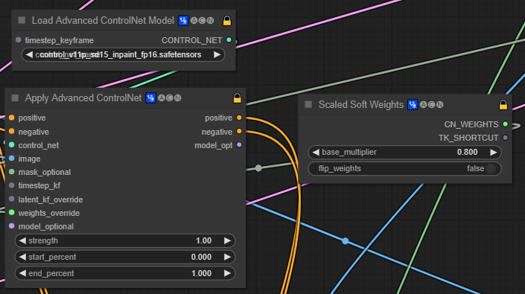
Version 6.
cfg scale can be quite different. I got nice results from 2.5 to 7 (I haven't really tried higher). Also v6 doesn't even need quality tokens in the positive prompt to give good results. At least as long as realisticvision-negative-embedding and epicrealism-neg are in the negative prompt.
Version 5.
The model should require less token in both positive and negative prompt to get realistic results, now.
Low CFG scale ~2.5 gives a nice photo-realistic look to the picture and allows you to go a bit crazier with the weighting in the prompts.
Heun sampler with as low as 8 steps also gives quite nice results.
Version 4.
Initially built to create lifelike portraits of characters from the novel I'm working on, whose title is Endless, thus the name of the model.
This is a rather complex merge, and sadly I did not took notes.
Prompting
Example of prompt for a realistic image (replace {prompt} with your subject):
professional photograph
{prompt}
((video grainyfilm)), natural cinematic lighting, ((professional photo highly defined))
realistic, best quality, photo-realistic
8k, best quality, masterpiece, realistic, photo-realistic
You can add more details using this lora which gives pretty good results: Detail Tweaker LoRA (细节调整LoRA)
Example of negative prompt for a realistic image:
(text, signature, watermark, logo, ux, ui:1.3), monochrome, (2D), (3D), ((camera)), ((cartoony)), (CGI), ((drawing)), ((lowres)), ((painting)), ((sketchy)), ((The Sims)), (ugly), ((blur)) (worst quality, low quality, normal quality:1.3), lowresNSFW content is possible, nsfw, uncensored in the negative prompt can help get rid of them.
More tips on prompting
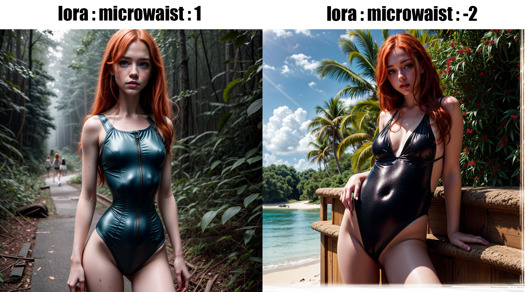
You can actually use negative weights on lora/lycoris. Here is an obvious example with Microwaist Lora:
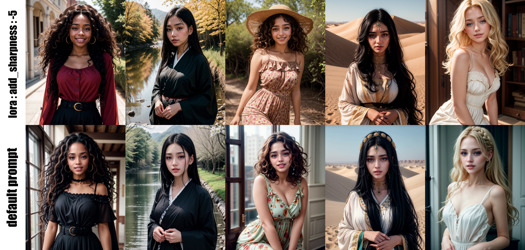
Using this, you can use Sharpness Tweaker LoRA (锐度调整LoRA) to lower the sharpness of the image, resulting in a somewhat more realistic picture as if it had been taken by an old camera. Here is an example showing the effect on girls of various ethnicities:
Description
v2 is also known as stage9.
This version has an added VAE.
As previously, I tried to maintain high resolution quality and realism. I found it works pretty well with the 8x_NMKD-Superscale_150000_G upscaler which you can find here : https://icedrive.net/s/43GNBihZyi.
Compared to the previous version, this one should probably have a bit sharper and less messy skin textures, while still maintaining the beautiful skin imperfections.
You can play with the factor in (worst quality, low quality:1.7), reducing it to 1.3 for example will yield an image where skin is a less textured. This can be useful if you find that the skin is too shiny or has too many moles.
FAQ
Comments (18)
why v.2 is twice smaller then v1.1?
I pruned v2. If I recall correctly, I also pruned v1.1. But I've made some modifications in v2 and maybe this caused the reduced size. I have a unpruned version of v2 on my computer, which is a bit less than 6GB. I've tested both pruned and unpruned versions they seem to produce the same pictures.
Anyway, if 2GB is as good as 6GB, it's just better to used 2GB version, as it allows for more flexibility with more free VRAM.
Whats the upgrade in v2 if I may ask ?
It's probably a "matter of taste upgrade". Basically, I noticed that sometimes the skin texture gets blown up in v1.x. I tried to fix that by making the skin a bit smoother and also took some time to reintroduce more "sci-fi/fantasy" feeling to the model, in hope of increasing the model's creativity.
Exceptional model. Do you have a training guide or could you please share the tools you use to train this model ?
Any specific steps you follow to get the exceptional skin detail ?
Best realistic model available right now IMO, if anyone can top this, I'll literally suck you off (no homo).
You didn't put a time limitation on that challenge, yikes...so in time it WILL happen. I'd get those lips ready... (for whoever cashes in; it won't be me)
model,NO.1!
I am getting very washed results. why is that? i thought it was a VAE issue but I have vae-ft-mse-840000-ema-pruned in my VAE folder.
Is it selected in the settings ? Can you give me an example of your prompt/settings ?
@davcha selected in the settings??? xD??
@davcha so i retried after reviewing and correcting my settings. its still bad. how can i go ahead and send you the generational data?
@Mephimoloch You can post them here, or reach me on civitai discord, as Thyri.
By "selected in the settings", I mean if you go to the settings tab -> stable diffusion, there's an option to select the default VAE. But I'm still not sure what you mean precisely by washed results, so the best thing would be to reach me on civitai, and send me an example I think.
真的太棒了!!!!爱了
Is it posible to make inpaint model version?
It is, but you'll get much better results if you use controlnet inpainting models instead.