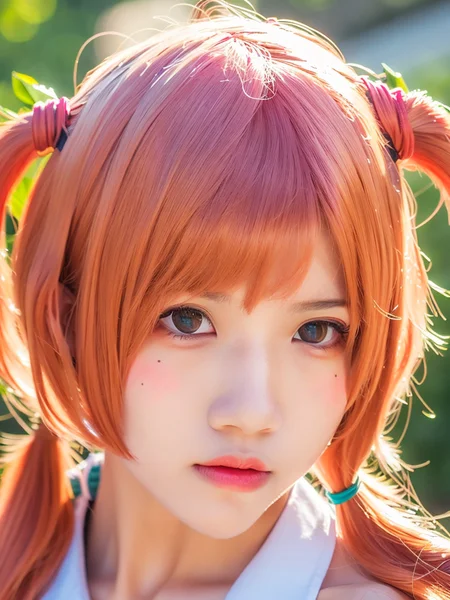
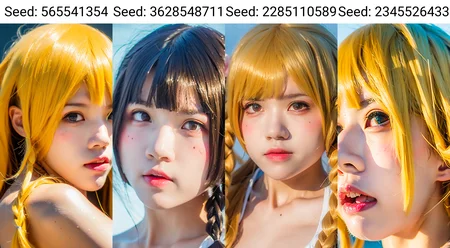
仅作学习目的,详细记录一下目前得到较好结果的训练过程,希望分享一些训练经验。
DO NOT POST YOUR NSFW WORKS HERE.
This model is clearly over-baked, and does not respond well to prompts like hair color (probably caused by the mis-tagged training data I've fed to model), I'm still working on it.
Notes on usage:
Add "hair over one eye" to your negative prompts, I've fed some Rem cosplay which were not tagged well, they seem to be toxic in the results.
LoRA weights around 1.0 should work fine when this model is the only one applied on.
The new sampler UniPC works well for me at a iterating numbers around 30.
Try different photo types such as face close-up, portrait and full-body, and different angles like from side, from behind and from above, the model will give decent results.
What is the purpose of this model?
I've spent last few days training LoRA models, and found out that most of my models were able to give a decent headshot or protrait output, but failed to keep the face structure when it came to a full-body photo.
Therefore, I'm looking forward to train a model with the capability to present both close-up and full-body photos.
The results are quite good, try different types of photo which are of various values on the proportion of the face in the photo (face close-up | portrait | full-body), the model will give good results to all of them.
Training Setup:
Using Akegarasu(秋葉)'s Lora-Scripts (based on Kohya's).
The whole training process of this model is completed on the AutoDL.com with the system image provided also by Akegarasu.
The base SD-model I've used to train this model is simply ChilloutMax, it may work with other SD-model.
Detailed scripts settings:
network_dim=network_alpha=32:
higher network dimension settings do not give better results for my datasets, so I pick the one with smallest file size.
resolution="768, 1024":
An aspect ratio of 3:4 just matches perfectly with the ratio of headshot photos.
batch_size=4:
Larger batch size will make the training faster, but requires more GPU memory, I'm using an A40 GPU, its 24GB memory supports this resolution and batch_size setting.
max_train_epoches=8:
Since this model I trained is obviously over-baked (even for the result from epoch=2), the setting for max_train_epoches is not going to be discussed here.
noise_offset=0.05:
According to the comments in scripts, this may have some effects on dynamic range of output.
clip_skip=2:
Though someone has adviced that it might be better to set clip_size to 1 while working on realistic photos, but I've found no noticeable difference here, so I kept this value as 2.
The other parameters are as same as the default settings from Akegarasu's scripts.
Training Data:
From what I've observed, the key to generate a decent output image without corrupted faces, is to feed the model with high-quality photos and use regularization.
The datasets can be divided into 3 tiers:
Lowest quality photos obtained from various platforms.
These photos are mostly headshot photos and of really low-resolution, especially the ones that are even smaller than training resolution. If you're picky to the generated images, these photos should be considered as toxic to the model.
Some headshot photos and few full-body photos which are not of low-resolution.
You can generate decent upper-body or close-up images from these data, but when it comes to the full-body photo, there will be a great chance for to have a corrupted and twisted face. The lack of full-body photo and face from a full-body photo is the reason why the model behaves poorly.
The Ideal condition is that you have dozens of photos, which are of high-resolution (something like 5k*7k or higher).
Regularization:
The regularization is quite helpful to train the model of a person, a simple explanation for regularization is that, telling the model where to put the person's face at.
There are plenty of ways to build both training and regularization sets, I'm just going to discuss the way I've taken here.
For any photo I have in hand, first I'll crop out the whole area where the person is located, and use this cropped photo as the regularization part. Then I'll zoom in to make the head/face fill the region of the training resolution (768*1024 in my case), and cropped the headshot as the training part.
It's not neccessary to match the training photo with the regularization photo since the scripts even allow that (num_repeats*num_photo) of regularization and training parts are not equal, but the way I build datasets just makes them match naturally.
Tagging:
As for the tagger, I use the wd14-vit-v2 to tag both of the regularization and training sets, with a threshold of 0.35,
TODO:
I'm currently working on training a LoRA model to learn the concepts of posture and clothing set, but the results are just not good when it comes to postures that are just a little bit complicated (such as squatting down and wrapping hands around legs).
Try a smaller training set.
Description
FAQ
Comments (7)
Do u plan on myking any sd stuff themed according to your name? ^^
Nice, hope to see more updates on cherry neko :)
羡慕跑1024的~
I commend you on your impeccable choice of preview image. Thank you :)
不是说训练角色不用reg图集吗?我实测好像也没感觉有什么提升,后面就再也不用了。
站点不知道什么毛病,大部分图都看不到
嗨 还是我我有一不情之请 ,可以吧你准备好的要LORA的图集发给我作为参考吗,包括这个的正则化,可以是任何你要训练的,我想从分配到TAG完全学习下 你的知识,我知道这个要求可能有些过分,但是我是真的想学习,我一直都在收集这方面的知识我发现只有你讲的靠谱一些,其他的都是在敷衍,只能学习个皮面 而愿意分享知识的人并不多,显然你是榜样,我的邮箱[email protected]十分感谢 愿意的话留个微信我可以发个红包以表敬意