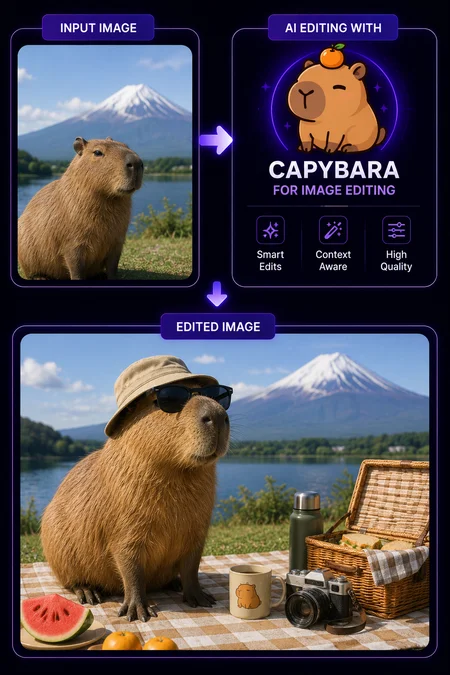
Edit an image with a text instruction
Open this ready-to-run workflow on Floyo. No install needed.
HOW IT WORKS
Step 1. Upload your image. The photo or render you want to change. Capybara holds the subject, pose, and layout steady while it edits the rest. Works great with: portraits · product shots · character art · keyframes
Step 2. Write your instruction. Describe the change in plain language, like "replace the background with a sunset beach" or "make it night, cyberpunk style." No mask needed for most edits. Add a negative prompt (like "watermark, low quality") to clean up the result.
Step 3. Hit run and download. You get back the edited image at the same aspect ratio as your input. Preview it in the workflow, then download. Ready for: Photoshop · Figma · Canva · any editor
First time? Leave every setting as-is. The defaults (50 steps · guidance fixed at 1 · output matches your input's aspect ratio) are tuned for clean instruction edits.
Overview
This workflow edits an existing image from a text instruction using Capybara, an open-weight unified visual model from XGen Universe. Capybara reads your instruction through a Qwen2.5-VL encoder and uses a vision encoder to lock the subject and layout in place, so it changes what you asked for while keeping the person, pose, and framing. It handles local edits like swapping one object and global edits like changing the time of day or the whole style, with no mask needed for most cases. You upload an image, write an instruction, and get back the edited version in about two minutes. No setup, no nodes to wire.
Who it's for: creators who want instruction-based image editing in ComfyUI without setting up Capybara and its nodes from scratch. Not for: pixel-perfect edits with zero iteration. Some instructions take a couple of tries, and complex edits still need a clear prompt.
Why Floyo
Floyo is the only ComfyUI platform built for teams in the browser.
Made for teams. Share run history, files, and models across your whole team. A teammate opens your exact run and picks up where you left off. No file handoffs, no version confusion.
No install, no setup. Every workflow and model is preloaded. Open it in your browser and run. Nothing to download, nothing to configure.
No local hardware. Workflows run on H100 NVL GPUs, so heavy models run fast without a card of your own. Your VRAM stops being the limit.
Open and closed models in one place. Floyo runs open-source workflows and API models side by side.
How to use (in your browser on Floyo)
Upload the image you want to edit.
Write your instruction (like "replace the background with a sunset beach"), add a negative prompt if you want, then run.
Download the edited image, ready for any editor.
Expectations The models are preloaded, so there is nothing to download. Running it needs a free Floyo account. Each edit comes back in about two minutes, since instruction editing runs more steps than a fast image model. One limit to know: Capybara is an early v0.1 release, so complex edits can take a couple of tries to land.
Use Cases
Background & Atmosphere Swaps. Change day to night, indoor to outdoor, or realistic to stylized on portraits and product shots.
Object & Outfit Changes. Swap props, clothing, or objects while keeping the same person, pose, and framing.
Style & Color Grading. Apply a new look or mood across the whole image with a single instruction.
Look-dev for Video. Try different styles on a keyframe before animating it, since Capybara shares one pipeline with image-to-video.
What can Capybara edit?

