Support
Everything here is free and stays free — the format spec, the nodes, the workflows, the cartridges, the LoRAs. If it saved you a night of debugging (it contains several hundred of mine), tips keep the 5090 warm:
🔁 Liberapay (recurring)
⚡ Or right here: the Civitai tip button on this page sends Buzz directly.
Type a story. Get one continuous video, with sound. Multi-shot scenes render as a single take - no last-frame chaining, no quality loss from shot to shot. That's the whole pitch.
Both workflows now read left to right: numbered lanes, and you only ever touch lanes 2-4. Everything below the main row is optional.
What you need
ComfyUI + this node pack (Manager: MiniMax-H3 Multishot, or the zip on this version).
A MiniMax-H3 checkpoint (links on this page). 24 GB card? Take a GGUF.
SEAMLESS CHAIN - multi-shot scenes as one take
Lane by lane:
README - the quick start lives on the canvas itself.
1 - MODELS - pick your H3 checkpoint and text encoder. VAEs are preset; LoRA slots are empty until you fill one.
2 - ANCHORS (optional) - a photo to open shot 1 on (enable its gate), and a short voice clip to lock the speaker's voice.
3 - YOUR PROMPTS - type your idea in the box, or point the switch at a prompt file. The writer expands it into shot prompts. Writing your own? Set the writer to
passthrough (raw JSON, skip LLM)and paste shots separated by---lines.4 - CONTROLS - size, frames per shot, steps, and
take_seconds(total length; 30 is a good first run). The switches stay off unless you installed the pack a switch names.5 - ENGINE - nothing to change. The remote encoder lives here if you want the text encoder on a second PC: enter its address, flip the encoder switch, free ~15 GB.
6 - OUTPUT - your video and its audio save here.
Optional panels below the main row: reference images (your character, ref2va checkpoints - folder per character + AUTO REFS on), V2V reference (a clip whose look guides the render), FFLF plates (flf_chain mode only), audio spine (a soundtrack the take follows).
EXTEND TAKE - one person talking, as long as you want
Same lanes, different job: one premise becomes ONE continuous speech cut across windows.
1 - MODELS - same as above.
2 - ANCHORS - a photo of your speaker (shot 1 opens on them) and a voice clip. More useful here than anywhere: one person carries the whole take.
3 - YOUR PROMPT - ONE premise, one speaker. The writer writes the whole speech. num_shots 0 = it decides. Passthrough works here too.
4 - CONTROLS -
take_secondsis the star: 30 ships, 60 clears TikTok's minute.windowstays on auto - it sizes itself to your card.5 - ENGINE / 6 - OUTPUT - same as above.
Keep takes to about 4 windows for now - very long takes slowly sharpen.
Rules of thumb (both workflows)
Spoken lines: 8-12 words per shot. Short lines sync; long lines garble.
Say the sounds you want ("rain on the roof, a fridge hum") or it invents its own.
Keep your character's face in frame - faces carry identity between shots.
If something breaks
Red node? Update the pack in Manager, restart, reload the workflow from disk.
Render crawls at low wattage? Lower resolution or frames per shot, or use the remote encoder.
Only one of the two workflows shows in your sidebar? Fixed in 2.6.5 - re-download both.
Still stuck: comment with your console log. I answer.
Deep dives: the two articles linked on this page. Every lane also has a short note on the canvas.
Detailed guide for people that can read good:
Every setting explained: the Seamless Chain deep manual | Civitai
Description
v1.2 adds keyframes anywhere in the clip, not just the first and last frame — plus a hard mode for reference-to-video, and two controls ComfyUI reads but no stock node ever sets.
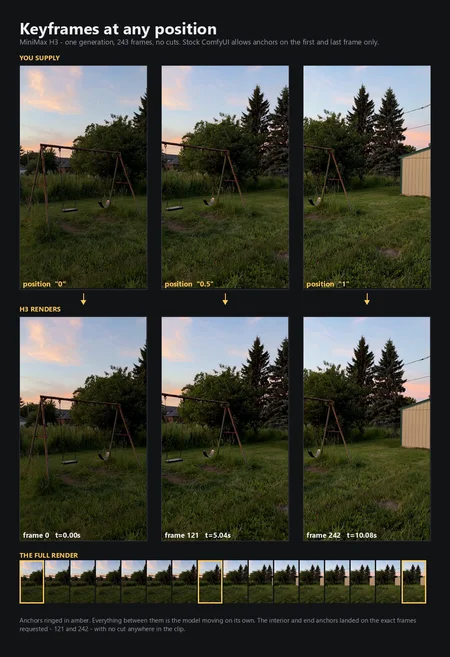
Keyframes at any position
Stock ComfyUI pins H3 keyframes to frame 0 and frame N−1, and raises only first/last keyframe anchors are supported for anything else. That turns out to be a positional-maths limit, not a model limit. Both stock cases are the same expression, because sum(_video_t_spans(latent_t)) == FRAME_RESCALE * frame_count:
cond_t = text_len + FRAME_RESCALE * pixel_indexwhich is defined for every frame. The new H3 Keyframes (any position) node takes up to six anchors, positioned as fractions (0, 0.5, 1) or absolute frame indices.
Measured on an RTX 5090, 243 frames, one anchor at pixel frame 121: the rendered frame most resembling the anchor image was frame 122 — the requested position, off by one — reached by continuous motion with no cut (peak frame-to-frame change 2.3× the median), and the audio ran unbroken straight through it.
The patch is applied in memory. It does not edit any ComfyUI file. It self-tests against the stock formula before committing and rolls itself back if first/last positions do not reproduce exactly — so a future ComfyUI change degrades to “interior anchors unavailable” rather than to broken renders.
It moves, or it cuts — and your images decide which
Anchor images with a plausible camera path between them (same place, different angle or framing) make H3 interpolate: a real move that arrives on time. Images with no possible path — a kitchen and a diner — make it cut, then hold.
That is not a limitation of this node. Stock first/last does exactly the same thing with such a pair; it is the model doing the only sensible thing. And the cut case has its own use: a timed shot change inside a single generation, which means the audio runs continuously across it, with no per-shot voice re-derivation and no seam.
Reference-to-video groundwork
The two nodes below are what reference workflows need. The hard-mode graph itself is built but has not been rendered yet, so it is not in this release — it ships when it has a render behind it.
References and keyframes are mutually exclusive, in ComfyUI core rather than by choice here. model_base.py assigns cond_video_latents for refs, discarding any keyframe latents while the keyframe layout rows survive — the packed sequence then desyncs into a shape-mismatch crash. There is no “reference images plus start frame” mode. Pick one per shot.
Two things that are easy to get wrong and are documented on the canvas: reference tags are 1-based in the prompt (<Picture 1>) while the input slots are 0-based (ref_image_0); and a reference video with a soundtrack consumes an <Audio j> ordinal before your standalone clips.
Two more nodes
H3 Reference Audio (stereo guard) — the audio VAE encodes
[B, 2, L]and the layout reserves exactly two channels, so a mono reference produces half the rows it reserved and dies deep inside the model with no useful error. Nothing in stock converts it. This forces stereo 32 kHz and trims length.H3 Condition Strength — exposes
minimax_visual_cond_noise_augandminimax_audio_cond_noise_aug, which core reads but no stock node writes, so they sat at 0.999 / 1.0 permanently. They blend noise into the conditioning latents and set the timestep the condition rows occupy: an anchor-strength dial.
Still in the box from v1.1
Image-to-video via an optional
start_image.~4× faster on 32 GB cards. The text encoder is evicted before sampling — encoder (~16.5 GB) and DiT (~25 GB) do not co-fit, so the DiT was loading partially and streaming ~19 GB from system RAM every step. RTX 5090: ~60 min to ~15 min, same render. The keyframes node does this too.
Long-form memory sampler for 2–5 minute pieces.
Audio seams crossfaded;
seed_per_shoton by default.
Links
Support
Everything I publish is free and stays free. If it saved you a night of debugging, tips keep the 5090 warm: Ko-fi · GitHub Sponsors · Liberapay.
FAQ
Comments (35)
Could we have first frame I2V support? 🙏
I will put it on the list for today's work. ;)
I'd like to see keyframes not just first/last
v1.1 added with I2V
@joeygambino ty for the quick update
@brnfd24434343d I'm definitely experimenting.
what about reference mode?
@Thimon That is the next workflow on its way soon.
@brnfd24434343d v1.2 uploaded with keyframes
Awesome work. I know the seed keeps audio consistency. Is it possible to use the other minimax ref model and include audio samples or include audio from video (so you can pipe in a video file you like) and keep the same voice?
@JustTrying2026 I am working on another workflow that uses the R2V models that should fix this issue. The audio consistency seems to be model-related. You will see a widget in the Generate node in the current workflow to keep the same seed or vary it, which was my attempt to get it to be consistent - and sometimes it works, if you also describe the voice word for word in every shot, but it's still not great. New workflow should be up today though.
@joeygambino Waiting for the ref to video update! just tested a 1 minute video with text to video and its awesome, cant imagine the increased consistency with ref to video!
@Psi_Clone Working on it as we speak!
@joeygambino i got some stuff going if you wanna take a look https://github.com/Shrek3OnVH5/MiniMax-H3-NativeAudio-MusicVideo-Workflow/commit/11a95f6 , optimizations letting me do 1.0mp at 20 steps within <15 minutes per 10 seconds (5070ti 32gb) , ref2vid, audio lock, combinations, gguf support
@PrettyAIGirls I will check it out!
@joeygambino Unfortunately, the new hard mode doesn't chain prompts similar to how this one does. I was hoping it would chain prompts and also follow the reference properly in the new chains, but none the less, really amazing extending the input image capaibility.
A great WF and Node
Thank you!
Thanks! i was making my own nodes (with zero knowledge of what i was doing) but these ones are already enough for me, thanks again, i'll be publishing videos attaching this workflow :)
Awesome, thanks!
aquí tu alumno maestro voy a probar este wf, gracias a creador
Amazing work! Any chance of maybe an alternate version of the node or an alternate input that accepts a batch of images?
EDIT: I made a pull request adding this as an option, take a look on your repo if you're interested :)
For complex motion it's nice to have a few frames at the start and end for consistency in motion, but then the number of frames starts adding up quickly and it's easy to pass 6. Also it's handy if you have a video source and want to specify a set of frames to keep from the original.
On it, and thank you for the tip! I'll be working on this today as well.
@joeygambino Excellent! I appreciate your work. I also made a pull request to make working with the index ranges a little easier and to change the fractions to percentages (I got caught by frame 1 being the end of the video when I was working with absolute indices haha). Now if I could just figure out how to get MiniMax to exactly inpaint audio into the edited regions I'd have all the tools I need XD
Interesting, but I don't see the point of using quantized models; my workflow already has a 15GB text encoder and the int8 convrot that is 20GB.
Without knowing which workflow, models and hardware you're running, it's difficult to respond to this.
@joeygambino quote: "The text encoder is evicted before sampling. The Qwen3-VL encoder (~16.5 GB even at Q4) and the H3 DiT (~25 GB) do not co-fit on a 32 GB card, so the DiT was loading partially and streaming ~19 GB from system RAM on every sampling step. " Question- Only gguf text encoders can be evicted per this WF logic?
@blhll No, it's not GGUF-specific - the eviction has nothing to do with the file format. It matches on the CLIP object's ModelPatcher and calls model_unload() on it. Every ComfyUI CLIP carries one no matter how it was loaded, so a safetensors encoder is freed by exactly the same call. The reason it comes up mostly with GGUF is just that GGUF is what people are running at these sizes; the loader node in the pack takes both formats and neither is treated differently.
One thing worth knowing, since it's the failure mode that actually bites: if the node cannot match your CLIP against the loaded models, it falls back to unloading everything. That's still safe where it sits - conditioning is fully computed by then, and the VAE reloads on demand after sampling - but it's blunter than intended. It tells you which path it took in the console:
[H3FreeTE] unloaded 1 model(s); 4.2 -> 21.8 GB free <- targeted, ideal
[H3FreeTE] unloaded all models; 4.2 -> 22.1 GB free <- fallback fired
So, if the encoder does not seem to be getting freed, that line is the thing to check rather than the file format. Worth adding, because the quoted numbers are from a 32 GB card: whether you need the node at all depends on whether the encoder happens to already be unloaded when sampling starts. In a long session where earlier nodes have freed it, you may
never notice the problem. Fresh start, encoder resident, big DiT - that's when the streaming shows up. The tell is power draw rather than utilization: a card shuffling weights sits near 100% "utilization" while pulling a fraction of its rated watts.
@joeygambino yeah , I am using 24GB VRAM, plus 128 GB RAM, so using MiniMAx puts shared memory constantly at ~80% plus ofc main VRAM at 100%, thats why I am asking, if offloading text encoder will help with this :)
@blhll Oh, absolutely. I have some new fl2va and ref2va GGUFs going up later today that should help with headroom there as well. 11GB Q4_0, 14GB Q5_1, and a Q8_0 at only 20GB - so even the Q8 should leave you with a little space for VAEs and activations.
Super helpful workflow. One issue I'm having is that in my experience it seems to forget what the audio was doing in the previous segments. If I prompt for "energetic pop-rock music" it still generates that in each segment, but it's like a completely different song in each one. Also the voices have no consistency between segments. Is there a way to mitigate this?
I have a workflow in the works right now that will use the H3 rev2v models, that hopefully should help with audio consistency. I expect to have it up sometime today after a whole lot of testing.
@joeygambino Awesome, I'll be excited to try it. Your workflow works great otherwise. The only other issue I had is that there's a little bit of a "hitch" where the segments are joined but it's not a huge deal. Is there a way to avoid that? I'm using the AIO version.
@Underbash I will look at the hitch, I honestly thought I got it as smooth as possible, but the last few days I've only been working on models and demos and workflows and haven't had much time to actually generate any real renders for myself yet - but I'll check it out and see if I can get it even smoother!
@joeygambino Nice, thanks. It's not too bad, but I did notice it when there was a lot of motion going on between the transitions. Maybe that made it more noticeable, idk. Good work though!