

Office Stability SDXL-VAE
Original file on Huggingface.
Description
FAQ
Comments (18)
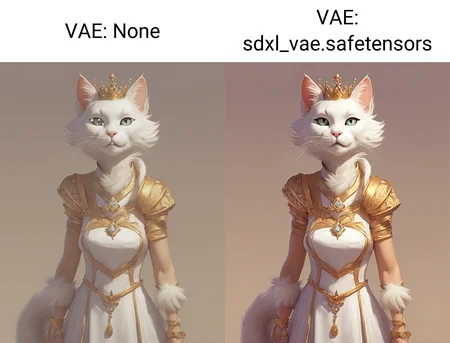
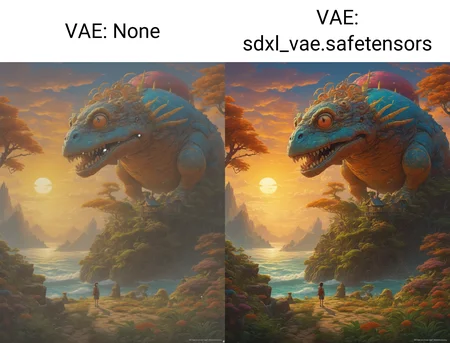
The example gallery doesn't make sense to me, with its "VAE: None / VAE: sdxl_vae" examples. Stable Diffusion always involves the use of a VAE, and what you've linked to as the "original file" is the VAE made available by Stability at the time of SDXL's release, isn't it?
But if this is the default VAE you'd get when you don't specify another to override it, why do the example images show such a dramatic difference between this and default?
"original" means the original of this version i guess. in case updates on the hugginface websites are newer then this version here on civitai. i am just guessing here but.... it clearly says "finetuned VAE". so it seems to be an updated default SDXL VAE. but i agree the explanation could be clearer.
I believe the original poster is correct, this 'none' image shows both the desaturate and ugly blue/white dots the baseline vae throws in. I'm mainly looking for alternate vae because of that fault in baseline. Not only would this vae not have the desaturate of the baseline, but might be adding a little more. It's up next in my trial to find a solution to the problems with the default baseline.
Merging model with built-in VAE and model without can give results like this. Probably same for two models with different VAEs.
After a bit more experience, the blue dots seem to represent an image return with noise remaining that a second ksampler or parameter change can usually address. I've done more in comfyui than stable-diffusion vanilla lately to be able to better see what is happening under-the-hood so to speak.
@squallseeker708 Comfy Master Race once again proving its superiority in debugging analysis.
You can use it for SDXL mixes with not correctly working built-in VAE. For example on Illustrious XL personal merge v2.1_noob-0.75_30%_merged you will get same result like it was in that gallery
Idk how but this fixed the issue that i have spent hours trying to fix.
Is this the same as the one put in pony?
how do you add it to your workflow?
1. Download the model.
2. Place it in: ComfyUI_windows_portable\ComfyUI\models\vae.
3. Refresh ComfyUI.
4. Double-click on ComfyUI workspace, type "load VAE," choose the downloaded VAE inside that node, and finally link it to the VAE Decode node.
god bless you
Highly recommend this when it's needed, my go to
fp32 is still my God.
Amen
Very good ...👍🏻
Using the shared image base mold and VAE to generate black images, replacing any base mold will not work properly and will be the final step in generating black images
Details
Files
sdxlVAE.safetensors
Mirrors
sdxl_vae.safetensors
sdxl_vae.safetensors
sdxl_vae.safetensors
sdxlVAE_sdxlVAE.safetensors
sdxl_vae.safetensors
sdxl_vae.safetensors
sdxl_vae.safetensors
sdxlVAE_sdxlVAE.safetensors
myslrVAE_v10.safetensors
sdxl_vae.safetensors
sdxl_vae.safetensors
sdxl_vae.safetensors
sdxl_vae.safetensors
sdxl_vae.safetensors
sdxl_vae.safetensors
sdxl_vae.safetensors
sdxl_vae.safetensors
sdxl_vae.safetensors
sdxlVAE_sdxlVAE.safetensors
sdxl_vae.safetensors
sdxl_vae.safetensors
sdxl_vae.safetensors
sdxl_vae.safetensors
sdxl_vae.safetensors
sdxl_vae.safetensors
sdxl_vae.safetensors
sdxl_vae.safetensors
sdxl_vae.safetensors
sdxl_vae.safetensors
sdxl_vae_1.safetensors
sdxl_vae.safetensors
sdxl_vae.safetensors
sdxl_vae.safetensors
sdxl_vae.safetensors
sdxl_vae.safetensors
_bothyper.safetensors
sdxl_vae.safetensors
sdxl_vae.safetensors
animagine_vae.safetensors
animagine_vae.safetensors
sdxl_vae.safetensors
sdxlVAE_sdxlVAE.safetensors
sdxl_vae.safetensors
sdxl_vae.safetensors
sdxl_vae.safetensors
sdxlVAE_sdxlVAE.safetensors
sdxl_vae.safetensors
sdxl_vae.safetensors
sdxl.vae.safetensors
sdxl_vae.safetensors
sdxl_vae.safetensors
sdxl_vae.safetensors
sdxl_vae.safetensors
sdxl_vae.safetensors
sdxl_vae.safetensors
sdxl_vae.safetensors
sdxl_vae.safetensors
sdxl_vae.safetensors
sdxl_vae.safetensors
sdxl_vae.safetensors
sdxl_vae.safetensors
sdxl_vae.safetensors
sdxl_vae.safetensors
sdxl_vae.safetensors
sdxlVAE_sdxlVAE.safetensors
sdxl_vae.safetensors
sdxl_vae.safetensors
sdxl_vae.safetensors
sdxl_vae.safetensors
sdxl_vae.safetensors
sdxl_vae.safetensors
sdxl_vae.safetensors
sdxl_vae.safetensors
sdxl_vae.safetensors
sdxl_vae.safetensors
sdxl_vae.safetensors
Animagine_XL_vae.safetensors
sdxl_vae.safetensors
sdxl_vae.safetensors
sdxl_vae.safetensors
sdxl_vae.safetensors
sdxl_vae.safetensors
sdxl_vae.safetensors
sdxl_vae.safetensors
sdxl_vae.safetensors
sdxl_vae.safetensors
sdxl_vae.safetensors
sdxl_vae.safetensors
sdxl_vae.safetensors
sdxl_vae.safetensors
sdxl_vae.safetensors
sdxl_vae.safetensors
sdxl_vae.safetensors
sdxl-vae.safetensors
sdxl_vae.safetensors
sdxl_vae.safetensors
sdxl_vae.safetensors
sdxl_vae.safetensors
sdxlVAE_sdxlVAE.safetensors
sdxl_vae.safetensors
sdxl_vae.safetensors
sdxlVAE_sdxlVAE.safetensors
sdxl_vae.safetensors
sdxlVAE_sdxlVAE.safetensors
SDXL_VAE.safetensors
sdxlVAE_sdxlVAE.safetensors
SDXLVAE.safetensors
sdxl_vae.safetensors
sdxl_vae.safetensors
sdxl_vae.safetensors
sdxl_vae.safetensors
sdxl_vae.safetensors
myslrVAE_v10.safetensors
sdxlVAE_sdxlVAE.safetensors
sdxl_vae.safetensors
sdxlVAE_sdxlVAE.safetensors
sdxl_vae.safetensors
sdxl_vae.safetensors
animagineXLV31_vae.safetensors
小马改XL模型v10_vae.safetensors
animagine-xl-31-sdxl_vae.safetensors
sdxl_vae.safetensors_sdxl_vae.safetensors
sdxl_vae.safetensors
sdxlVae.jwfj.safetensors
sdxl_vae.safetensors
sdxl_vae.safetensors
sdxlVAE_sdxlVAE.safetensors
diffusion_pytorch_model.safetensors
sdxlVAE_sdxlVAE.safetensors
sdxl_vae.safetensors
sdxl_vae.safetensors
sdxl_vae.safetensors
sdxl_vae.safetensors
sdxl_vae.safetensors
sdxl_vae.safetensors
sdxl_vae.safetensors
sdxl_vae (for Animagine XL V3.1).safetensors
sdxlVAE_sdxlVAE.safetensors
sdxl_vae.safetensors
sdxl_vae.safetensors
sdxl_vae.safetensors
sdxlVAE_sdxlVAE.safetensors
sdxl_vae.safetensors
sdxl_vae_fp16_fix.safetensors
sdxl_vae.safetensors
sdxl_vae.safetensors
sdxl_vae.safetensors
sdxl_vae.safetensors
sdxl_vae.safetensors
sdxl_vae.safetensors
sdxl_vae.safetensors
sdxl_vae.safetensors
sdxlVae.jwfj.safetensors
sdxl_vae.safetensors
animagine_vae.safetensors
sdxl_vae.safetensors
sdxl_vae.safetensors
sdxl_vae.safetensors
SDXL_VAE.safetensors
sdxl_vae.safetensors
sdxlVAE_sdxlVAE.safetensors
sdxl_vae.safetensors
sdxl_vae.safetensors
sdxlVAE_sdxlVAE.safetensors
sdxlVAE_sdxlVAE.safetensors
sdxl_vae.safetensors
animagine-xl_sdxl_vae.safetensors
sdxl_vae.safetensors
sdxl_vae.safetensors
sdxlVAE.safetensors
sdxl_vae.safetensors
sdxl_vae.safetensors
sdxl_vae.safetensors
sdxl_vae.safetensors
sdxl_vae.safetensors
sdxl_vae.safetensors
sdxlVAE_sdxlVAE_264202.safetensors
sdxl_vae.safetensors
sdxl_vae.safetensors
sdxl_vae.safetensors
sdxl_vae.safetensors
sdxl_vae.safetensors
sdxl_vae.safetensors
sdxl_vae.safetensors
sdxl_vae.safetensors
sdxl_vae.safetensors
sdxl_vae.safetensors
sdxlVAE_sdxlVAE.safetensors
sdxlVAE_sdxlVAE.safetensors
animagine_sdxl_vae.safetensors
sdxl_vae.safetensors
sdxl_vae.safetensors
sdxlVAE_sdxlVAE.safetensors
sdxl_vae.safetensors
sdxlVAE_sdxlVAE.safetensors
sdxl_vae.safetensors
sdxl_vae.safetensors
sdxl_vae.safetensors
sdxl_vae.safetensors