


Trush-DTL[Detail Tweaker LoRA] V1.0
【模型细节调节LoRa︱模型手术刀】
如果没有意外,这应该是最早使用差异炼丹法的SD LoRA
说明 | specification
This model uses a special training method,It does not contain any style or content
采用差异炼丹训练法制作,本身不含有任何风格和内容
This Lora can be used to adjust the correction model.
本lora可以调节模型细节
According to their own model to use positive and negative weight for adjustment, the actual test results are good
根据自己的模型使用正负权重用于调节,实际测试下来效果不错
This LoRa can adjust some of the features of the model as accurately as a scalpel. To achieve the desired effect without changing the basic style of the model.
这个LoRa可以像手术刀一样精准的调节模型的部分特征。使其在不改变模型基本画风的情况下达到想要的效果。
This has a very good effect on the detail explosion model that comes out of a few QQ groups.
这对于少数QQ群里传出来的细节爆炸模型,有着相当好的效果。
Whether to choose A or B needs to be seen according to the specific model, some use A better effect, some use B better effect
选取A还是B需要根据具体的模型来看,有的用A效果更好,有的用B效果更好。
例图 | Example diagram
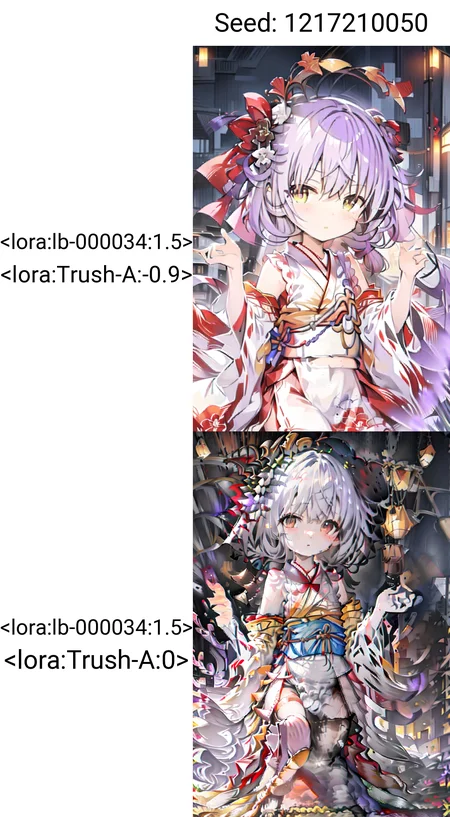
The example is to test the use effect (when the weight is set to -1). It is not necessary to set the weight that high in actual use
例图为测试使用效果(权重开到-1的情况),实际使用没有必要开那么大权重

使用 | Use:
Adjust the model by selecting positive and negative weights and values according to your own model situation
根据自己模型情况选择正负权重以及数值,即可完成对模型的调整
This lora can be used with any prompt word for any model.For example, you can use it with Rainbow lines style LoRa to correct details
此lora对于任何模型任何提示词都可以使用,例如你可以和彩线法LoRa一起使用达到如图所示的效果

This model has a powerful adjustment ability, and the specific effect is shown in the figure(The picture is an example of extreme cases)
本模型具有强大的调节能力,具体效果如图(图片为极端情况)

Note that this model is careful to turn on too high a weight, otherwise the output graph will collapse completely
注意,本模型谨慎开启过高的权重,否则会产生过多的细节造成输出图完全崩坏的效果(权重过高),或者使画面丢失细节(负数权重过低)


May not be compatible with partial LorAs, such as txmfkr
可能不兼容部分lora,例如txmfkr等
【PS:This model can not only be used to adjust the details, but also affect the effect of the prompt.】
【PS:这东西不只是可以用来调节细节,也可以影响你的提示词的效果,但是具体情况还需要自己测试(不同模型不同tag影响程度都不一样)】
局限性 | Limitations
Not compatible with live action models (not tested, training set has no map)
不兼容真人模型(没测过,训练集也没对应的图)
There may be failures or crashes that are not covered by the training set
可能有训练集未涉及的存在导致失效或者崩溃
As for the merged model with excessive partial fitting, it will collapse once used and cannot be used at all
对于部分拟合过度的乱融的模型一用就崩,根本无法使用
The upper limit is too low(Use some of the more useful models to know, generally is not touched)
上下限过低(用过一些比较好用的模型就知道了,一般是碰不到的)
This model is not suitable for fixed proportion ckpt, only suitable for external adjustment
本模型不适合固定比例容入大模型,只适合外置调节使用
特别鸣谢 | Special Thanks
GitHub - bmaltais/kohya_ss:训练UI,非超好用!
Automatic1111: SD-WebUI,帮助处理训练集,当然很大一部分图是我自己用PS裁的
Danbooru:打标器,帮助标注训练集图片,当然很大一部分图是我自己标的
秋叶的甜品店(频道):让我发现了这个LoRa的训练方法,以及促成了这个LoRa的制作
祝大家玩得开心<3
你可以随意将本模型合并到其他地方,但如果你共享该合并模型,别忘了标注一下
We allow you to merge with another model, but if you share that merge model, don't forget to add me to the credits.
Description
FAQ
Comments (16)
One of your notes, translated of course, says 'Of course, those who can use it will naturally understand, and those who can’t use it don’t need to figure out how to use this lora.".
This is remarkably unhelpful. Can you please not do that, and can you instead actually explain your creation here?
magic circles? art style ?
The problem is, people who know how to use this lora don't need to read the manual, people who don't know how to use this lora read it and won't use it, so I don't need to spell it out here, right
hello, I used it and I guess you just need to try it, which means try to use this lora with different weight, and finally you may found the best weight, which can make picture have more details and not be too messy. I can't say this way must be right but I used it by this way and it worked well
FYI, I used it with 0.6 weight for the model "anythingv5", which is another model by this author
The author has just added the instructions for use.
@CaCan180 如果不是为了方便我自己分享,我压根不会把这东西发出来
@99999779 辛苦作者添加说明,留言已经编辑。:)
@99999779 原来如此。不过我在大佬您的anythingv5上拿来加细节真挺好用的(个人感觉)
If my understanding and testing are correct, this is actually an incredible idea and result. In simple terms, this is a Lora type patch for models that are "overcooked" during merging with many other models and able to correct the bad output image.
Based on the author's description on other publishing pages and my own experience, the overcooked model, or in the author's term "Truch-liked" model exhibits several characteristics: 1) weak association between the generated image and the prompt words. Although it is possible to generate images with just a few prompt words, it is difficult to effectively control the image with long and more detailed prompt words. 2) The image is prone to "break" when processing long prompt words or combining multiple LORA models.
Using this Lora model (or I would say patch) with appropriate weights can correct the broken image and enhance the effect of the prompt words in the image. At least in my small-scale testing, it was able to be achieved.
I have uploaded a comparison image that uses this Lora patch. It is evident that the image exhibits an overfitting-like breakdown when not using this Lora. However, after applying this Lora with a weight of 0.1, the distorted parts of the image were adjusted, and some details (such as the texture of the slime's clothing) also began to appear.
Moreover, this correction seems also to work on other enabled Lora models during one batch generation. I am not sure why or how this is achieved, but at least in my small-scale testing, I had this feeling.
In addition, regarding the author's mentioned model verification, my understanding is that you can enable only this Lora and observe at which weight from 0 to 1 (or maybe -1 to 0) the model will exhibit significant breakdowns. The smaller the interval, the closer it is to the "garbage model" defined by the author.
For instance, in my testing model A's normal operating range is between 0.1 and 0.6, and model B's range is between 0.0 and 0.8, I usually feel that the controllability of model B is slightly better than that model A(I don't what to bring up the actual name of models but you got my point and you can test by yourself)
Anyway, these are just my personal understanding and test results. Perhaps the author created this Lora model for a completely different purpose, but at least for me, its corrective effect is very apparent.
The hero we needed ! thanks for taking the time.
喵喵喵
拿我瞎融的模型实测可以改变人物在画面占比,非常有趣
开个0.1可以在不改变结构的情况下增加不少细节