

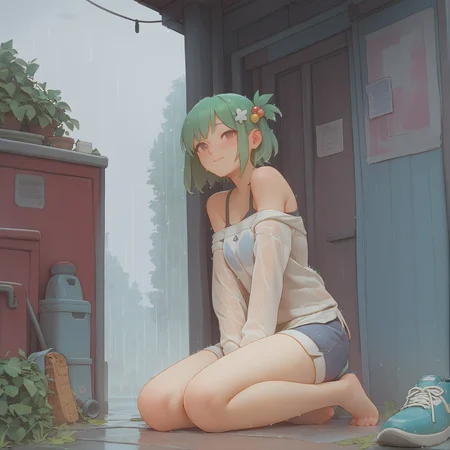


This LoRA aims to replicate the style of artist Bartolomeobari.
If you like this LoRA, please consider directly supporting the artist (don't forget that without the artist, this LoRA wouldn't exist).
Please don't pretend to be or publish in the name of the artist.
Please share you creations! I'm curious to see what you can achieve with my models!
Recommended parameters 1 (basic and universal):
Base model: Pony Diffusion XL v6, AutismMix... I've noticed that AutismMix tends to solve certain anatomical problems at the cost of the less obvious style.
CFG Scale: 6-7
Sampler: Euler a.
If you want less "faded colors" look and more contrast, you can use another sampler such as DPM++ 2m SDE Exponential which works great with hires fix.
Steps: 30 - 40 or more
LoRA Strength: 0.7 - 1.0
Inpainting or hires fix are your friend to fix faces and details, but I advise you to use with 15-20 steps.
Recommended parameters 2 (awesome on ComfyUI):
Base model: Pony Diffusion XL v6
CFG Scale: 3.5 - 4.0 (1.5 - 2.5 if you're using LCM-LoRA)
Sampler: LCM
Scheduler: simple (recommended to avoid very small noise / artifacts) / sgm_uniform
Steps: 30 (5 - 15 if you're using LCM-LoRA)
LoRA Strength: 0.8 - 1.0
It works surprisingly well even without the LCM-LoRA. Of course, adding the LCM LoRA will speed up the generation but you'll need to lower steps and CFG scale.
Then you can apply your hires workflow if you want to.
Another approach that works well too is to start generating your raw image using Euler A sampler, then refine it using LCM-LoRA with very few steps. This is preferred if you want a more complex background as LCM tends to simplify the details a lot, especially in the background.
Note: the yellow / warm color tone comes from the style itself. You can add some custom post processing nodes if you want a colder tone, assuming you're using ComfyUI.
This model comes with no warranty. Do not use this model for inappropriate purposes.
Description
This version has been enhanced with a higher quality dataset and merged with the beta version. Both versions had advantages and disadvantages, and this version falls somewhere in between.
It also generates better eyes and the barto's style is stronger now.
Works well with hires fix and inpainting.
To get a similar look to v0.1, you can just lower the strength a bit.
FAQ
Comments (4)
Can i have your dataset and train settings? Your lora performance is GREAT!
Why is lora so cool on a f***ing pony xl, why am I being punished?
just use pony, its easily the best XL model out there, and its derivatives of course
Realy cool LoRa!
Details
Files
Available On (1 platform)
Same model published on other platforms. May have additional downloads or version variants.