


EDIT: it seems some people are happy with that concept! I'm currently training a V2 with a lot more images. It will probably include some customization features like color tone and will be able to handle low-light scenes!
This LoRA is designed to elevate your scene by enhancing the scenery quality and seamlessly integrating your anime characters into the scene. It emphasizes the background and adds more information and details to your composition. The lighting is also natural and volumetric, creating an "epic" or "cinematic" feel. Moreover, depth is more obvious, enabling you to explore the "foreground, middle ground, background" concept more effectively.
This model has been trained on cherry picked pics and specific AI generated images.
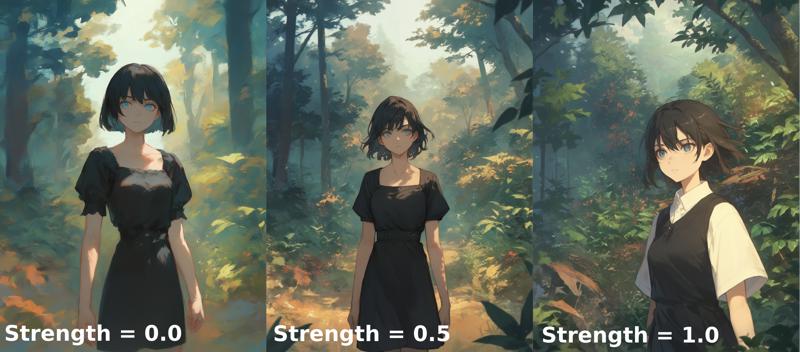 HQ: https://drive.google.com/file/d/1x8q1I3YLw87MMWLwfKemNH8K7Xy7vBV4/view?usp=sharing
 HQ: https://drive.google.com/file/d/1AP_2uPHdVCKSMPN_BfVPbfE_oJSiOCR2/view?usp=sharing
The higher the strength, the more the cinematic color tone is accentuated and certain details appear, such as dust particles illuminated by light, depth of field, etc. The background is also more prominent.
Recommended parameters (universal):
Base model:
Pony Diffusion XL v6: best style expression. You may have to use other LoRAs to get the style you want. Best contrast and light.
AutismMix: easiest setup, works out of the box. No other LoRAs needed. Several LoRAs may produce unexpected results though.
Other models based on Pony XL.
Sampler: Euler a.
CFG Scale: ~6.0.
Steps: > 30.
LoRA strength: technically 0.0 - 1.0 but 0.5 - 0.8 is a good range. While 1.0 is possible in some cases, don't go too high or you will screw up your image.
I recommend using hires fix or other upscaler to enhance details after raw generation.
Alternative parameters:
DPM++ 2M SDE Karras or DPM++ 2S a
Those settings produce consistent and detailed pictures, even at lower resolutions without upscaling. Better backgrounds than Euler a. On the other hand, the images may look a little more like oil paintings.
Sampler: DPM++ 2M SDE Karras or DPM++ 2S a.
CFG Scale: ~6.0.
Steps: 25 - 30.
LoRA strength: 0.0 - 0.9 (0.5 - 0.7 is good)
Example matrix: https://drive.google.com/file/d/1X5CyV6EdePFlyPg8vQqJCh0Uu_JR5eVa/view?usp=sharing
LCM
The first tests I did with the LCM sampler gave very good results, sometimes better, but they were very irregular. It seems to depend very much on the prompt.
I'm still trying to find the right formula. Recommendations to come...
Known issues:
Night or low-light scenes are difficult to achieve. Although the background is correct with the right keywords (night, dark background), the characters tend to be too bright. This will be addressed in the version 2.
"I don't want to have light or dust particles" / "There are too much particles": just put "particles" in negative prompt.
Description
There is no trigger word, but you can add the keyword "scenery" to accentuate the effect of the LoRA.
FAQ
Comments (7)
seems to be limited to 0 - 0.1 strength for in site generation
Indeed. It's fixed. Sorry for inconvenience.
This is one my new favorite LoRAs to add in at low strength to all of my images. The added background details are great to have.
Thank you so much! The image you posted is amazing, love the colors!
Very nice results! Also thank you for not calling the file or the Lora something like 3p1c_4n1m3_sc3n3r7...
Yeah, i hate that. I download a lora for 'X' and then 3 days later, look for X. "no results"
Check the filename. "T1k Dodgfn kjngskdfbajhsdvkqahgwd" everything but what its actually called.
Does this work with a background enhancer or would it conflict if both are trying to improve the quality of the scene?
Details
Files
Available On (1 platform)
Same model published on other platforms. May have additional downloads or version variants.