



 👇👀 Read me! 👇👀
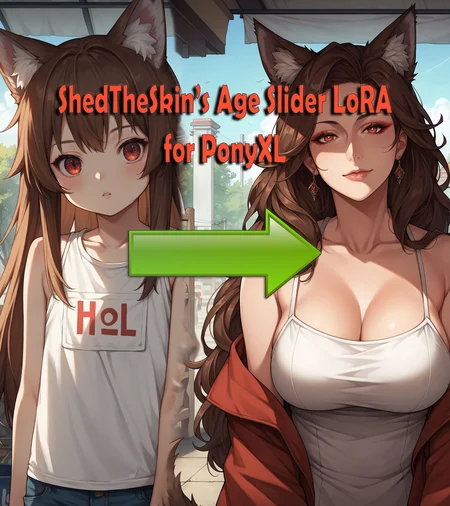
This is a slider for SDXL PonyXL. Trained on AutismMix Confetti. The purpose of this slider is to allow control of the age of depicted person(s) in generated images.
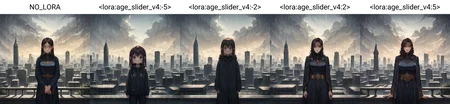
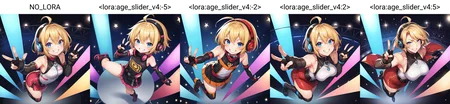
Negative LoRA values result in younger age. Positive LoRA values result in older age. v1.0 supports both men and woman and can support values between -5 and 5, although I generally recommend sticking between -4 and 4. Anything farther than -5 and 5 is untested.
NOTICE: On April 22, 2024 CivitAI moderator @chipshajen informed me that they are disabling the use of this LoRA with CivitAI's generator service due to "historical abuse with age-slider". There is nothing I can do about this other than recommend you run this model on TensorArt instead.
No activation tag required. Goes well with my PonyXL detail slider. Example prompt: score_9, score_8_up, score_7_up, source_anime, (pov), (pov looking up), ((Saber), Fate, Fate Grand Order, Artoria Pendragon, armor, (looking down), (leaning forward)), concerned, arms behind back, hands behind back, head tilt, looking at viewer, detailed eyes, [[eyeshadow]], (mountain) background, <lora:age_slider_v4:2>, absurdres, [[backlighting]]
If you generate images with this, please share! I love seeing what people make with my LoRAs and it helps keep me motivated to make more. If you have PonyXL LoRA requsts, feel free to leave a comment and I'll look into into it 👍
Known Issues:
- May not scale age properly when multiple people are present in image
Changelog:
April 15, 2024 - Initial v1.0 release
April 22, 2024 - Updated cover image to remove small artifacts. Disclosed CivitAI barring this LoRA from being used with CivitAI's generator service.
Jan 20, 2025 - Added SeaArt link to description
June 4, 2025 - Replaces SeaArt link with TensorArt link
Description
FAQ
Comments (179)
YES
Thanks thanks!!
You're welcome :) Enjoy!
@Shed_The_Skin I don't know if it's necessary but can you make a "ponyxl perfect eyes" lora? if you think it can be useful, Just an idea.
@AshWasTaken Do you mean perfect eyes in a realistic style or an anime style? I don't really do realism styles.
@Shed_The_Skin anime ofc I am not into realism either.
@AshWasTaken I can take a look into it. AutismMix with a decent HiRes upscaler already does eyes pretty well from my experience, so it would likely have to be a in-painting LoRA which I haven't done before. But I can't imagine making an in-painting LoRA to be too difficult.
@Shed_The_Skin I mean it's not necessary I just had an idea since that was the only lora that pony seems to be missing.
How do you make the slider not require activation words?
From my limited understanding, in training activation words are more or less simply a word or phrase applied to each and every single image used in training. So if the tags of every image in my training dateset start with the tag "StS-Lora", that will essentially serve as my activation tag because when you prompt "StS-Lora", the<lora:LORA:#> part of the prompt will receive that tag it was trained on and activate since it was very explicitly trained on "StS-Lora" if that makes sense. This LoRA slider did not have a singular uniform tag applied to every training image, so it's "activation" is much broader (basically anytime a person is prompted).
This is how i understand it, and I could be wrong since I have not delved deep into activation tags.
@Shed_The_Skin Thank you!, but what about the slider training?
@Haiigdso3 I used AI Toolkit (https://github.com/ostris/ai-toolkit) to make this slider, and in the config for training with it you can specify the prompts you want to use to generate the images the LoRA will train off of. The script generates the images from your prompts, and then LoRA is trained off the images. From my limited understanding, since those image generation prompts are seemingly not used to train the LoRA (only the images themselves are), you don't really get the opportunity to craft an activation phrase. I could be wrong about that though, these are the first sliders I've ever made.
@Shed_The_Skin Thank you for explaining
@Shed_The_Skin Thanks. I had seen a Japanese tutorial on Leco training (can't find it anymore) and she said that the way Leco works is that you make one vector point to another one so you need to get to the first vector with your prompt and therefore you always need to have an activation word and can't get rid of it.... I guess she was wrong or this is something else.
@gina24485404 That very well might be correct for LECO, but the AI Toolkit I used to generate this slider is a modified version of LECO that might change that. LECO is made for erasing concepts and is not really tuned for +/- sliders from my understanding. In the AI Toolkit, there is a "concept" parameter that is essentially telling the AI what it's supposed to be seeing and learning, so maybe that is akin to LECO's vector/activation phrase/word.
@Shed_The_Skin Makes sense
I have looked forward to this for long time, thank so much~dude~
Great Lora, highly recommended.
This thing is amazing. I've never had an age slider for ANY model produce results this consistent. I can take a character from a literal baby to an old granny and it looks consistent.
Hey, how did you train the slider, if I may ask? With Leco?
@denrakeiw I used AI Toolkit (https://github.com/ostris/ai-toolkit) to make this slider, which has a modified LECO tuned for +/- sliders.
@Shed_The_Skin Thank you.
Useful if you want to use a style that would normally "chibi-ize" the character, essentially keeping the proportions the same.
Great slider! Would you consider making a skin color slider as well?
Sure thing, I will look into it 👍
Doesn't work in the generation option in civitai. It locks at 4.00 with the slider. Can't do negative.
See my comment in the LoRAs description about CivitAI's moderation team putting limits on using this LoRA with the in-site generator.
The slider works poorly to negative values, might be due it being heavily trained with giant characters perhaps
@___marsh___ Might I ask what model you are using and an example of a prompt you're using? I did not intentionally train it with any giant/small character tags, so I would like to investigate this further.
@Shed_The_Skin I used both your detail slider and age slider, if I use age slider with value lower than -2, the background has a tendency to become way smaller than the characters, making them looks like giant.
most likely when I use camera angle as prompt (from above, below, etc). the most broken one is "overhead shot" but that tag usually broke proportion even without your loras.
@PurplefinNeptuna I will take a look into this, thanks. I am presume you are using one of the Autism Mixes for this?
@Shed_The_Skin yep I use autism confetti too, but I am using many other pony anime models
I like the previous one more and still use it. I'll just thumbs up this one.
What's the previous one?
@Gouda I don't know what they are referring to 🤷♂️
By looking at many examples, it doesn't seem supporting older people. Ages between 10 and 30 can be done natively in most models. The problem is usually for ages 40 - 60. Can anyone recommend a different solution? Or is it training material problem for most models/loras?
@green_anger Current ways to train sliders do not support training on ideas that the base model has no concept of. If you wanted to add support for something that a model has no idea of, it would be best to use a traditional LoRA/LyCORIS and not a slider.
Looks good
your link to your detail lora has /edit at the end so it 404s
Thanks for pointing this out, I have updated the link.
Error: Could not load the lora model! Reason: Could not find unet.label.emb.0.0 in the given object!
Can't make it work, with any Pony checkpoint. Using Easy Diffusion. Is there any way to fix this?
@ed_reserve532 Are you able to use any slider LoRAs with your setup? I have several on my profile you can try. This is the first I've heard of someone encountering this error with one of my LoRAs.
any fix? I have a similar error
@upallnight I need more info for troubleshooting since I do not use Easy Diffusion myself. Are you able to use any slider LoRAs with your setup? I have several on my profile you can try.
@Shed_The_Skin i tried the one you have, the detail slider, same error
Doesn't work on diffusers colab either
@rockfallseveryonedies628 Can you send me a message on CivitAI with a link to this Google Collab so I can take a look? Thanks.
I have the same issue on easy diffusions - Error: Could not load the lora model! Reason: Could not find unet.label.emb.0.0 in the given object! - other lora's working ok.
@tyrteds321 Thanks for the information. After looking into it, EasyDiffusion doesn't seem to be importing slider-type LoRAs correctly. I will open an issue for it on the GitHub page for EasyDiffusion.
@Shed_The_Skin was there any update about you adding it as an issue on the GitHub page for EasyDiffusion please?
@tyrteds321 Thanks for the reminder, I've open a GitHub issue: https://github.com/easydiffusion/easydiffusion/issues/1818
@Shed_The_Skin @Shed_The_Skin Great thanks, was there any update or change?
Any news about this working on Easy Diffusion please?
What do you use to train a slider lora ?
Works exactly as advertised. Plays well with other Loras. Enjoy the buzz.
Is there anyway to use this with Fooocus?
@BertLeSpurt I've never used Fooocus before. If it supports and properly import SDXL based LoRAs it should work but I wouldn't be surprised if it doesn't.
@Shed_The_Skin Doesn't seem to. The slider only goes from -2 to 2 and I'm not even sure if that would carry over or whether that would just increase how much the LoRA is deciding things. Doesn't seem like you can manually write in LoRA information on Fooocus either.
Had it working well in SD though.
@BertLeSpurt you can change the min and max weight on the sliders in the config file
Hey guys. I tried this with realistic models and guess what? It worked too and it worked perfectly.
Hey, someone is knocking on my door, wait a moment..
为什么我把这个lora模型放Lora的指定文件夹里,但是在工作的时候就是,没有找到这个Lora模型
I like it. But it seems to slow down local image generation by a great amount. Can you come out with a new version that is more optimized?
@olternaut This isn't something I can do. The only optimization I could do is maybe try to make the LoRA smaller in case it's exceeding some user's amount of VRAM. How "optimized" LoRAs are is 99% up to the software you're using Stable Diffussion with because that's what is responsible for implementing the LoRAs into the rendering pipeline.
@Shed_The_Skin I dunno. It could be the current Nvidia driver I'm using because I have a 3090 with 24GB of vram. Or, I read somewhere that there is a way to set up the auto1111 install so that it is more efficient. I'll have to investigate. Still though, try making it smaller anyways just to see. Thanks.
@olternaut It's a 40 MB LoRA which is already on the smaller size for a LoRA. At most I could shrink the LoRA to maybe 8 MB, and that would likely sacrifice quality and flexibility which is not a compromise I wish to make. I have no inclination to release an updated version of this LoRA unless something is demonstrably wrong with it that I can fix in a new version as I am a firm believe in "if it isn't broke - don't fix it".
Stock A111 WebUI is not known for being well optimized (quite the opposite actually). I personally use WebUI Forge and plan to switch to reForge in the future (https://github.com/Panchovix/stable-diffusion-webui-reForge).
@Shed_The_Skin I'll check out reForge. But I refuse to use ComfyUI. The workflows are unnecessarily complicated to me. It could very well be that auto1111 has outlived it's usefulness. I'll have to investigate to figure out what's going on.
@olternaut I also refuse to use ComfyUI for many of the same reasons. reForge works well for me.
Using reForge, for your reference using this LoRA to generate a 1024 x 1024 image using Eular A at 40 Steps, 2x Hires Fix with 4x_fatal_Anime_500000_G, and CFG Scale 5 takes about 37 seconds for me. If I remove the LoRA is take about 36 to 37 seconds, so the difference in negligible.
@Shed_The_Skin Did some research. With my 3090 and 24GB of vram, using reforge may only save me 2 seconds. Reforge is good if you have an older card with less vram. There must be something else I'm doing wrong then when using the Lora.
@olternaut What commandline arguments are you launching reForge with? You can find them in the webui-user.bat folder. Here is what I use:
--listen --enable-insecure-extension-access --xformers --pin-shared-memory --cuda-malloc --cuda-stream
I'm curious as to what your render times are with these with your 3090.
@Shed_The_Skin @Shed_The_Skin I'm just going by Olivio Sarikas' review on YouTube - https://www.youtube.com/watch?v=Th-jfath02E&t=82s
Without your Lora my render time is in seconds when I do a render with say....50 to 60 steps. Usually I mean, depending on the checkpoint. With your Lora for whatever reason it is stretching to several minutes. I'm not a programmer so I don't know how to make a Lora. So I can't really suggest a solution until I learn more.
@olternaut I took a look at that video and he doesn't do any of the commandline optimizations. Since you have an RTX card, you're missing out on performance by not using --xformers in your commandline args in webui-user.bat . I would highly suggest you add "--xformers --pin-shared-memory --cuda-malloc --cuda-stream" to your commandline args and try again.
@Shed_The_Skin --xformers I have. But the rest I will add and see how that works out. Thanks.
This is very useful, thank you. One thing I've noticed is that if you use the same prompt and change distances, it also seems to change the age, so you have to readjust the age slider. I'm not sure if this is intentional or maybe caused by my Checkpoint.
@Halfaron When you say change distance, do you mean the distance of the "camera" to the subject? AKA, how close or far the subject is in the picture?
@Shed_The_Skin Yes. I tend to do a series of images with the same general prompt, but only changing a few things about how far the "camera" is from the subject. I've been playing around with it and I'm having a hard time determining the cause of the changes. It's probably not your LoRA specifically, but a combination of factors. I was just wondering if you had noticed this before and it was a known "issue" or more likely if it was something wrong with my setup.
Love this but cannot get it to work for two subjects in one pic. using regional dividers which work great but the LORA prompt for age seems affect everyone. is there any workaround or a possible fix?
@Sterned I have not used regional dividers before, but this sounds like something in the SD tool you're using isn't properly separating the prompts. To the best of my knowledge, there isn't any reason why this LoRA would be overriding regional prompting if it was implemented correctly.
@Shed_The_Skin Thanks got it to work by using latent on the regional settings, works pretty well I can mix ages now, only issue I have with it not sure why is the face looks like a doll when it is done. that can be fixed with in paint pretty easy though by masking the face and in painting it with your age slider again with the same age settings.
don't put LoRA's in common or base prompt; they'll get applied multiple times and bake the image.
Regional prompter in general is good but not perfect at segregating prompts. Latent mode may work better in some cases as you discovered
The Lora works very well with ages. I've tinkered with it and it's very accurate. A question. Is it possible to train it together with other Lora styles? I have 3 Lora styles that I always use.
@megachina31296 This LoRA should have little to no impact on style, so you should be able to use style LoRAs along with the age slider without any issues.
This is absolutely amazing for these Fire Emblem loras I have where the characters look correct but also look like children or significantly younger than they do in the games. Works like a charm.
getting
"Error: Could not load the lora model! Reason: Could not find unet.label.emb.0.0 in the given object!" using easy diffusion, seems like no fix will happen.
issue known since jul. 2024
@Masked_anubis I raised this issue on the EasyDiffusion Github page months ago - https://github.com/easydiffusion/easydiffusion/issues/1818 . If they haven't fixed it by now, they probably never will. I would suggest migrating to WebUI Forge anyways because it's more performant and (imo) a better interface than EasyDiffusion. I also don't think EasyDiffusion is getting updates anymore as the last update on the Github repo is 2+ months old.
@Shed_The_Skin https://github.com/easydiffusion/easydiffusion/releases/tag/v3.0.9, released 5 days ago. Not exactly sure if the modifications for this model(i.e. unet.label.emb.0.0) have been made? Have you tried it or abandoned?
Now this is what i call peak lora slider.
Hi! Awesome LORA. Can you, please, make it available for generation on this website?
@IlyaEfimov I would if I could. As stated in this LoRA's description, the CivitAI Mod Team disabled the use of this LoRA with the in-site generator because of CivitAI's safety policies. It's not something I can change.
cool stuff
could you make an age slider for flux?
@Janet Last I checked, the tools to do so have not been made yet.
@Shed_The_Skin I think they exist now; there's even a slider sidebar in ComfyUI
@Janet I'll take a look into it, thanks for letting me know.
Thanks fpr the great lora! Do you have any tutorial teaching how to do something similar?
@martinjas393 How to do what?
Lora slider that works so well
VERY GOOD LORA, THE ONLY COMPLAINT WOULD BE ABOUT THE EYES, THEY ARE TOO BIG.
@MrShouttaKun Have you tried adding the prompt small eyes or similar?
@Shed_The_Skin I meant that it still makes the eyes very anime style, that's why the big size.
@MrShouttaKun This slider LoRA was trained exclusively on an anime/cartoon dataset, so honestly I'm very surprised it works as well as it does on different style.
@Shed_The_Skin I don't complain about the results in realistic, although with the eyes if done at -5 or -2 it makes the eyes big.
dont work for what im doing wrong?
i put it in my loras folder and used
<lora:age_slider_v4:2>
@rsngo What are you using to run SD? A111 WebUi, Forge WebUi, ComfUI, SwarmUI, or something else?
@Shed_The_Skin hello sir im using fooocus im kinda new to ai :)
@rsngo fooocus is not something I've used before. I'd recommend trying out SD Webui Forge - https://github.com/lllyasviel/stable-diffusion-webui-forge
@Shed_The_Skin ok thank you sir i think i try a111 next :D
I see some photos have a v4 in the description? All I see is v1- initial release. Am I missing something?
@BigSad11 Some of the photos reference "v4" because they were made with the fourth version of the slider I trained locally. However, versions 1, 2, 3 were test iterations and never released. For the public release I renamed v4 to v1 because it is the first public release of the age slider. My "age_slider_v4" is the same as the public "StS_age_slider_v1". In the example images, the LoRA names that start with "StS_" are this renamed LoRA. "age_slider_v4" is from before I renamed the LoRA file.
For my new LoRAs, I tend to use "Iter" (for "Iteration") instead of "v" now to not cause this confusion.
@Shed_The_Skin Thanks for the detailed reply! Understood. Nice work 💪
I apologize for my ignorance, what does it mean score_9, score_8_up, score_7_up, in the prompt ?
I understand that when you have in the prompt for example <lora:age_slider_v4:2> then generator is using lora age_slider_v4 with the strength of 2.
But what impact have parameters like score_9, score_8_up, score_7_up ?
@Marissa This is part of PonyXL. This article explains it: https://civitai.com/articles/4248/what-is-score9-and-how-to-use-it-in-pony-diffusion
Thank you very much!
thanks
Please make this available for on-site use
@ninjahatoori8 I would if I could. As stated in this LoRA's description, the CivitAI Mod Team disabled the use of this LoRA with the in-site generator because of CivitAI's safety policies. It's not something I can change.
@Shed_The_Skin civitAI mods are smooth brained, their policies are dumb as hell
@Shed_The_Skin on a second thought, do you think they would allow it if it only aged up the character with no negative slider? Because the reason civitai is out for blood is because these LoRa's can de age characters causing them "safety" concerns
@ninjahatoori8 It's possible CivitAI might allow a uni-polar "Age Up" slider, but I find it unlikely. CivitAI very much likes to err on the side of caution. I may make one regardless to test out some new training methods - we'll see.
@Shed_The_Skin well thanks for considering it, looking forward to it if you do end up publishing it
@Shed_The_Skin honestly dude a new improved age up lora would be super if you ever get around to it
make a Illustriou ver please!
@navy123 Currently working on it - training the LoRA as I type this.
I wanted to ask the same thing. I'm looking forward to the IL version.
I use the Pony version on Holy Mix and have no problems at all. It also works well in Illustrious Pencil. I haven't tried any of the other IL models.
Would it be possible to change the range of the slider to +2 to -2 instead of +5 and -5?
@avicdar410 That is possible to do, yes, but why do you need it +/- 2 instead of +/- 5? Doing +/- 2 while keeping the same support age range would be quite difficult to balance and keep the LoRA from jumping too much between input values.
@Shed_The_Skin The original poster is probably asking because +/- 2 is the limit of the weight range on the Civitai generator and it's not possible to go beyond that. So, for those using the Civitai on-site generator, they're only able to use part of the full range of the LoRA.
@dita That is a fair point except for the fact that this LoRA can not be used on CivitAI's on-site generator as it has been blacklisted by the CivitAI moderation team.
@Shed_The_Skin Ahh, in that case, the only thing I can think of is that automatic1111 webui is the same way, not allowing you to set the default value outside of ±2.0. I checked in the settings.json file to see if that was something that could be configured by the user, but it doesn't look like it. So with webui, Forge, and probably other forks, it's not possible to set a value outside that range. I meant to mention it in my first comment but it looks like I forgot to.
@dita there is practically no limit to the weight you can set an extra network to in webui based inference softwares, the concrete limitation is most often the base checkpoint used: some are very sensitive for weight values beyond -2/2 and will produce heavy artifacts or no real image at all. in such a case you can try if increasing the value "settings/extra networks/Default multiplier for extra networks" can help.
@Shed_The_Skin He is just a white knight.
@vicentlennie956 I don't understand what you mean by this given the context of this conversation.
@eurotaku It's been a while, so sorry for the late reply. I'm not talking about setting the weight of the LoRA when you are generating/inferring. I understand that you can set that to 10000 if you want (and generate garbage of course). I have on occasion slipped and entered an additional digit, giving me gens with a weight of 22.
What I mean is, if you go to the LoRA tab (where you have "Generation", "LoRA", "Textual Inversion", etc., each LoRA has a hammer and wrench icon in the upper right corner when you hover over it. If you go in there, you can set the default tags to add to the prompt when you tap to add the LoRA. You can also set the default weight that it should be given when you tap it to add it to the prompt. That default weight, which will be 1.0 unless you change it, can only be set from 0 to 2.
If a person likes to use the age LoRA at a weight of +3 on most of their generations to make the generated character appear quite a bit older, then the best they can do is set the default to 2, and edit the weight each and every time the LoRA is added to the prompt.
You can see what I'm talking about in this image.
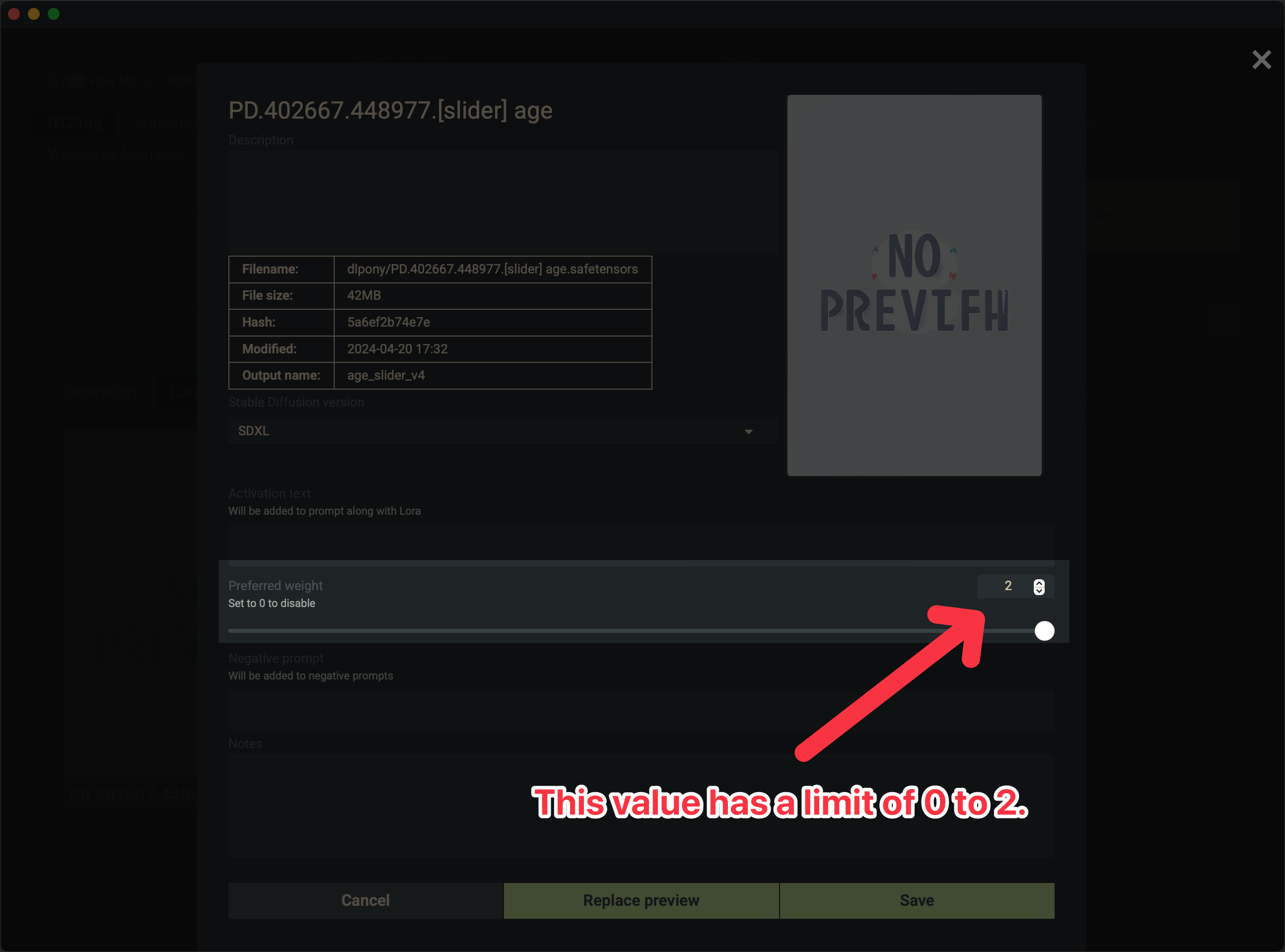
@dita The preferred weight values is simply stored in a JSON file in the same directory as the LoRA and with the same name. It has a "preferred weight" attribute that you can edit to whatever number you please and it will work. Example: https://i.imgur.com/frw9k5H.png
That being said I am planning on replacing my old LoRAs with Scaled ones for online services that supports +/- range. Not terribly hard to do.

So this model does a great/better job of making slim bodies/slim hips than some of the body sliders, I wonder if you could do a version that doesn't impact the face like this one currently does?
@rogue8888992 So basically a hip width slider or a body proportion slider decoupled from age?
@Shed_The_Skin yea exactly that, really just decoupled from the head, once you prompt the body to be thin and toned and with breast enhancing Loras etc it's only the head that's an issue age wise
@rogue8888992 That's an interesting idea. I will add it to my list of LoRA ideas to look into.
@Shed_The_Skin thank you, what other exciting LoRAs do you have planned?
@rogue8888992 Currently have Breast Size Slider for IllustriousXL that I just need to create cover art for before publishing. Besides that, currently working on semi-custom tools for better slider training so I can create sliders with lower inherent noise offsets and better disentanglement. If successful, I will like update my IllustriousXL Age Slider first with this new training method.
@Shed_The_Skin I've not checked out IllustriousXL yet. will have to with your sliders to enhance it! Always enjoy a good breast slider as well so I'll keep a look out, thanks 🙏
@Shed_The_Skin Thanks for the great work! - Hope you see this, i am looking to move on this idea, have photo datasets of 1m+ and an RTX 6000 96gb VRAM - I am going over some of these brilliant loras and updating them, I especially want to work on these sliders as they are so useful to the community. using Photo's and anime for a choice of realism - I have a good understanding of how to make Loras, however no idea on making these sliders, can you let me know some basics or point me in the direction of a resource? Would be massively appreciated! Thank you!
@ronikush While I can't give away all my secrets, feel free to contact me via Discord: shed_the_skin
I eventually want to update my training toolkit to support Chroma, and having someone with access to a 96 GB GPU to do a test run or two would be very helpful if you want to help. Otherwise, no worries.
Number 1 must have lora, then SPO and Expressiveh.
I couldnt generate good looking girls without it. Thanx.
what's SPO?
I can't seem to download the file. Are the downloads working?
@olternaut Downloads are enabled as long as you're signed in. If you're having trouble you can also download it from Sea Art - https://www.seaart.ai/models/detail/e7910d18e321122d626db1ba5def109d
@Shed_The_Skin Got the file thanks. Any way you can make a version for Illustrious models?
@olternaut I already did. Check my profile.
Thanks! The slider works fine. I use it with prefectPonyXL_v10
I think they won't let you make it available on site because it could be abused for kids. Would it be possible to upload a version where it can only be used to age a character up? I'd like to try it for maturing characters.
@BatesianMimicry Looking at CivitAI's ToS and Safety policy, theoretically it should be possible to do this. However, the messaging I have received from CivitAI Moderators indicates that they do not want any age adjusting LoRAs to be used with CivitAI's generator service. This leaves me not very interested in putting in all the effort required to make an 'Age Up Slider' only for it to likely be removed by CivitAI.
@Shed_The_Skin That's totally understandable, I thought maybe you could just submit it with the negative weights disabled. I can understand where making a new lora would be a pain.
@Gr1ef If you want finer control of a known character's age, an age up slider may be helpful - especially if you're also using a character LoRA. I can think of several situations where aging up a character may hard to do without a LoRA.
and how to control this lore in relation to two characters, for example: a 60-year-old man and a 20-year-old woman, for me this lore makes two characters under one characteristic.
@79513685587k937 PonyXL is based off of Stable Difussion XL, which does not support per-subject prompting like FLUX can. To be able to control individual characters in an image with PonyXL you need something like the Regional Prompter extension or you need to use inpainting.
This shortcoming is not something I can fix.
I use comfuai, and found a solution (use 3 clips, 2 for character description and 1 for action description, and I connected the lora separately to the clip and got a separate age adjustment)
You can also use the Lora and add an age modifier to the prompt like (age difference:1.8) which will put some years between the characters.
79513685587k937 workflow?
79513685587k937 Thank you!
79513685587k937 Wait you can do that? You can't imagine how much this comment helped. You are a legend man.
@79513685587k937 Oh Outstanding! A couple of the most useful ComfyUI tips ever left in a comments section! Massive thanks!
Why is this file id'd as flux and not sdxl?
@astarotte I am not sure what you mean. As far as I can tell, it's labelled for PonyXL. If you're using some sort of automatic metadata reader, it may have gotten it wrong.
Don't even mind trying, it does not work at all.
@SaburoDio With over 5,000 positive reviews, I am rather confident it does work. Can you share your workflow so I can help you get it workig?
@Shed_The_Skin maybe I was a bit too harsh here and I appreciate your help! Could be very much me being the error in this whole situation.
I am using the regular recommended WF provided by the BigLove checkpoint creator https://civitai.com/images/49514234
I only added a second loraloader in ComfyUI and it did not work with any checkpoint I tried (SDXL, Illu, Pony).
Lots of checkpoints seem to be naturally good at this stage and time anyways, but whatever I tried I could not see any effect of your Lora and browing through the plenty example images here it seems like it does not have a lot of effect or am I missing something?..
Look, who is rocking still in 2026.
Sorry to be stupid, but you say 'no tag required' so how do I 'slide' the age?
You do with the LoRA weight. If you're using a WebUI variant, this is done in the prompt: <LoRA>:X where "X" is the weight. Positive numbers drive age up - negative numbers drive age down. If you're using Comfy, the weight is controlled in the LoRA node iirc and functions the same way.
Will you make models for ANIMA as well?
@Joen98 Currently sitting on 3 - 5 Anima sliders pending testing and QA. Hoping to release them soon 🙂
Details
Files
StS_age_slider_v1_initial_release.safetensors
Mirrors
StS_age_slider_v1_initial_release.safetensors
StS_age_slider_v1_initial_release.safetensors
StS_age_slider_v1_initial_release_ponyxlv6.safetensors
StS_age_slider_v1_initial_release.safetensors
StS_age_slider_v1_initial_release.safetensors
StS_age_slider_v1_initial_release.safetensors
StS_age_slider_v1_initial_release.safetensors
StS_age_slider_v1_initial_release.safetensors
StS_age_slider_v1_initial_release.safetensors
StS_age_slider_v1_initial_release.safetensors
StS_age_slider_v1_initial_release.safetensors
StS_age_slider_v1_initial_release.safetensors
StS_age_slider_v1_initial_release.safetensors
age_slider.safetensors
StS_age_slider_v1_initial_release.safetensors
StS_age_slider_v1_initial_release.safetensors
StS_age_slider_v1_initial_release.safetensors
ageslider.safetensors
Set14.safetensors
14.safetensors
StS_age_slider_v1_initial_release.safetensors
5.safetensors
StS_age_slider_v1_initial_release.safetensors
StS_age_slider_v1_initial_release.safetensors
StS_age_slider_v1_initial_release.safetensors
StS_age_slider_v1_initial_release.safetensors
StS_age_slider_v1_initial_release.safetensors
StS_age_slider_v1_initial_release.safetensors
AGE-Age_Slider_v4-SDXL.safetensors
AGE-StS_age_slider_v1_initial_release.safetensors
StS_age_slider_v1_initial_release.safetensors
StS_age_slider_v1_initial_release.safetensors
StS_age_slider_v1_initial_release.safetensors
StS_age_slider_v1_initial_release.safetensors
age-slider.safetensors
age-slider-lora-ponyxl-sdxl.safetensors
Age_Slider_PONY_[Shed_The_Skin].safetensors
Available On (2 platforms)
Same model published on other platforms. May have additional downloads or version variants.