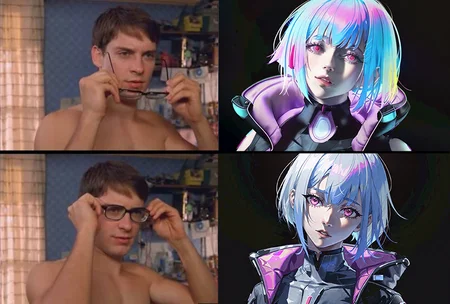
介绍(中文)
它的作用很简单——让图像更清晰。它会使图像中所有模糊的区域更加清晰,如果这破坏了你原本的画风,则停止使用它。我不建议调整它的权重。
使用方法
将下载得到的 .pt 文件放入您 stable diffusion 的 embeddings 文件夹内(无需重启 webui)。在生成图像时,于负面提示词内输入你下载的 .pt 的文件名(不包括扩展名)。例如,你下载的文件名叫 'lr.pt' 则输入 'lr' 即可。
Introduction (English)
What it does is simple - it makes the image clearer. It will sharpen any blurred areas in the image, if this ruins your original style, stop using it. I don't recommend adjusting its weight.
Instructions
Put the downloaded .pt file into the embeddings folder of your stable diffusion (no need to restart the webui). When generating the image, input the filename (extension is excluded) of the .pt file you downloaded in the negative prompt. For example, if the file name you downloaded is 'lr.pt', just enter 'lr'.
Description
FAQ
Comments (8)
The meme is wrong. Peter Parker can see better without glasses after be bitted because he has aracnid superpowers. I undertand the message, but will be more correct exchange the order.
Very good… :D
I can't understand anything I'm stoopid... So I put this file in the negative prompt?
No. After downloading the file, you should move it into the embeddings folder of your stable diffusion. For example, 'C:\stable-diffusion-webui\embeddings\'. This is equivalent to add an extra prompt named 'lr' into your stable diffusion.
So, after that, enter the name of the file, such as 'lr', as a negative prompt.
I hope this can help you :D.
请问一下是不需要解压zip文件吗?需要更改后缀名吗?还是直接放进文件夹去就可以了呢?谢谢大佬啦
下载得到的应该是一个“lr.pt”文件,不需要解压,直接放进去embeddings文件夹内即可。
Thank you, sir. It works pretty well.
Very useful embedding, can often improve the quality of images greatly. From time to time it does not play well with others, but generally speaking I use this embedding on everything, all models, loras, etc.