

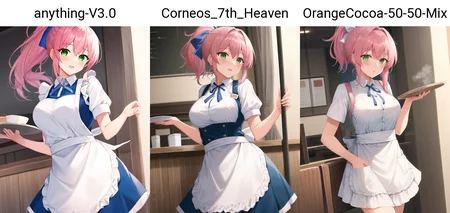


This is a checkpoint mix I've been experimenting with - I'm a big fan CocoaOrange / Latte, but I wanted something closer to the more anime style of Anything v3, rather than the softer lines you get in CocoaOrange. If that sounds like something you want, this is the mix for you!
And yes, it does NSFW quite well.
The recipe is fairly simple:
35% Cocoa from https://huggingface.co/andite/yohan-diffusion
35% Counterfeit v2 from https://huggingface.co/gsdf/Counterfeit-V2.0
30% 7th Anime v2_A from https://huggingface.co/syaimu/7th_Layer
The comparison images were all generated using the Anything v3 VAE and no hypernetwork.
If you enjoy this embed, I genuinely love seeing your creations with it - you can attach them to a review if you're not aware (but not comments sadly)!
Description
Version 2 just fixes a "broken" CLIP, by using CLIP-fixed versions of the constituent models. I've not actually spotted any difference in outputs yet but some people said this should be done so here it is.
FAQ
Comments (40)
Hey,
This model looks amazing !
You said you used the AnythingV3 VAE, could you hint me a way to do this ? I can't manage to find a way to set this up.
Thanks !
I've since learned that they're mostly the same VAE file on different models, but you can get it from https://civitai.com/models/66/anything-v3 and refer to https://rentry.org/sdhypertextbook#vae though the web UI is changing all the time
Fast, simple, easy answer. Thanks a lot !
Hi. The images I get from your model have pale colors and idk how can I fix it. There is a big difference between your preview pictures colors and colors that I keep getting from my stable diffusion webui. I tried to use your preview picture's prompt tags and other parameters and the results color is completely different. I have V2 regular model (7gb). How can I fix my colors? Help me, please.
You need to download Anything V3 VAE [https://civitai.com/models/66/anything-v3]. Rename it to the <modelName>.vae.pt (in my case, to the corneos7thHeavenMix_v2.vae.pt) and place it into /models/Stable-diffusion.
https://rentry.org/sdhypertextbook#vae
@Persival Thanks. I will try now.
Hey, I'm trying to replicate your preview images, but the output always differs from yours. I've downloaded and renamed the anything v3 vae.pt, and use png info in automatic1111 to get the same parameters as you, but it still won't work. Any Advice?
Only other thing that usually comes up is are you using clip skip 2?
@Master_Corneo I don't even know what that is
@yoshi111100 checck the settings section --> show all --> set from 1 to 2
How to use? Sorry New to this ☺️
There's a how to use button in the info panel
Nice
how do you prune a model and how do you know it's not pruning anything important? Is it only pruning nodes with 0 weight?
What happened to your POV loras? Were they deleted?
They're still there, but NSFW content is displayed separately now.
Hi Corneo, could you please upload a fp16 version of the pruned model? It's a benefit to many people and an increasingly popular choice to have a lighter 2 GB model. I used Checkpoint Merger to do it myself and I can confirm it performs exactly the same as the full model. Cheers
I think so too.
That would be nice. 7GB is a kick in the teeth
It works great, but my results are always blurry and low quality, even when putting high quality etc in the prompt.
I know this was a month ago, but have you tried (in the text to image area) checking the box for hires and then choosing R-ESRGAN 4x+ Anime6B for your upscaler?
Me too
Should we expect any model updates?
do you need any vae's?
yeah, use anything vae otherwise you will get pale colors.
@siddhanta19 thanks <3
I'm wondering why all my generated images for the model seems grey and bland, even with no prompts, can someone help me?
you don't have a VAE as this model doesn't come with one, here's a guide on how to use one:
https://civitai.com/articles/72
@vslinx When i add that one I get.
"Expected all tensors to be on the same device, but found at least two devices, cpu and cuda:0! (when checking argument for argument index in method wrapper_CUDA__index_select"
@saberlost272 maybe the vae you're trying to use is not working with this checkpoint. Or it's corrupted.
It'd be best to try another one and see if the problem still persists
When i generate with the model i end up with very bad anatomy. However it only happens when i apply the hi-res fix. Before the hi-res is applied the image in the preview has perfect anatomy, but once the image is done (hi-res and all), the anatomy is horrible. Can someone explain?
like the hi-res, REALLY messes it up
also when i inpaint with the model, it does not work at all, the colors, are like broken, but the colors in the original image are fine (i have anything v3 VAE)
I'm new to all this, sorry for the question, what is the difference between the "normal" model and the "pruned" model?
No worries, they should basically be identical for generations other than one has a smaller filesize, so you probably want that. I think the difference is only if you want to play around with mixing models, but even then I'm not sure anymore.
Could you please forward this model to https://tensor.art/
I want to use your model to generate ai images. Thanks!
Through which program/UI did u use to make this '35%+35%+30%' recipe?
Checkpoint merger in automatic1111 webui
It's no longer downloadable, "file with such name does not exist"
Details
Files
corneos7thHeavenMix_v2_pruned_fp16.safetensors
Mirrors
corneos7thHeavenMix_v2.safetensors
corneos7thHeavenMix_v2.safetensors
corneos7thHeavenMix_v2.safetensors
corneos7thHeavenMix_v2.safetensors
corneos7thHeavenMix_v2.safetensors
corneos7thHeavenMix_v2.safetensors
corneos7thHeavenMix_v2.safetensors
coreno-7th-heaven-mix-v2.safetensors
corneos7thheavenmix.safetensors
crns7thhvnmx.safetensors
corneos7thHeavenMix_v2_full_fp16.safetensors
Mirrors
4669_corneos7thHeavenMix_v2.safetensors
corneos7thHeavenMix_v2.safetensors
corneos7thHeavenMix_v2.safetensors
corneos7thHeavenMix_v2.safetensors
corneos7thHeavenMix_v2.safetensors
corneos7thHeavenMix_v2.safetensors
corneos7thHeavenMix_v2.safetensors
corneos7thHeavenMix_v2.safetensors
corneos7thHeavenMix_v2.safetensors
corneos7thHeavenMix_v2.safetensors
corneos7thHeavenMix_v2.safetensors
corneos7thHeavenMix_v2.safetensors