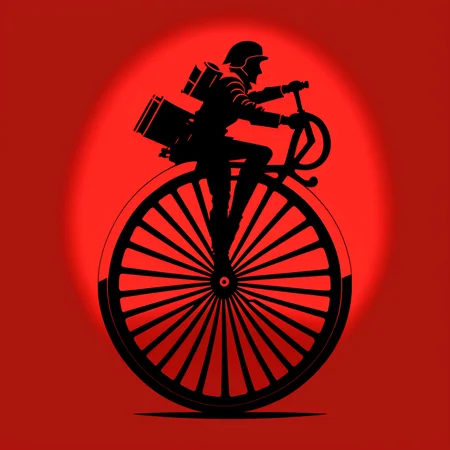


new test model v 1.1 - try it, it is mainly for testing purposes. Let me know in the comments what you think, I can tune it more in case of problems
MAGIFACTORY model is trained to generate t-shirt logos based on text input. The model takes in a text description of the desired t-shirt logo and generates a corresponding image. It is trained on a dataset of t-shirt logos with resolution 512x512px. Ideally use hires-fix rescale to 896x896 ( for not having repeated artifacts ) in automatic1111 WebUI with "Latents antialiased" and finally upscale 4x with SwinIR_4x. Euler a scheduler preferred. You can also try DPM++ 2S a Karras scheduler. I am running Instagram with top designs, so you can download and use them.
prompts:
cyberpunk astronaut flying in space (on a black background:1.4) as a t-shirt logo in the style of <MAGIFACTORY> arta symbol of a car (on a black background:1.2) as t-shirt logo in the style of <MAGIFACTORY> artnegative prompt:
badly drawn, noisy, noise, blurred, ugly, cropped, out of frame, (double:1.4), (repeated:1.4), (repeating:1.4), signature, text, font, watermarkDescription
FAQ
Comments (24)
Looks promising, unfortunately getting error that this model may be malicious in Automatic1111, so cannot use it.
UPDATE: Now able to use with the updated safetensor version! Thanks for the quick turnaround!
Could you please release a safetensor? This looks very promising
converting just now ....
safetensor uploaded
Thx mate for the model :) Looks great :) I am going to try combine output from my model with img2img of yours and other way around - might give interesting results. Can I ask how many images have you used for training? Thx
Hi. let's do it. Your model looks great too btw:) I used 18 images properly named according the scene and color of the background. What really helped was using vintedois-diffusion-v0-1 model as a base.
Do you have any plans for updates? I mean model is fine, but not good for anthropomorphic animals
I am definitely going to update the model. Do you think you can share the 'failure case' and maybe a 'desired case' so I can try to optimize for it during training? If you have a midjourney account, you can generate a few examples and I can add them to the training dataset.
@magifactory unfortunately I don't have points for Midjourney. But you can take a look at Anthro embeding here, on CivitAI to see what i mean about anthropomorphic animals
@magifactory I second the update request, I want to put characters on them, maybe merge it with another model to help it understand. If it works that way
@whywhynot sorry for later response.. i will update during weekend
@magifactory Will my thought work though? Getting characters on T-shirts
@whywhynot New version just released. Let me know if it suits you. If you want some special character to be included, I can add it to the training set maybe ... we can try it
@magifactory i want pinkie pie Https://static.wikia.nocookie.net/mlp/images/b/b2/Pinkie_Pie_ID_S4E11.png/revision/latest?cb=20190410214815
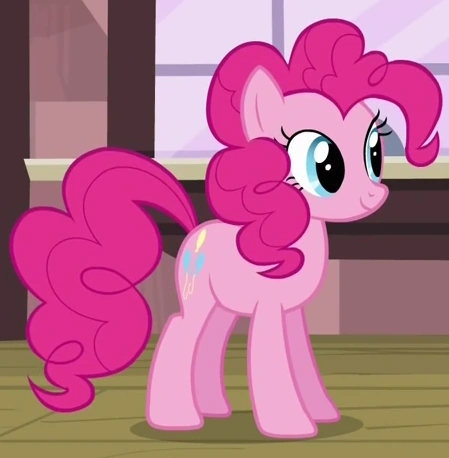
i tried merging it with my pony model and got good results occasionally but maybe you can make a better version with training
@magifactory Also, see if you can make a shorter trigger word, it takes up a lot of space
Can you tell me on which stable-diffusion model this was trained on? Is it the 1.5 model? I am able to run this model locally with the AUTOMATIC1111 GUI. But if i try to run it through a google colab, i always get a runtime error. i suppose on google colab i download the wrong stable-diffusion version. For colab im using the fast stable diffusion document from TheLastBen. Would appreciate some input.
Hi, it was trained on top of https://huggingface.co/22h/vintedois-diffusion-v0-1 . I think that it is SD 1.5 originally
Thanks for the reply. Sorry, i totally forgot that here. But i was able to fix it in the end. Thanks for the input though. Cheers.
This is cool but it seems to love certain colors a lot, is there any way that I could fix that? I got it to stop using so much blue and purple by adding synthwave as negative prompt. But now it favors the color yellow a lot. Like 90% of my images are very yellow.
EDIT: I found out that using more steps really helps the color issue. I was doing only 30, but using more helps a lot.
Details
Files
Available On (1 platform)
Same model published on other platforms. May have additional downloads or version variants.